
GPT Image 2AI 提示词
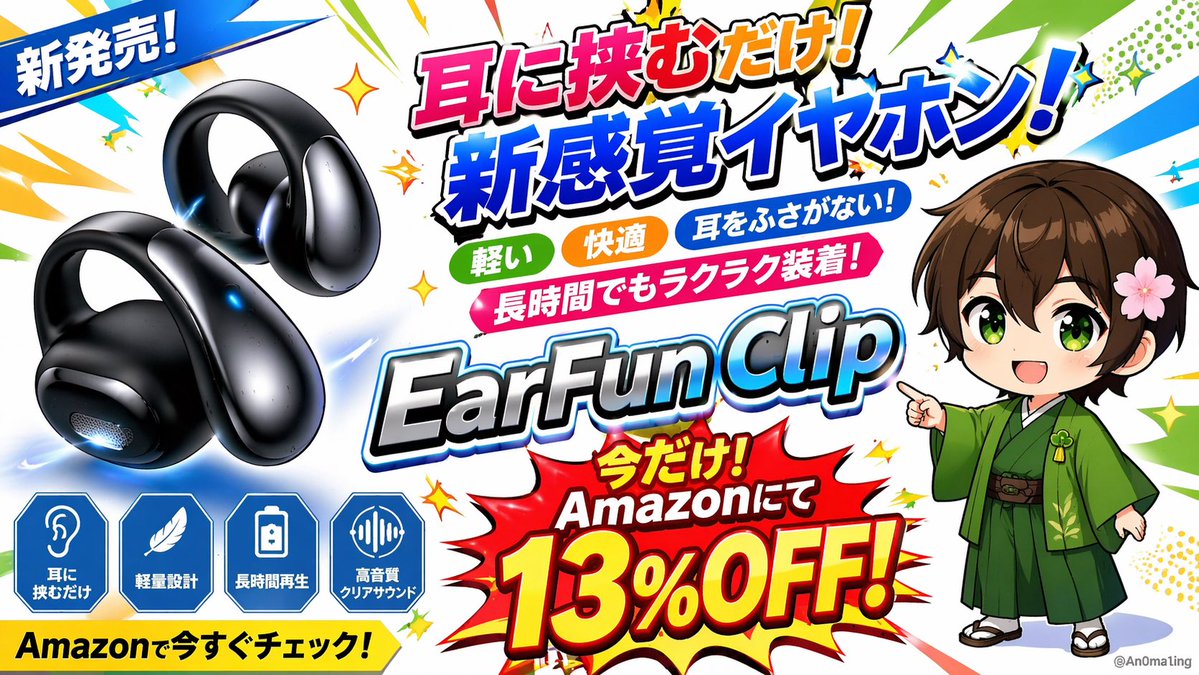
Anime-Style Product Banner Ad — Sora 2 AI Prompt
Generate a vibrant, high-energy promotional banner with a product close-up, chibi mascot, bold text overlays, and explosive comic-book effects perfect for social media ads.
提示词 · EN
type
宣传横幅广告style
充满活力、高能量、动漫风格,漫画书式的爆发背景,配有黄色星星和动作线条product
description
一副 {argument name="product color" default="亮黑色"} 夹耳式无线耳机position
中左character
description
棕色头发、绿色眼睛的 Q 版动漫男孩,身穿 {argument name="character outfit" default="绿色和服"},戴着粉色花朵发夹,指向中心文字position
中右layout
top_left_ribbon
新品上市!center_text_stack
line_1
轻轻一夹!line_2
{argument name="main catchphrase" default="新感官耳机!"}tags
count
3labels
item 1
轻盈item 2
舒适item 3
不入耳!ribbon
长时间佩戴也轻松自如!product_logo
{argument name="product name" default="EarFun Clip"}bottom_right_burst
text
限时优惠!亚马逊现已 {argument name="discount text" default="8.7 折!"}bottom_left_features
count
4shape
蓝色六边形图标labels
item 1
轻轻一夹item 2
轻量化设计item 3
超长续航item 4
高音质清晰音效bottom_banner
立即前往亚马逊查看!关于这个提示词
Generate a vibrant, high-energy promotional banner with a product close-up, chibi mascot, bold text overlays, and explosive comic-book effects perfect for social media ads. 它更适合作为 GPT Image 2 的概念艺术起点:先保留画面结构、主体关系和风格约束,再替换成你的品牌、人物或场景。
这条提示词使用结构化 JSON 组织信息,包含 type、style、product、character、layout 等字段。保留这种层级能让模型更清楚地区分画面主题、布局、界面元素和细节约束。
使用时建议先小幅修改主体、场景、镜头和色调,再生成多个版本对比构图与细节。这样页面内容对用户有实际帮助,也避免把模型名或标签机械堆在正文里。
如何使用这个提示词
- Copy the entire prompt JSON and paste it into your AI image generator (e.g., Sora 2).\n2. Select your preferred model or rendering style for anime/cartoon outputs.\n3. Customize variables like
product color,character outfit,main catchphrase, anddiscount textto match your brand.\n4. Generate the image and review the banner layout, adjusting any text or elements as needed.\n5. Export the final banner in your desired resolution for use on social media or ad platforms.


