
GPT Image 2AI 提示词
Scrapbook Boutique Mirror Selfie with Chibi Overlays — Sora 2 Prompt
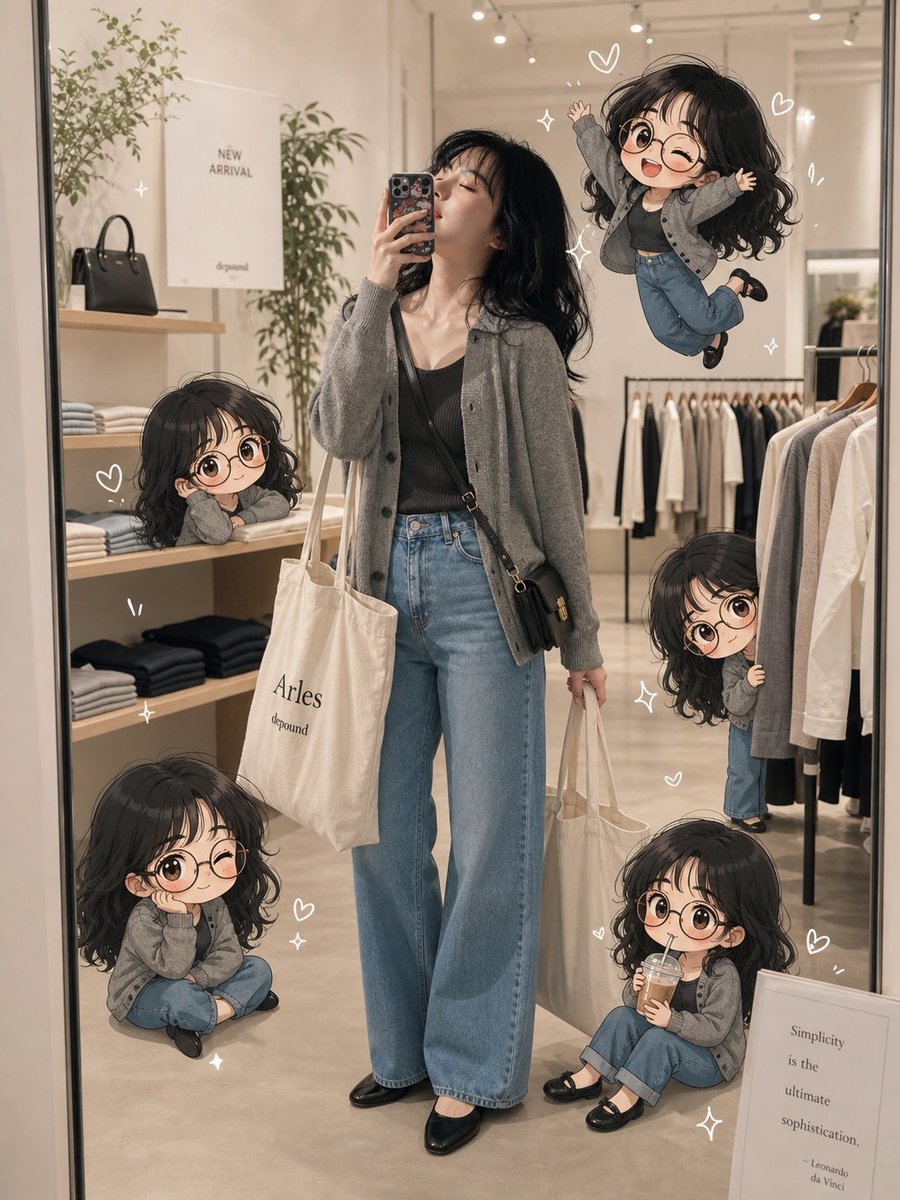
Generate a stylish boutique mirror selfie and transform it into a cozy, high-fashion scrapbook diary scene featuring five adorable chibi character stickers.
提示词 · EN
type
剪贴簿风格时尚镜面自拍,叠加 Q 版角色scene
一张在光线柔和的极简主义服装精品店内的垂直全身镜面自拍,采用温暖的米色和奶油色调,抛光混凝土底板,右侧为衣架,左侧木架上摆放着折叠衣物和黑色手提包,配有高大的室内植物、天花板轨道灯,营造出优雅的生活方式购物氛围。main_subject
description
一位时尚的年轻女性正拿着手机进行镜面自拍,姿态放松地站在镜子中央。outfit
cardigan
{argument name="cardigan color" default="灰麻色廓形针织开衫"}top
黑色修身吊带或罗纹背心jeans
{argument name="jeans style" default="高腰阔腿浅蓝色牛仔裤"}shoes
黑色尖头平底鞋bags
两个奶油色帆布托特包,一个背在肩上,一个手提,外加一个小巧的黑色斜挎包hair
{argument name="hair style" default="黑色长卷发"}face
为了隐私考虑,面部经过柔和的匿名化或遮挡处理,身体比例写实chibi_overlays
style
主角的可爱动漫 Q 版迷你形象,大头造型,光泽感黑色卷发,部分变体佩戴圆框眼镜,身穿同样的灰色开衫和蓝色牛仔裤,像手绘剪贴簿贴纸一样融入照片中,带有柔和的阴影count
5poses
item 1
position
左中部的架子上description
一个困倦的 Q 版形象将头靠在折叠的衣物上,倚在木架旁item 2
position
右上角,漂浮在主角头部附近description
一个快乐的 Q 版形象在空中跳跃,双手举起,单腿弯曲item 3
position
右侧衣架后description
一个害羞的 Q 版形象从悬挂的衣物后探出头,戴着圆框眼镜微笑item 4
position
左下角地板上description
一个蜷缩的 Q 版形象盘腿坐着,袖子遮住了双手item 5
position
右下角购物袋附近description
一个坐着的 Q 版形象拿着小饮料或手机,周围环绕着爱心scrapbook_details
doodles
在主角和 Q 版形象周围装饰着白色手绘爱心、闪光、动感线条和细小的装饰线条text_elements
count
4labels
item 1
墙上海报上的 NEW ARRIVALitem 2
帆布托特包上的 Arlesitem 3
托特包文字和海报下方的 depounditem 4
Simplicity is the ultimate sophistication. Leonardo da Vinci(简约是极致的复杂。——列奥纳多·达·芬奇)出现在装裱好的标牌上mood
舒适、时尚、俏皮、日记感、高级生活方式剪贴簿美学composition
camera
智能手机镜面自拍,正面对准全身构图,垂直 3:4 画幅lighting
温暖的精品店室内灯光,柔和的高光,轻柔的阴影quality
照片级真实的背景,搭配清晰的高分辨率动漫 Q 版叠加层,无缝融合,画面整洁,适合社交媒体发布的精致图像custom_text
剪贴簿风格的可选手写标题:{argument name="handwritten caption" default="购物日"}关于这个提示词
Generate a stylish boutique mirror selfie and transform it into a cozy, high-fashion scrapbook diary scene featuring five adorable chibi character stickers. 它更适合作为 GPT Image 2 的概念艺术起点:先保留画面结构、主体关系和风格约束,再替换成你的品牌、人物或场景。
这条提示词使用结构化 JSON 组织信息,包含 type、scene、main subject、chibi overlays、scrapbook details、composition、custom text 等字段。保留这种层级能让模型更清楚地区分画面主题、布局、界面元素和细节约束。
使用时建议先小幅修改主体、场景、镜头和色调,再生成多个版本对比构图与细节。这样页面内容对用户有实际帮助,也避免把模型名或标签机械堆在正文里。
如何使用这个提示词
- Copy the entire prompt text from this page.
- Select your preferred AI model (like Sora 2) that supports image generation with text and overlay blending.
- Customize the optional arguments
{argument ...}to change details like the cardigan color, jeans style, or hair style to match your vision. - Paste the prompt into the model's input field and generate. Review the output for the desired blend of realistic selfie and whimsical chibi overlays.


