
GPT Image 2AI 提示词
First-Person RPG Screenshot with Custom HUD — Sora 2 Prompt
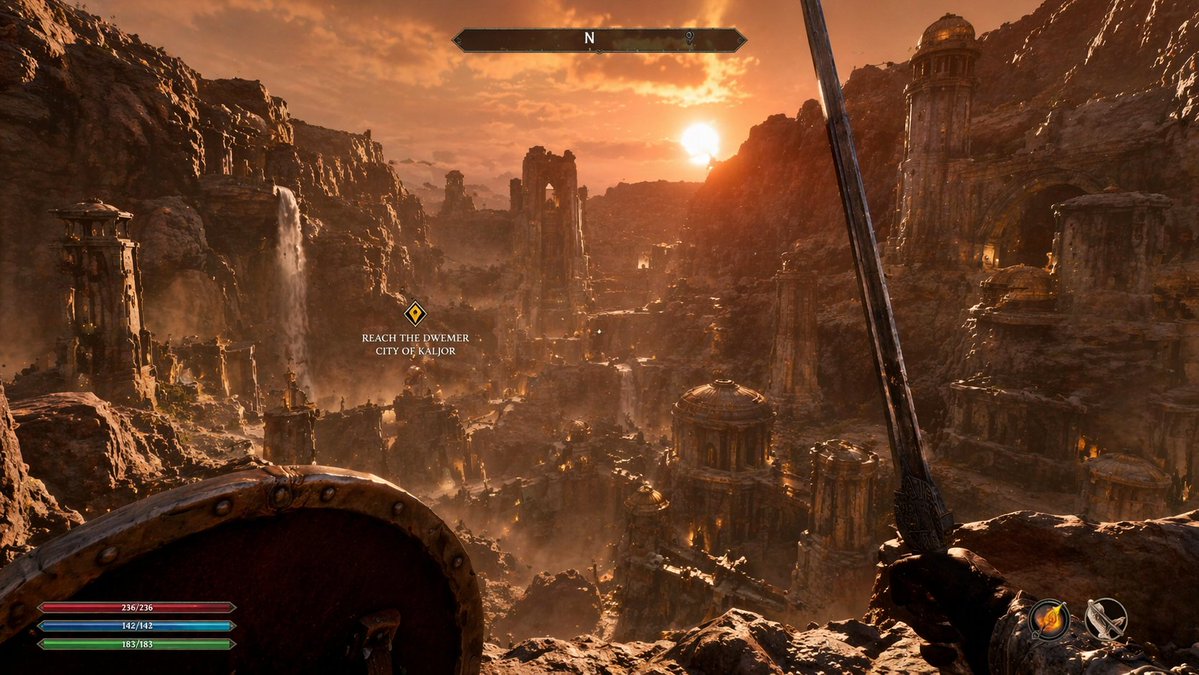
Craft an immersive first-person RPG game screenshot with a fully customizable fantasy landscape, dynamic lighting, and a complete HUD overlay.
提示词 · EN
type
第一人称 RPG 游戏截图environment
{argument name="场景描述" default="岩石峡谷中拥有石塔、黄铜圆顶和瀑布的古老废墟城市"}lighting
{argument name="时间段" default="带有体积光和温暖橙色光芒的黄金时刻日落"}first_person_view
left_hand
{argument name="左手装备" default="圆形木制金属盾牌"}right_hand
{argument name="右手武器" default="向上倾斜的钢剑"}hud_elements
item 1
position
顶部中央description
带有“N”和标记的水平指南针栏item 2
position
左侧中部description
悬浮的黄色菱形任务标记,带有文本“{argument name="任务文本" default="前往 DWEMER 城市 KALJOR"}”item 3
position
左下角description
3 条水平资源栏:红色 (236/236)、蓝色 (142/142) 和绿色 (183/183)item 4
position
右下角description
2 个圆形动作图标,显示火焰法术和弓箭关于这个提示词
Craft an immersive first-person RPG game screenshot with a fully customizable fantasy landscape, dynamic lighting, and a complete HUD overlay. 它更适合作为 GPT Image 2 的概念艺术起点:先保留画面结构、主体关系和风格约束,再替换成你的品牌、人物或场景。
这条提示词使用结构化 JSON 组织信息,包含 type、environment、lighting、first person view、hud elements 等字段。保留这种层级能让模型更清楚地区分画面主题、布局、界面元素和细节约束。
使用时建议先小幅修改主体、场景、镜头和色调,再生成多个版本对比构图与细节。这样页面内容对用户有实际帮助,也避免把模型名或标签机械堆在正文里。
如何使用这个提示词
- Copy the prompt from sora2hub.com.
- Paste it into Sora 2 or your chosen AI generation tool.
- Adjust the variables like scene description, lighting, equipment, and quest text to fit your concept.
- Generate the image and review the HUD placement.
- Fine-tune by tweaking HUD element positions or adding new ones as needed.


