GPT Image 2AI 提示词
RPG Town Map to Anime Cutscene — Sora 2 Prompt
Transform a top-down RPG Maker town map into a cinematic, perspective-rich anime event illustration with full character details and atmospheric JRPG vibes.
提示词 · EN
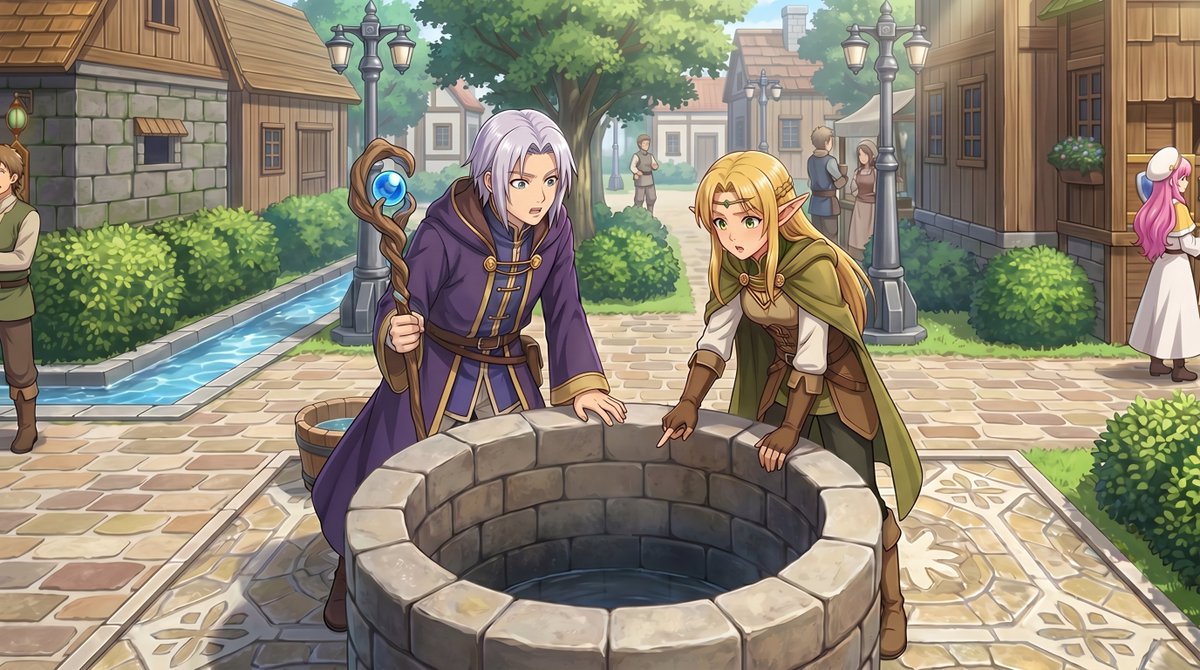
使用提供的参考图像,将俯视视角的 RPG 城镇地图转换为从人眼高度观察的精致动漫风格事件插画。保留相同的村庄位置和布局线索:中央的石井、路径网络、树篱、木屋以及左侧狭窄的水渠。将井边的 2 个小型像素角色转换为前景中 2 个全尺寸的奇幻角色:一位身穿紫色长袍、手持法杖的银发法师,以及一位身穿绿棕色冒险者服装的金发精灵,两人正俯身看向井内。添加具有电影感的 JRPG 氛围,采用柔和的日光、细腻的绘画渲染、清晰的线条艺术以及柔和的景深效果。保持场景位于同一城镇广场的感觉,但通过自然的透视、更丰富的环境细节进行增强,并加入 5 位背景村民:左侧边缘处截取了 1 名男性,远处中央路径上站着 2 个小人影,右侧建筑旁有 2 位正在交谈的镇民。
关于这个提示词
Transform a top-down RPG Maker town map into a cinematic, perspective-rich anime event illustration with full character details and atmospheric JRPG vibes. 它更适合作为 GPT Image 2 的概念艺术起点:先保留画面结构、主体关系和风格约束,再替换成你的品牌、人物或场景。
使用时建议先小幅修改主体、场景、镜头和色调,再生成多个版本对比构图与细节。这样页面内容对用户有实际帮助,也避免把模型名或标签机械堆在正文里。
如何使用这个提示词
- Copy the full prompt text from this page.
- Open your preferred AI image generator (e.g., Sora 2, Midjourney, or DALL·E) and paste it into the input field.
- Upload your own top-down RPG map or pixel art town screenshot as the reference image.
- Tweak character outfits, lighting mood, or number of background NPCs to match your game's story.
- Generate, review, and iterate by adjusting keywords like "soft sunlight" or "depth of field" for finer control.