
GPT Image 2AI 提示词
SaaS AI Dashboard Hero Graphic — Sora 2 Prompt
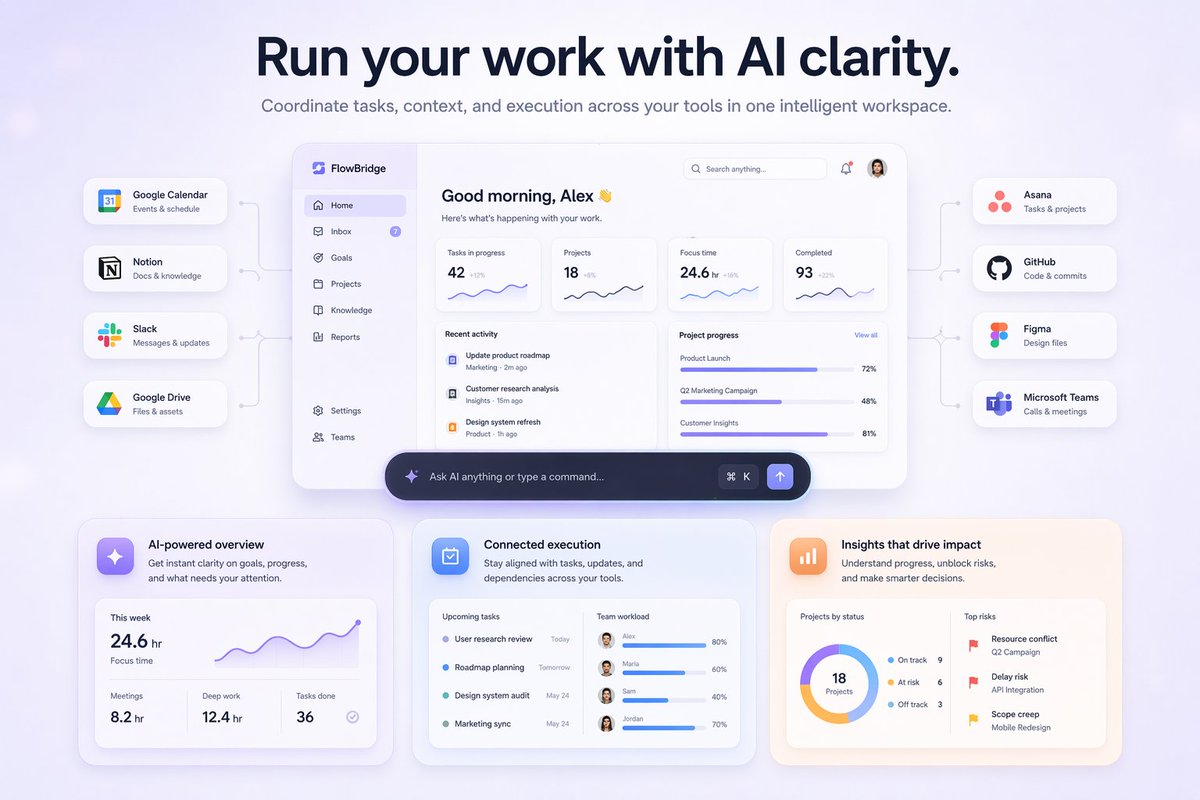
Create a visually striking SaaS landing hero graphic featuring a central AI dashboard connected to 8 popular tools, with sleek glassmorphism and gradient accents.
提示词 · EN
type
SaaS 落地页首屏图形style
现代 UI/UX,浅色主题,柔和阴影,毛玻璃效果,{argument name="primary theme color" default="紫色和蓝色渐变"}header
headline
{argument name="main headline" default="以 AI 的清晰视角驱动工作。"}subheadline
在一个智能工作空间中协调跨工具的任务、上下文和执行。layout
center_dashboard
app_name
{argument name="app name" default="FlowBridge"}greeting
{argument name="user greeting" default="早上好,Alex 👋"}sidebar_links
8top_metrics_cards
4recent_activity_items
3project_progress_bars
3floating_action_bar
{argument name="floating bar text" default="向 AI 提问或输入指令..."}left_integrations
count
4style
通过细线连接到中央仪表盘的胶囊状卡片labels
item 1
Google Calendar:事件与日程item 2
Notion:文档与知识库item 3
Slack:消息与更新item 4
Google Drive:文件与资产right_integrations
count
4style
通过细线连接到中央仪表盘的胶囊状卡片labels
item 1
Asana:任务与项目item 2
GitHub:代码与提交item 3
Figma:设计文件item 4
Microsoft Teams:通话与会议bottom_feature_cards
count
3style
带有柔和阴影的矩形卡片cards
item 1
title
AI 驱动的概览description
即时掌握目标、进度以及需要你关注的事项。visuals
显示 24.6 小时专注时间的折线图,以及 3 个底部指标(会议、深度工作、已完成任务)item 2
title
互联执行description
保持跨工具的任务、更新和依赖关系同步。visuals
包含 4 个即将到来的任务列表和 4 个带有用户头像的团队工作负载进度条item 3
title
驱动影响的洞察description
了解进度、解除风险并做出更明智的决策。visuals
显示 18 个项目状态的环形图,以及带有红旗图标的 3 个主要风险列表关于这个提示词
Create a visually striking SaaS landing hero graphic featuring a central AI dashboard connected to 8 popular tools, with sleek glassmorphism and gradient accents. 它更适合作为 GPT Image 2 的概念艺术起点:先保留画面结构、主体关系和风格约束,再替换成你的品牌、人物或场景。
这条提示词使用结构化 JSON 组织信息,包含 type、style、header、layout 等字段。保留这种层级能让模型更清楚地区分画面主题、布局、界面元素和细节约束。
使用时建议先小幅修改主体、场景、镜头和色调,再生成多个版本对比构图与细节。这样页面内容对用户有实际帮助,也避免把模型名或标签机械堆在正文里。
如何使用这个提示词
- Copy the prompt text above.
- Choose a high-fidelity AI image generator like Midjourney, DALL·E 3, or Stable Diffusion XL.
- Paste the prompt and replace any bracketed variables (e.g., app name, color theme, user greeting) with your own details.
- Generate the image and review the output. If needed, tweak the prompt to refine the layout or style.
- Use the generated graphic for your SaaS landing page concept, presentation, or mockup.


