
GPT Image 2AI 提示词
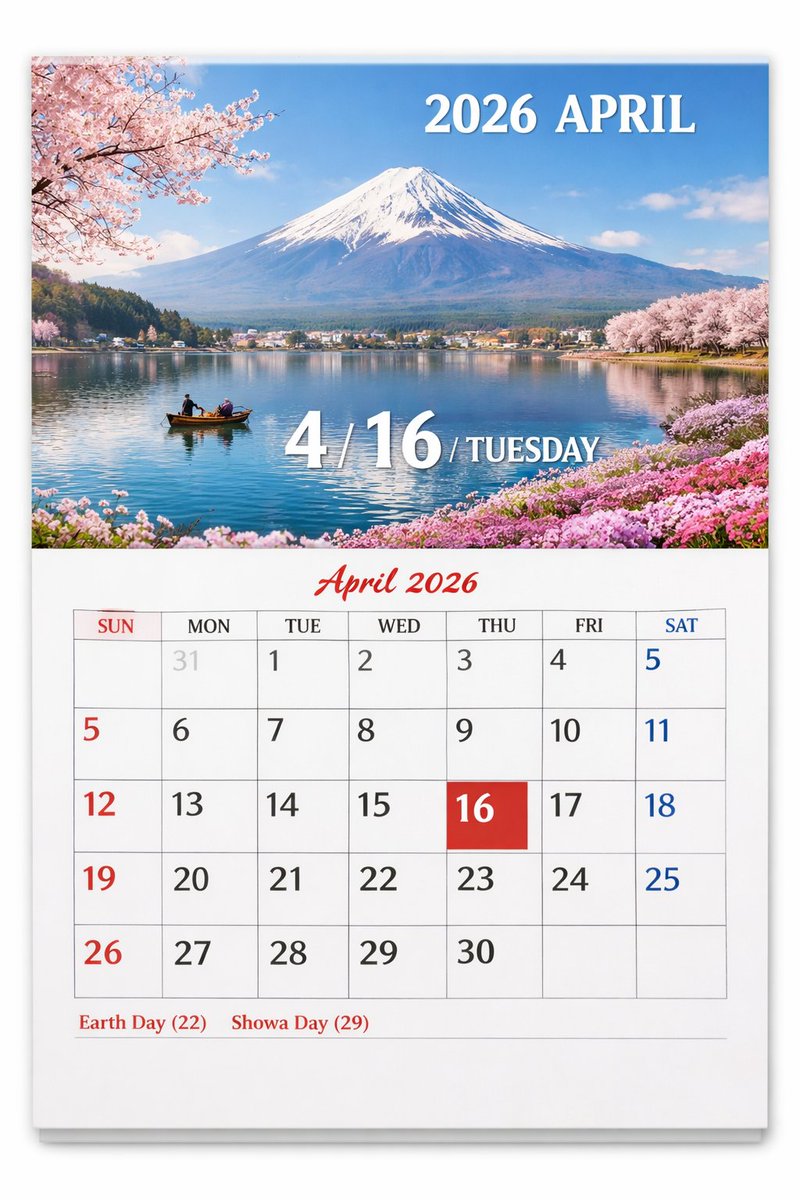
Scenic Photo Wall Calendar — Customizable Monthly Page
Create a realistic wall calendar with a stunning scenic photo on top and a detailed, color-coded monthly grid below, fully customizable with your own dates and locations.
提示词 · EN
type
wall calendar pagepresentation
physical paper calendar hanging on a white wall with a subtle drop shadowlayout
top_half
type
scenic photographsubject
{argument name="scenic location" default="Mount Fuji with cherry blossoms and a lake"}details
snow-capped mountain, calm blue lake reflection, small wooden boat with two people, pink cherry blossoms framing the top left and right shores, pink flowers on the bottom right shoretext_overlays
item 1
position
top righttext
{argument name="year and month" default="2026 APRIL"}style
white serif fontitem 2
position
bottom centertext
4 / {argument name="highlighted date" default="16"} / {argument name="day of week" default="TUESDAY"}style
large white serif font with drop shadowbottom_half
type
calendar gridheader
text
April 2026style
red cursive script font, centeredgrid_structure
columns
7rows
5column_headers
item 1
SUNitem 2
MONitem 3
TUEitem 4
WEDitem 5
THUitem 6
FRIitem 7
SATgrid_content
highlighted_cell
date
{argument name="highlighted date" default="16"}style
solid red square background, white textnumber_colors
Sundays in red, Saturdays in blue, weekdays in black, previous month dates in light graynotable_features
AI generation artifact where the number 5 appears twice (end of row 1, start of row 2)footer
text
{argument name="holidays" default="Earth Day (22) Showa Day (29)"}position
bottom leftstyle
red serif font关于这个提示词
Create a realistic wall calendar with a stunning scenic photo on top and a detailed, color-coded monthly grid below, fully customizable with your own dates and locations. 它更适合作为 GPT Image 2 的概念艺术起点:先保留画面结构、主体关系和风格约束,再替换成你的品牌、人物或场景。
这条提示词使用结构化 JSON 组织信息,包含 type、presentation、layout 等字段。保留这种层级能让模型更清楚地区分画面主题、布局、界面元素和细节约束。
使用时建议先小幅修改主体、场景、镜头和色调,再生成多个版本对比构图与细节。这样页面内容对用户有实际帮助,也避免把模型名或标签机械堆在正文里。
如何使用这个提示词
- Copy the entire prompt template.
- Choose an AI model like Sora 2 that supports image generation from detailed text.
- Customize the variables inside curly braces—such as
scenic location,year and month, andhighlighted date—to match your desired calendar. - Generate the image and review the output for any creative artifacts.
- Use the final calendar page for digital wallpaper, planning, or a personalized print.


