
GPT Image 2AI 提示词
Sci-Fi VTOL Technical Spec Sheet Prompt — Sora 2
Creates a multi-panel technical reference sheet with orthographic views, fan layout diagrams, airflow annotations, and detailed specs for a futuristic VTOL aircraft.
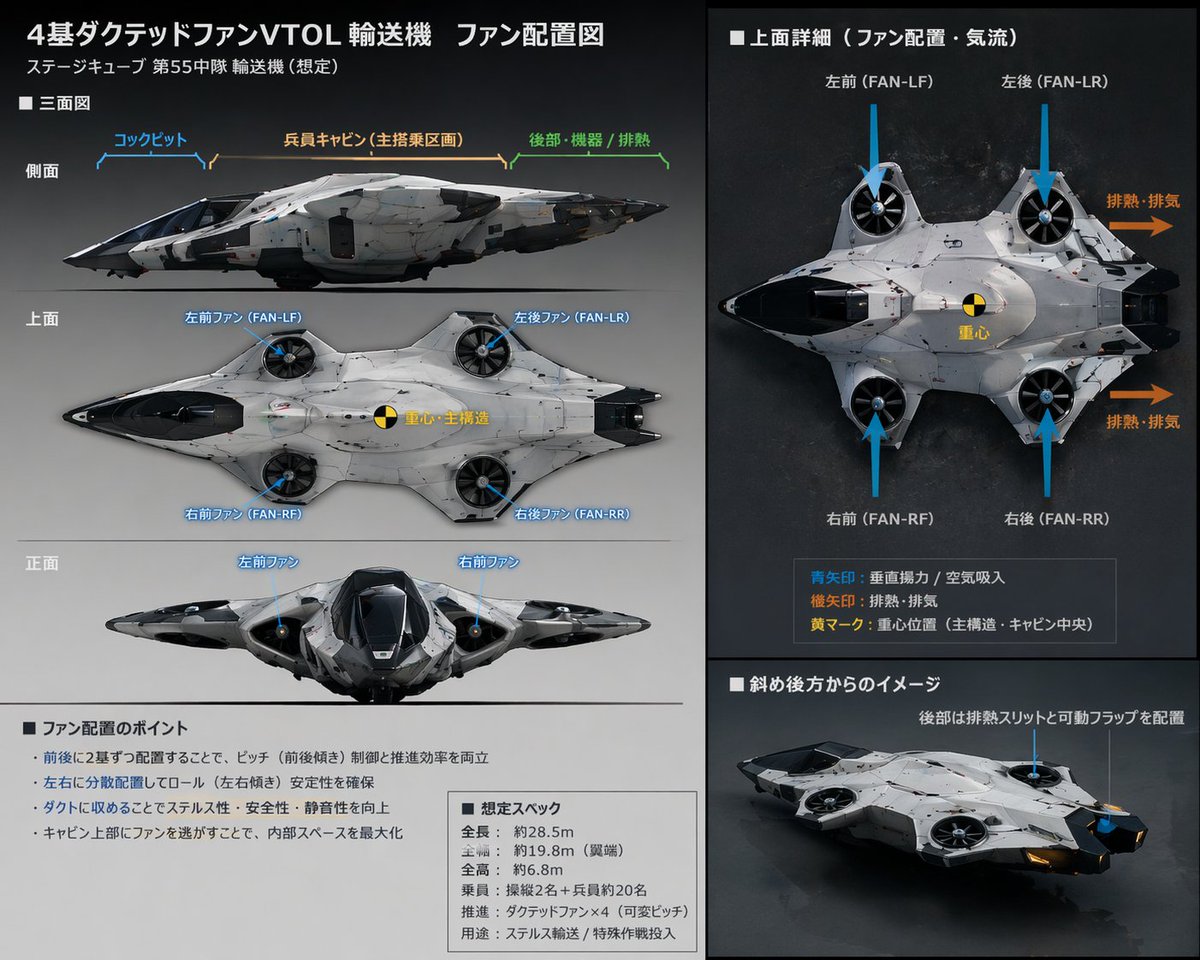
提示词 · EN
type
technical reference sheetsubject
design
{argument name="aircraft type" default="futuristic VTOL transport aircraft"}features
4 ducted fans integrated into a blended wing bodycolors
item 1
{argument name="primary color" default="white"}item 2
{argument name="secondary color" default="black"}style
sci-fi concept art, schematic layout, detailed annotationslayout
background
{argument name="background color" default="dark grey"}header
title
{argument name="main title" default="4基ダクテッドファンVTOL輸送機 ファン配置図"}subtitle
ステージキューブ 第55中隊 輸送機 (想定)columns
item 1
position
leftsections
item 1
title
■ 三面図description
Orthographic projectionsview_count
3view_labels
item 1
側面item 2
上面item 3
正面annotations
Blue lines pointing to cockpit, cabin, and fansitem 2
title
■ ファン配置のポイントdescription
Text box with bullet pointsbullet_count
4item 3
title
■ 想定スペックdescription
Text box with specificationsline_count
6item 2
position
rightsections
item 1
title
■ 上面詳細(ファン配置・気流)description
Large top-down viewvisual_elements
blue_arrows
4orange_arrows
2center_of_gravity_marker
1legend
item_count
3description
Explains arrow colors and markersitem 2
title
■ 斜め後方からのイメージdescription
3/4 rear perspective view of the aircraft关于这个提示词
Creates a multi-panel technical reference sheet with orthographic views, fan layout diagrams, airflow annotations, and detailed specs for a futuristic VTOL aircraft. 它更适合作为 GPT Image 2 的概念艺术起点:先保留画面结构、主体关系和风格约束,再替换成你的品牌、人物或场景。
这条提示词使用结构化 JSON 组织信息,包含 type、subject、style、layout 等字段。保留这种层级能让模型更清楚地区分画面主题、布局、界面元素和细节约束。
使用时建议先小幅修改主体、场景、镜头和色调,再生成多个版本对比构图与细节。这样页面内容对用户有实际帮助,也避免把模型名或标签机械堆在正文里。
如何使用这个提示词
- Copy the entire prompt template from the page. 2. Paste it into your preferred AI image generator (Sora 2 recommended). 3. Customize the variables like aircraft type, colors, and background to match your vision. 4. Generate the image and review the multi-panel layout with annotations. 5. Adjust variables and regenerate to refine details until satisfied.


