
GPT Image 2AI 提示词
Mobile Short-Video App UI Mockup — Scenic Overlay Prompt
Create a realistic Chinese-style short-video app interface mockup layered over a customizable, stunning landscape photo for social media content.
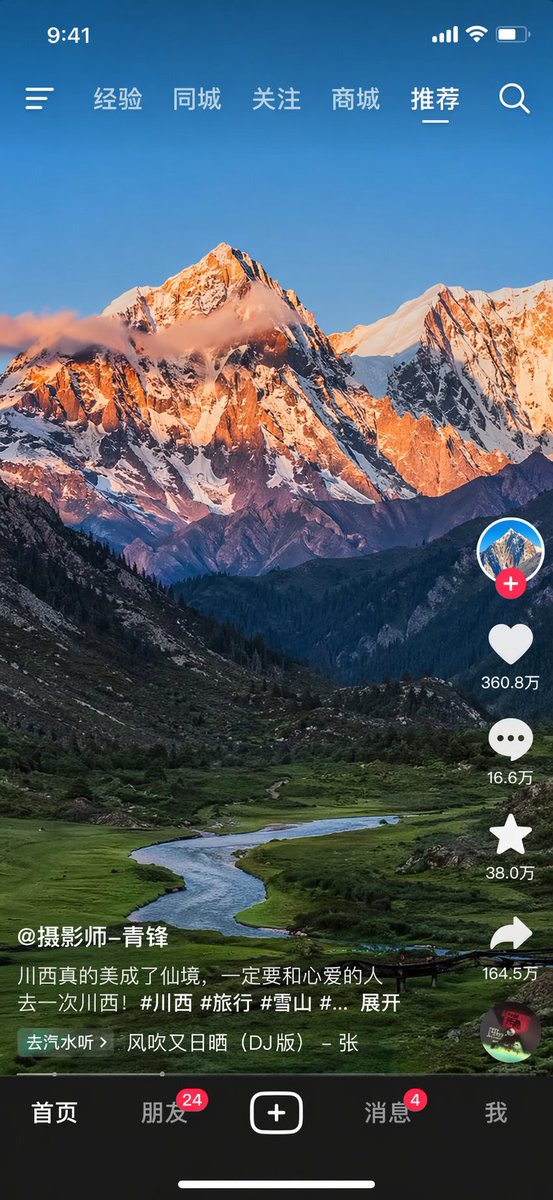
提示词 · EN
type
mobile short-video app interface mockupbackground_image
{argument name="landscape subject" default="majestic snow-capped mountain peak illuminated by golden hour sunlight with a winding river in a lush green valley"}layout
top_status_bar
time
9:41icons
item 1
cellular signalitem 2
wifiitem 3
batterytop_navigation
left_icon
hamburger menuright_icon
search magnifying glasscenter_labels
item 1
经验item 2
同城item 3
关注item 4
商城item 5
{argument name="active tab" default="推荐"}right_interaction_bar
count
6items
item 1
icon
profile picture with red plus buttonitem 2
icon
heartlabel
{argument name="like count" default="360.8万"}item 3
icon
speech bubblelabel
16.6万item 4
icon
starlabel
38.0万item 5
icon
share arrowlabel
164.5万item 6
icon
spinning music recordbottom_left_info
username
{argument name="username" default="@摄影师-青锋"}caption
{argument name="video caption" default="川西真的美成了仙境,一定要和心爱的人去一次川西!#川西 #旅行 #雪山 #... 展开"}music_ticker
去汽水听 > 风吹又日晒 (DJ版) - 张bottom_navigation
count
5items
item 1
label
首页item 2
label
朋友badge
24item 3
icon
square plus buttonitem 4
label
消息badge
4item 5
label
我home_indicator
horizontal line at bottom关于这个提示词
Create a realistic Chinese-style short-video app interface mockup layered over a customizable, stunning landscape photo for social media content. 它更适合作为 GPT Image 2 的概念艺术起点:先保留画面结构、主体关系和风格约束,再替换成你的品牌、人物或场景。
这条提示词使用结构化 JSON 组织信息,包含 type、background image、layout 等字段。保留这种层级能让模型更清楚地区分画面主题、布局、界面元素和细节约束。
使用时建议先小幅修改主体、场景、镜头和色调,再生成多个版本对比构图与细节。这样页面内容对用户有实际帮助,也避免把模型名或标签机械堆在正文里。
如何使用这个提示词
- Copy the entire JSON prompt structure into your preferred AI image generator that supports code-based inputs.
- Choose a compatible model like Sora 2 or DALL·E 3 optimized for UI and photorealistic rendering.
- Customize the "landscape subject" and "active tab" variables to fit your specific theme or campaign.
- Adjust other text fields like "username" or "video caption" to personalize the mockup further.
- Generate the image to receive a high-fidelity mockup ready for presentation or social media use.


