
GPT Image 2AI 提示词
Shynloc AI Brand Identity Guide — Sora 2 Prompt
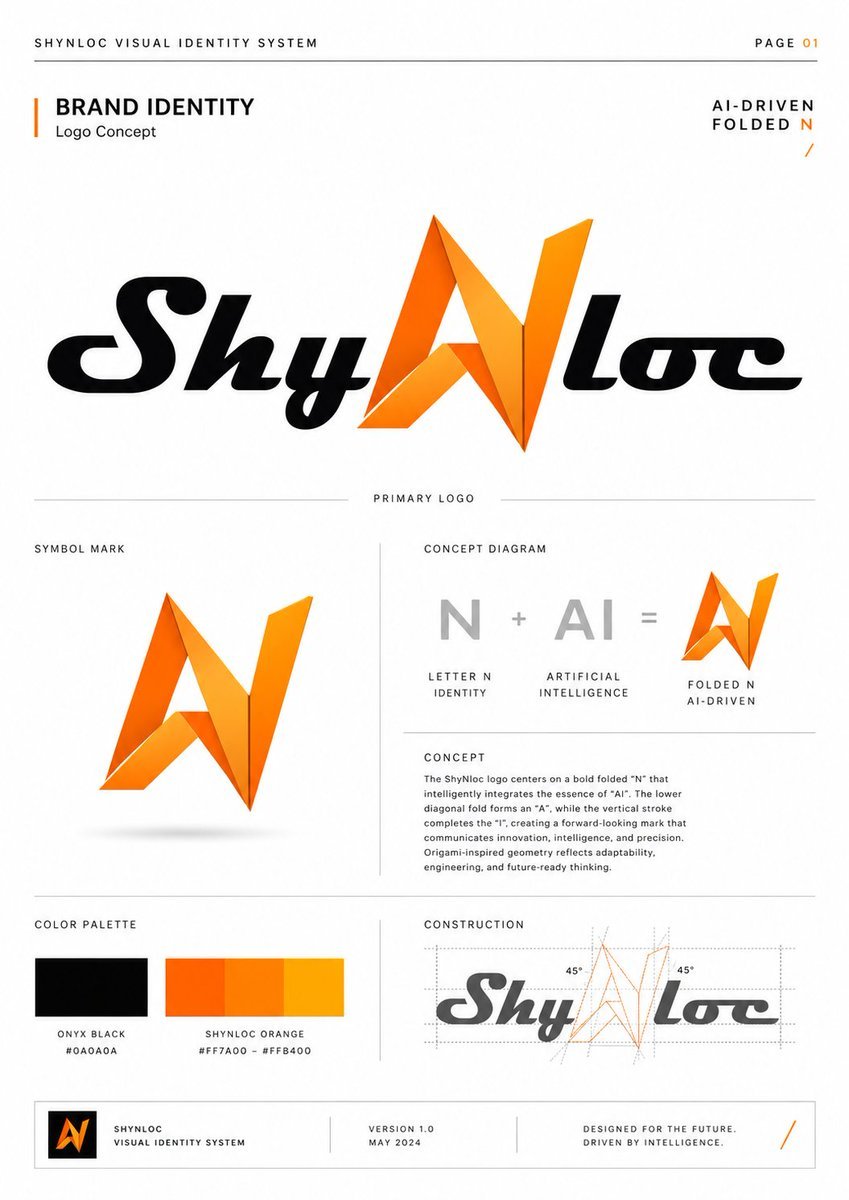
Generate a minimalist, Swiss-grid brand identity page for a futuristic, AI-driven logo concept, perfect for professional presentations.
提示词 · EN
type
简洁的企业视觉识别演示页format
单页品牌识别指南,第 01 页,纵向排版brand
name
{argument name="brand name" default="Shynloc"}system title
{argument name="system title" default="SHYNLOC 视觉识别系统"}tagline
{argument name="tagline" default="AI 驱动的折叠 N"}logo concept
一种未来感的字标设计,中心字母 N 转化为类似折纸的角形符号,同时可解读为 AI;周围文字采用黑色斜体,N 采用亮橙色渐变折叠几何图形style
background
纯白背景,留白充裕layout
极简瑞士网格,细浅灰色分割线,大写微型排版,高级品牌手册美学typography
粗体无衬线标题,小号宽间距大写说明文字,简洁的正文colors
黑色、白色、灰色、鲜艳橙色渐变layout
header
position
顶部边缘left text
SHYNLOC 视觉识别系统right text
第 01 页divider
页面横向细灰线hero section
position
上半部分居中title block
品牌识别,副标题为 Logo 概念,配有垂直橙色强调条right label
AI 驱动的折叠 N,配有小橙色斜杠primary logo
居中大号 Shynloc 字标;黑色光泽斜体定制字体,中间为橙色折叠 N,下方标注 PRIMARY LOGOsections
item 1
title
符号标识position
中左count
1items
item 1
独立的橙色折叠 N 符号,具有锐利的三角形切面,下方有细微阴影item 2
title
概念图解position
中右count
3labels
item 1
N,字母 N 识别item 2
AI,人工智能item 3
折叠 N,AI 驱动content
灰色 N 加灰色 AI 等于橙色折叠 N 图标item 3
title
设计理念position
概念图解下方count
1body text
Logo 以一个大胆的折叠 N 为核心,巧妙地融合了 AI 的精髓。下方的对角折痕构成了 A,垂直笔画补全了 I,创造出一个传达创新、智能和精准的前瞻性标志。折纸风格的几何图形反映了适应性、工程学和面向未来的思维。item 4
title
色彩调色板position
左下count
2swatches
item 1
玛瑙黑 #0A0A0Aitem 2
Shynloc 橙 #FF7A00 – #FFB400item 5
title
构造position
右下count
1content
小型灰度字标,橙色 N 上叠加点状构造网格、角度引导线和两个 45° 标注footer
position
底部盒状条count
4items
item 1
包含橙色折叠 N 的小型黑色方形 Logo 块item 2
SHYNLOC 视觉识别系统item 3
版本 1.0 / 2024 年 5 月item 4
为未来而设计。由智能驱动。配橙色斜杠rendering
清晰的矢量图形设计,高分辨率品牌指南样机,完美对齐的网格,细线,精确间距,专业代理机构演示风格,无照片纹理,无人像customization
primary color
{argument name="primary color" default="鲜艳橙色渐变 #FF7A00 到 #FFB400"}secondary color
{argument name="secondary color" default="玛瑙黑 #0A0A0A"}关于这个提示词
Generate a minimalist, Swiss-grid brand identity page for a futuristic, AI-driven logo concept, perfect for professional presentations. 它更适合作为 GPT Image 2 的概念艺术起点:先保留画面结构、主体关系和风格约束,再替换成你的品牌、人物或场景。
这条提示词使用结构化 JSON 组织信息,包含 type、format、brand、style、layout、rendering、customization 等字段。保留这种层级能让模型更清楚地区分画面主题、布局、界面元素和细节约束。
使用时建议先小幅修改主体、场景、镜头和色调,再生成多个版本对比构图与细节。这样页面内容对用户有实际帮助,也避免把模型名或标签机械堆在正文里。
如何使用这个提示词
- Copy this entire prompt and paste it into your chosen AI model interface.
- Select a model capable of generating detailed graphic design layouts (e.g., Sora 2, DALL-E 3, or Midjourney).
- Customize the brand variables within the prompt, such as
brand nameandtagline, to fit your project. - Generate the image. For variations, adjust style keywords like "minimalist" or "bright orange gradient."
- Review the output. The prompt is designed to produce a single, cohesive page; refine it if needed.


