
GPT Image 2AI 提示词
Museum-Style Chinese Cloisonné Art Slide — Sora 2 Prompt
Create a stunning, academically elegant PowerPoint slide showcasing Ming-Qing dynasty cloisonné enamel artifacts in a refined Chinese museum aesthetic.
提示词 · EN
type
单页教育类 PowerPoint 幻灯片,采用精美的中国博物馆风格slide
aspect_ratio
16:9 宽屏page_indicator
05 / 10title
{argument name="slide title" default="历史沿革:高峰时期与代表作品"}subtitle
{argument name="subtitle text" default="明清两代,掐丝珐琅从工艺走向宫廷艺术的高峰。"}topic
明清时期的掐丝珐琅艺术language
简体中文可见文本style
优雅的历史演示风格,中国故宫博物馆美学,奶油色羊皮纸背景,藏青色与金属金色装饰边框,边角饰有云雷纹,背景右侧隐约可见水墨山水与亭台,左侧有淡淡的莲花线条艺术,精致的宋体中文字体layout
composition
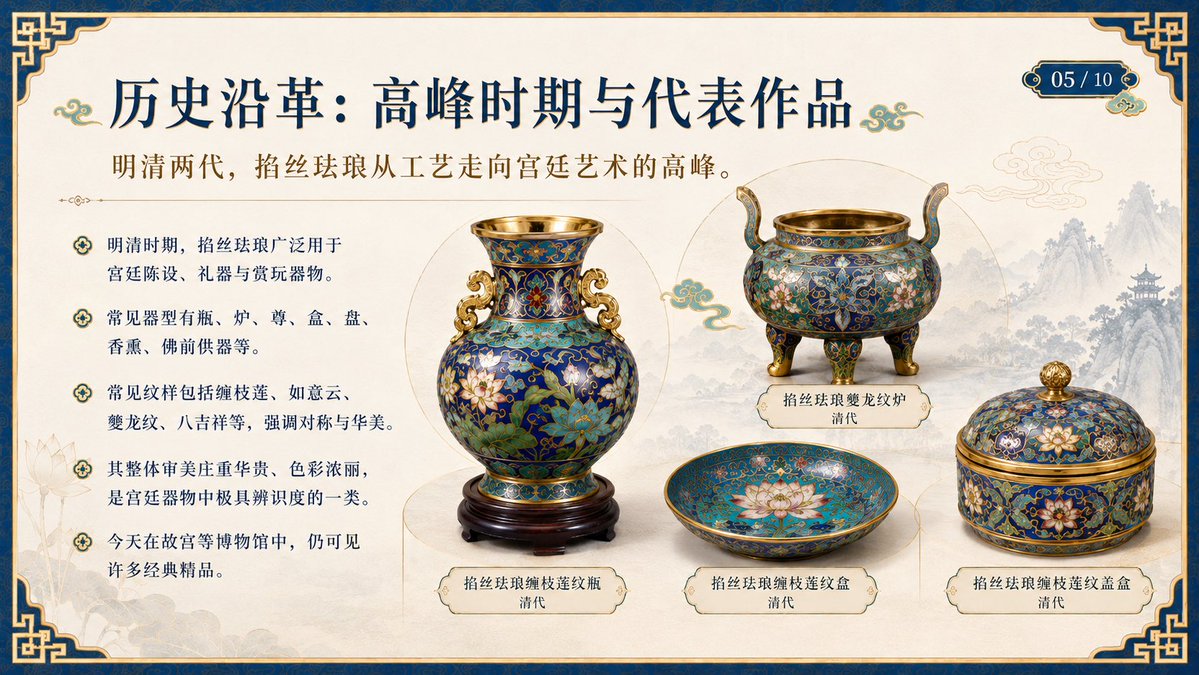
左侧三分之一包含说明性要点文本;右侧三分之二包含四个标注好的掐丝珐琅器物,呈博物馆陈列状;左中为大型花瓶,右上为三足炉,下中为浅盘,右下为盖盒background
温暖的象牙色纸张纹理,带有浅金色分割线,器物后方有圆形展示光晕border
厚重的深蓝色外边框,配以细金边和精美的中国结边角decorations
标题旁及器物周围饰有绿松石色与金色的小云纹text_elements
bullet_section
position
副标题下方的左侧栏count
5bullets
item 1
明清时期,掐丝珐琅广泛用于宫廷陈设、礼器与赏玩器物。item 2
常见器型有瓶、炉、尊、盒、盘、香熏、佛前供器等。item 3
常见纹样包括缠枝莲、如意云、夔龙纹、八吉祥等,强调对称与华美。item 4
其整体审美庄重华贵、色彩浓丽,是宫廷器物中极具辨识度的一类。item 5
今天在故宫等博物馆中,仍可见许多经典精品。artifacts
count
4items
item 1
label
掐丝珐琅缠枝莲纹瓶
清代position
center-leftdescription
放置在深色雕花木座上的大型蓝色掐丝珐琅花瓶,金口,金耳,瓶身布满绿松石色、钴蓝色、红色、白色和绿色的缠枝莲纹 enamelitem 2
label
掐丝珐琅夔龙纹炉
清代position
upper-rightdescription
圆形三足香炉,配有凸起的弧形提手,金口金足,深蓝色珐琅炉身,饰有花卉与夔龙纹样item 3
label
掐丝珐琅缠枝莲纹盒
清代position
lower-centerdescription
浅口圆形盘或盒底,绿松石蓝色内壁,饰有硕大的粉白色莲花和精致的金色掐丝纹样item 4
label
掐丝珐琅缠枝莲纹盖盒
清代position
lower-rightdescription
圆形带盖盒,配有金色钮,蓝色掐丝珐琅表面,饰有莲花、缠枝纹和金边visual_requirements
渲染为精美的成品 PPT 幻灯片,而非软件截图。掐丝珐琅器物使用照片级真实的博物馆藏品剪影,带有柔和的阴影和清晰的标签牌。确保所有中文字符清晰、易读且对齐准确。配色方案:帝王藏青、古董金、象牙白、绿松石珐琅色、钴蓝色、柔和的水墨灰。整体氛围:学术、奢华、中国传统文化教育。customization
course_topic
{argument name="course topic" default="掐丝珐琅"}dynasty_focus
{argument name="historical period" default="明清两代"}page_number
{argument name="page number" default="05 / 10"}关于这个提示词
Create a stunning, academically elegant PowerPoint slide showcasing Ming-Qing dynasty cloisonné enamel artifacts in a refined Chinese museum aesthetic. 它更适合作为 GPT Image 2 的概念艺术起点:先保留画面结构、主体关系和风格约束,再替换成你的品牌、人物或场景。
这条提示词使用结构化 JSON 组织信息,包含 type、slide、layout、text elements、artifacts、visual requirements、customization 等字段。保留这种层级能让模型更清楚地区分画面主题、布局、界面元素和细节约束。
使用时建议先小幅修改主体、场景、镜头和色调,再生成多个版本对比构图与细节。这样页面内容对用户有实际帮助,也避免把模型名或标签机械堆在正文里。
如何使用这个提示词
- Copy the full prompt text from Sora2Hub.com.
- Paste it into your preferred AI image generation model that supports detailed slide or illustration prompts (e.g., Sora 2, DALL-E 3, or Midjourney).
- Customize the slide title or subtitle by editing the default text within the curly braces
{}if needed. - Adjust any artifact labels or descriptions to feature different cloisonné pieces if desired.
- Generate the image and review the output for layout clarity and text legibility. Re-run with slight wording tweaks for best results.


