
GPT Image 2AI 提示词
Modern Engineering Sketch Slides — Sora 2 Prompt
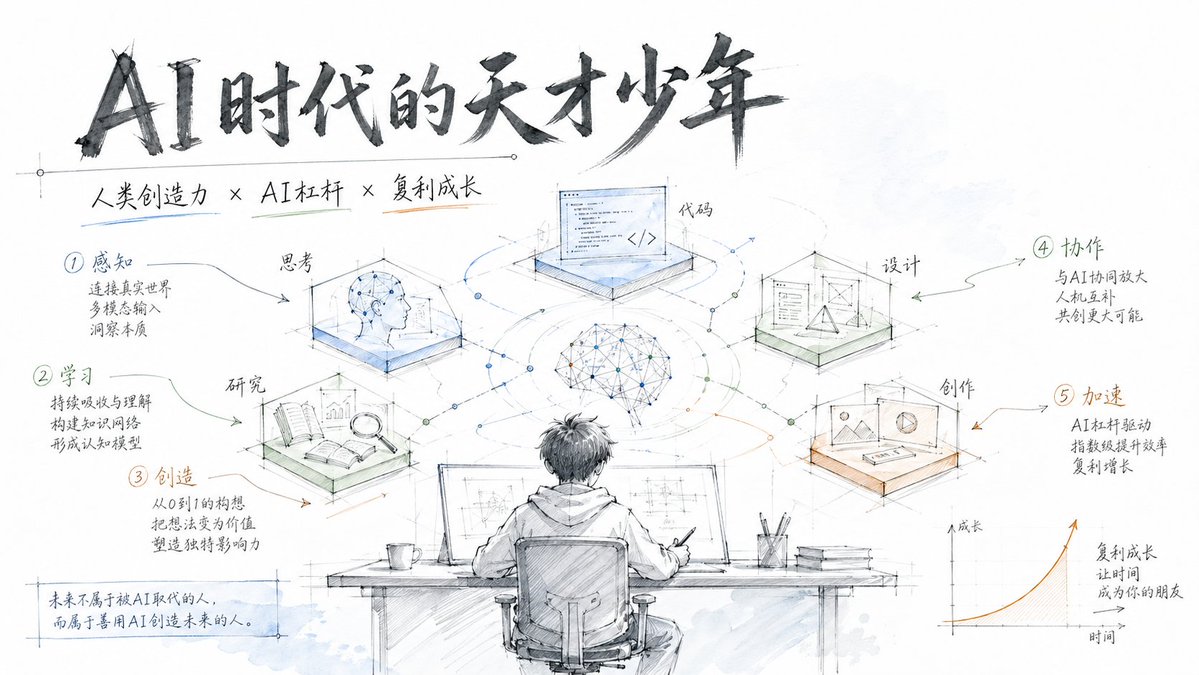
Create clean, professional slides mimicking Apple/Tesla product design sketches, with hand-drawn engineering annotations and subtle watercolor accents.
1 / 4
提示词 · EN
生成具有现代化工程手绘风格的完整 Slides,类似于 Apple 或 Tesla 的产品设计手稿。支持自定义主题和分步流程,采用纯白背景、工程标注和轻盈的水彩点缀,营造出简洁、专业且富有科技感的视觉效果。 - 纯白背景,留白充足
- 工程制图线条风格(细腻、精准)
- 手写标题(深灰色)
- 通过工程标注方式展示步骤
- 浅蓝、浅绿和浅橙色水彩点缀(高透明度)
- 类似于 Apple/Tesla 产品设计草图的现代感
- 简洁图标搭配步骤说明
- 简洁、专业、科技感 主题:argtheme: AI 时代的极客少年
关于这个提示词
Create clean, professional slides mimicking Apple/Tesla product design sketches, with hand-drawn engineering annotations and subtle watercolor accents. 它更适合作为 GPT Image 2 的概念艺术起点:先保留画面结构、主体关系和风格约束,再替换成你的品牌、人物或场景。
使用时优先替换 theme 等占位符,并保持镜头、构图和材质描述的顺序不变。这样更容易获得稳定的画面结果,也方便继续做多版本对比。
如何使用这个提示词
- Copy the prompt from the box above.
- Open Sora 2 or any AI image generator that supports text-to-image or slide creation.
- Replace the
themevariable with your desired topic (e.g., "Product Launch 2025" or "Renewable Energy Tech"). - Generate the slides. If using Sora, the model will produce a sequence of slides; other models may output a single image.
- Optionally refine by adjusting the sketch style or watercolor colors in the prompt.


