GPT Image 2AI 提示词
Chinese Cloisonné Craft Process — Sora 2 Presentation
Generate a stunning single-slide presentation detailing the 10-step Cloisonné enamel making process with an elegant classical Chinese design.
提示词 · EN
type
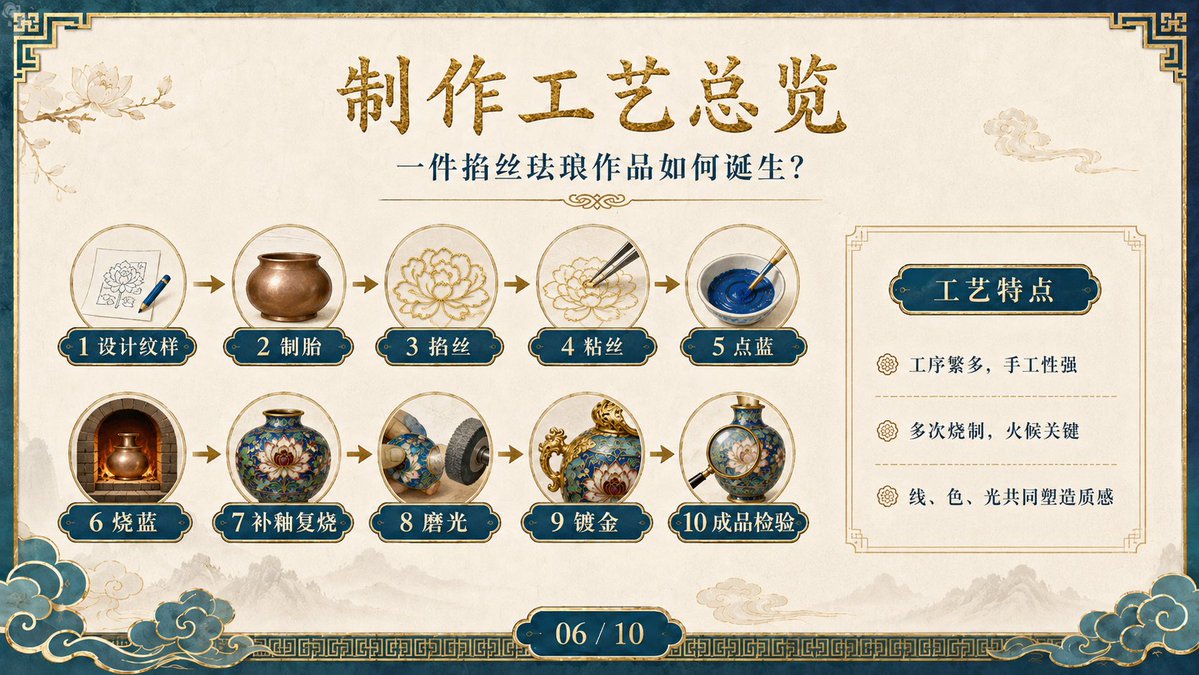
华丽中国古典风格单页演示文稿canvas
aspect_ratio
16:9 宽屏background
暖象牙色羊皮纸质感,带有细腻纸纹,底部有淡淡的水墨山水,左上角有浅色莲花线条画,右上角有小型祥云插图border
深青色外框配古金色装饰,边角饰有几何中式纹样,底部为金色回纹带,左右下角装饰有青金配色云纹title_area
main_title
{argument name="main title" default="制作工艺总览"}main_title_style
居中大号毛笔书法字体,带有金属质感金漆效果subtitle
{argument name="subtitle text" default="一件掐丝珐琅作品如何诞生?"}subtitle_style
标题下方居中的深青色衬线字体,配有细金分割线及小型装饰花纹main_process_flow
position
左侧及中部,占据幻灯片约三分之二区域count
10layout
两行五列圆形图像徽章,由小型金色向右箭头连接medallions
细金圆形边框,每个徽章内含一幅逼真的景泰蓝制作工序微缩插图labels
item 1
number
1text
设计纹样image
绘有莲花图案的草图纸和一支蓝色钢笔item 2
number
2text
制胎image
素面铜胎器皿item 3
number
3text
掐丝image
正在弯曲成花卉轮廓的金丝item 4
number
4text
粘丝image
镊子将细金属丝放置在花卉轮廓上item 5
number
5text
点蓝image
画笔在圆盘中调和鲜艳的钴蓝色珐琅釉料item 6
number
6text
烧蓝image
正在窑炉中烧制的器皿,炉火通红item 7
number
7text
补釉复烧image
成品蓝色花卉景泰蓝花瓶item 8
number
8text
磨光image
旋转抛光轮打磨蓝色珐琅器皿item 9
number
9text
镀金image
带有镀金把手和边缘的华丽蓝金景泰蓝器皿item 10
number
10text
成品检验image
放大镜检查成品蓝色景泰蓝花瓶label_style
每个工序标签均为深青色圆角牌,配金色轮廓、奶油色数字及白色中文字体right_feature_panel
position
右侧panel_style
羊皮纸背景上带有切角装饰的细金矩形框heading
{argument name="feature panel heading" default="工艺特点"}heading_style
深青色圆角牌,配金色轮廓及奶油色中文字体bullet_count
3bullets
item 1
工序繁多,手工性强item 2
多次烧制,火候关键item 3
线、色、光共同塑造质感bullet_style
小型金色花卉图标,深青色中文字体,项目间带有浅色虚线金分割线footer
slide_number
{argument name="slide number" default="06 / 10"}style
居中深青色圆角胶囊形状,配金色边框及白色数字visual_style
高端文化遗产风格 PPT 页面,优雅的博物馆展览美学,逼真的工艺缩略图与传统中式装饰图形结合,间距平衡,高分辨率,无人物,字体清晰,采用低调的金色与青色调rendering_notes
确保所有中文字体清晰且位置正确;使用 10 个编号工序步骤和 3 个特点要点;保持精致的 PowerPoint 课件外观关于这个提示词
Generate a stunning single-slide presentation detailing the 10-step Cloisonné enamel making process with an elegant classical Chinese design. 它更适合作为 GPT Image 2 的概念艺术起点:先保留画面结构、主体关系和风格约束,再替换成你的品牌、人物或场景。
这条提示词使用结构化 JSON 组织信息,包含 type、canvas、title area、main process flow、right feature panel、footer、visual style 等字段。保留这种层级能让模型更清楚地区分画面主题、布局、界面元素和细节约束。
使用时建议先小幅修改主体、场景、镜头和色调,再生成多个版本对比构图与细节。这样页面内容对用户有实际帮助,也避免把模型名或标签机械堆在正文里。
如何使用这个提示词
- Copy the complete prompt.
- Select a model like Sora 2 or GPT-4 that supports image generation.
- Optionally edit variables like "main title" to customize the slide heading.
- Submit the prompt and generate the visual.
- Download the resulting presentation image for your project.