
GPT Image 2AI 提示词
Dark Tech Marketing Collage Slides — Sora 2 Prompt
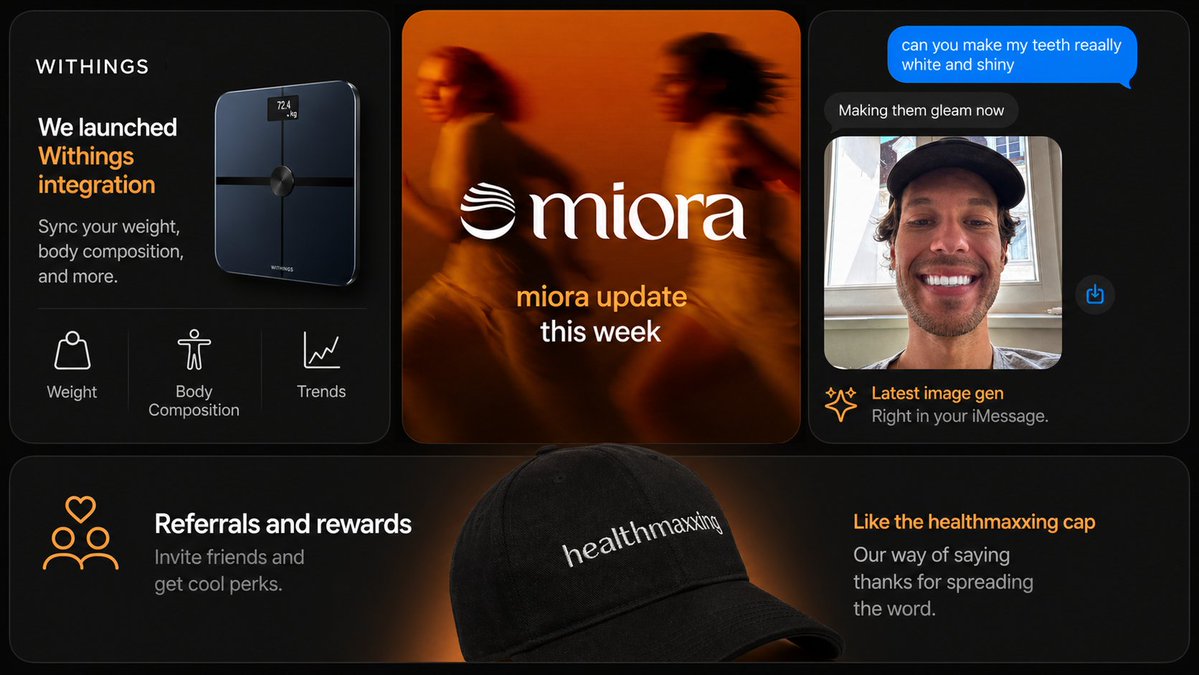
Generate a premium multi-panel startup marketing collage with smart scales, brand updates, AI chat UI, and referral banners in sleek dark mode.
提示词 · EN
type
现代营销 Slides 拼贴style
高端深色模式科技品牌演示,时尚产品营销,柔和光效,圆角卡片,细腻渐变,高对比度,精致的初创公司美学canvas
aspect_ratio
16:9background
深黑色,带有微弱的暖橙色光晕点缀brand
name
{argument name="brand name" default="WITHINGS"}accent_color
暖橙色layout
structure
顶行 3 张卡片,底部全宽横幅卡片 1 张card_count
4sections
item 1
title
智能秤产品卡片position
左上count
3labels
item 1
体重item 2
身体成分item 3
趋势content
深色卡片,左上角为品牌名称,大号白色和橙色标题写着 'We launched Withings integration',较小的副标题 'Sync your weight, body composition, and more.',右侧浮动着一台光亮的黑色智能秤,带有微小的发光屏幕,显示 '72.4 kg',底部特征行由细分隔线隔开,显示 3 个白色线条图标及标签item 2
title
品牌更新卡片position
顶部居中count
1labels
item 1
miora 本周更新content
暖橙色调的模糊生活方式图像,展示 2 名奔跑者,中间为巨大的白色衬线字体 Logo '{argument name="center brand" default="miora"}',左侧带有波浪状徽标,下方堆叠文本,第一行为橙色,第二行为白色item 3
title
聊天图像生成卡片position
右上count
4labels
item 1
你能让我的牙齿变得非常洁白闪亮吗item 2
正在为您美化item 3
最新图像生成item 4
直接在 iMessage 中使用。content
深色 iMessage 风格手机对话界面,顶部为亮蓝色发出消息气泡,下方为深灰色回复气泡,下方显示肖像照片预览,展示一名戴黑色帽子的人在窗前,脸部被矩形模糊遮挡,右侧浮动一个小蓝色分享图标,页脚标题带有火花图标、橙色大标题和灰色副标题item 4
title
推荐横幅卡片position
底部全宽count
2labels
item 1
推荐与奖励item 2
喜欢这款 healthmaxxing 帽子content
宽幅深色横幅,中心前景处为一顶黑色棒球帽,后方有柔和的橙色聚光灯,帽子上绣有白色文字 '{argument name="cap text" default="healthmaxxing"}',左侧有 3 个人的橙色线条图标,上方带有一个心形,以及白色标题和灰色副标题 'Invite friends and get cool perks.',右侧有橙色标题和灰色副标题 'Our way of saying thanks for spreading the word.'design_details
corners
每张卡片均采用大圆角borders
细腻的灰色细边框spacing
卡片之间间距均匀typography
UI 和营销文案采用简洁的无衬线字体,中心 Logo 字标采用优雅的衬线字体lighting
深邃的黑色背景,配以橙色边缘光和光晕product_rendering
高端逼真的 3D 产品和配件渲染ui_style
极简高端应用/商店推广美学text_overrides
top_left_brand
{argument name="headline brand" default="WITHINGS"}center_update_line
{argument name="update text" default="miora update this week"}关于这个提示词
Generate a premium multi-panel startup marketing collage with smart scales, brand updates, AI chat UI, and referral banners in sleek dark mode. 它更适合作为 GPT Image 2 的概念艺术起点:先保留画面结构、主体关系和风格约束,再替换成你的品牌、人物或场景。
这条提示词使用结构化 JSON 组织信息,包含 type、style、canvas、brand、layout、design details、text overrides 等字段。保留这种层级能让模型更清楚地区分画面主题、布局、界面元素和细节约束。
使用时建议先小幅修改主体、场景、镜头和色调,再生成多个版本对比构图与细节。这样页面内容对用户有实际帮助,也避免把模型名或标签机械堆在正文里。
如何使用这个提示词
- Copy the full prompt JSON and paste it into your AI image generator supporting Sora 2 or similar models.
- Choose a high-resolution model like Sora 2 for best detail on gradients and UI mockups.
- Customize variables: replace brand name (default WITHINGS), center brand (default miora), and cap text (default healthmaxxing) with your own.
- Adjust the aspect ratio if needed — 16:9 works for presentations, but 1:1 suits social media posts.
- Generate and iterate: refine prompts for card layouts, accent colors, or add specific product imagery.


