
GPT Image 2AI 提示词
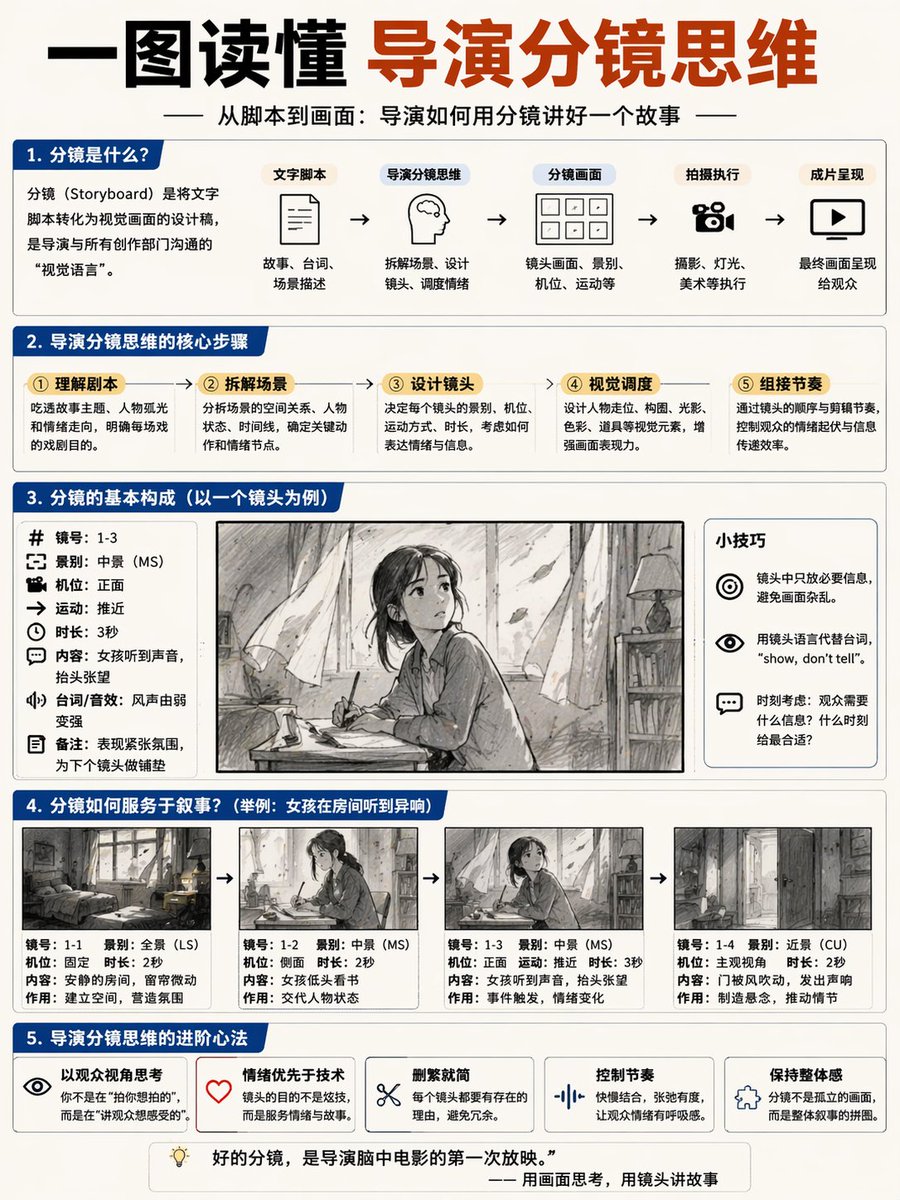
Director Storyboard Infographic — AI Prompt for Educational Poster
Creates a detailed 5-part educational poster explaining the director's storyboard process, complete with flowcharts, breakdowns, and a visual example.
提示词 · EN
type
educational infographic posterheader
title
{argument name="main title" default="一图读懂 导演分镜思维"}subtitle
{argument name="subtitle" default="从脚本到画面:导演如何用分镜讲好一个故事"}layout
sections
item 1
title
1. 分镜是什么?components
item 1
definition text boxitem 2
type
flowchartcount
5labels
item 1
文字脚本item 2
导演分镜思维item 3
分镜画面item 4
拍摄执行item 5
成片呈现item 2
title
2. 导演分镜思维的核心步骤count
5labels
item 1
① 理解剧本item 2
② 拆解场景item 3
③ 设计镜头item 4
④ 视觉调度item 5
⑤ 组接节奏item 3
title
3. 分镜的基本构成(以一个镜头为例)columns
item 1
position
leftcount
8labels
item 1
镜号item 2
景别item 3
机位item 4
运动item 5
时长item 6
内容item 7
台词/音效item 8
备注item 2
position
centerimage
{argument name="character subject" default="anime girl reading in a room"}item 3
position
righttitle
小技巧count
3description
icon bullet pointsitem 4
title
4. 分镜如何服务于叙事?subtitle
{argument name="example scenario" default="举例:女孩在房间听到异响"}count
4panels
item 1
wide shot roomitem 2
medium shot girl readingitem 3
medium shot girl looking upitem 4
close up door openingcaption_labels
item 1
镜号item 2
景别item 3
机位item 4
时长item 5
内容item 6
作用item 5
title
5. 导演分镜思维的进阶心法count
5labels
item 1
以观众视角思考item 2
情绪优先于技术item 3
删繁就简item 4
控制节奏item 5
保持整体感footer
{argument name="footer quote" default="好的分镜,是导演脑中电影的第一次放映。"}style
clean corporate infographic, blue and white palette, structured grid关于这个提示词
Creates a detailed 5-part educational poster explaining the director's storyboard process, complete with flowcharts, breakdowns, and a visual example. 它更适合作为 GPT Image 2 的概念艺术起点:先保留画面结构、主体关系和风格约束,再替换成你的品牌、人物或场景。
这条提示词使用结构化 JSON 组织信息,包含 type、header、layout、style 等字段。保留这种层级能让模型更清楚地区分画面主题、布局、界面元素和细节约束。
使用时建议先小幅修改主体、场景、镜头和色调,再生成多个版本对比构图与细节。这样页面内容对用户有实际帮助,也避免把模型名或标签机械堆在正文里。
如何使用这个提示词
- Copy the entire prompt JSON object.
- Choose an AI image generator that supports complex JSON prompts (e.g., Sora 2).
- Customize the default Chinese text and character scene by editing the
{argument}variables in the prompt. - Submit the prompt to generate a clean, corporate-style infographic in blue and white.
- Use the output for film education, presentations, or creative planning.


