
GPT Image 2AI 提示词
AI Product Launch Infographic — 3D Isometric Sora 2 Prompt
Creates a stunning long vertical tech product announcement poster with 3D illustrations, feature grids, and side-by-side model comparisons.
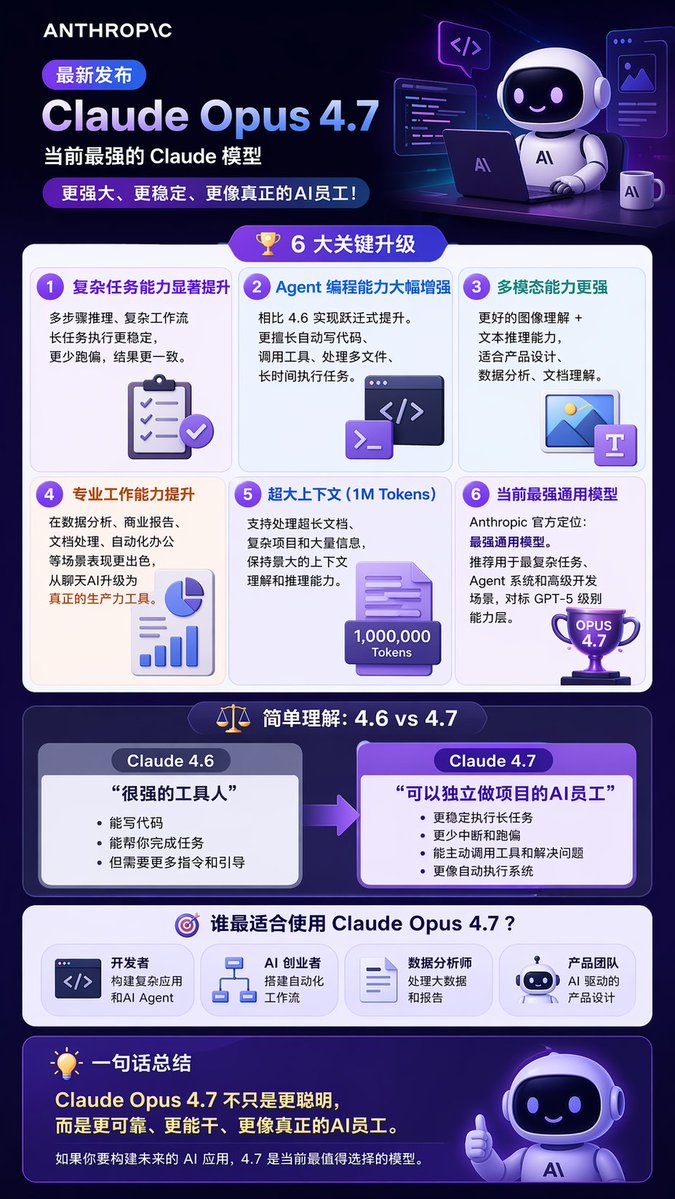
提示词 · EN
type
long vertical infographic posterstyle
modern tech, 3D isometric illustrations, dark purple and blue color palette, glassmorphism UI elementsheader
logo
{argument name="company logo" default="ANTHROPIC"}badge
最新发布title
{argument name="product name" default="Claude Opus 4.7"}subtitle
{argument name="main subtitle" default="当前最强的 Claude 模型"}tagline
更强大、更稳定、更像真正的AI员工!illustration
3D cute robot sitting at a desk with a laptop, coffee mug, and floating code windowslayout
sections
item 1
title
6 大关键升级icon
3D gold trophylayout
2x3 gridcount
6items
item 1
title
复杂任务能力显著提升icon
3D clipboard with checkmarksitem 2
title
Agent 编程能力大幅增强icon
3D code terminal windowitem 3
title
多模态能力更强icon
3D image and text documentitem 4
title
专业工作能力提升icon
3D pie chart and bar graphitem 5
title
超大上下文 (1M Tokens)icon
3D document with 1,000,000 Tokens textitem 6
title
当前最强通用模型icon
3D purple trophy with OPUS 4.7 textitem 2
title
简单理解:4.6 vs 4.7icon
3D balance scalelayout
side-by-side comparison with right-pointing arrowcount
2columns
item 1
header
{argument name="comparison version 1" default="Claude 4.6"}quote
很强的工具人style
grey boxitem 2
header
{argument name="comparison version 2" default="Claude 4.7"}quote
可以独立做项目的AI员工style
purple box, highlighteditem 3
title
谁最适合使用 Claude Opus 4.7?icon
3D targetlayout
horizontal rowcount
4labels
item 1
开发者item 2
AI 创业者item 3
数据分析师item 4
产品团队footer
title
一句话总结icon
3D lightbulbmain_text
Claude Opus 4.7 不只是更聪明,而是更可靠、更能干、更像真正的AI员工。sub_text
如果你要构建未来的 AI 应用,4.7 是当前最值得选择的模型。illustration
3D cute robot giving a thumbs up关于这个提示词
Creates a stunning long vertical tech product announcement poster with 3D illustrations, feature grids, and side-by-side model comparisons. 它更适合作为 GPT Image 2 的概念艺术起点:先保留画面结构、主体关系和风格约束,再替换成你的品牌、人物或场景。
这条提示词使用结构化 JSON 组织信息,包含 type、style、header、layout 等字段。保留这种层级能让模型更清楚地区分画面主题、布局、界面元素和细节约束。
使用时建议先小幅修改主体、场景、镜头和色调,再生成多个版本对比构图与细节。这样页面内容对用户有实际帮助,也避免把模型名或标签机械堆在正文里。
如何使用这个提示词
- Copy the full prompt JSON and paste it into your chosen AI model (e.g., Sora 2, DALL·E 3, or Midjourney).
- Replace the default variable values (like
ANTHROPIC,Claude Opus 4.7) with your own product or brand details. - Adjust the style keywords or color palette in the
stylefield if you prefer a different aesthetic. - Submit the prompt and wait for the AI to generate the complete infographic image.
- Download, review, and make minor edits or re-generate if needed.


