
GPT Image 2AI 提示词
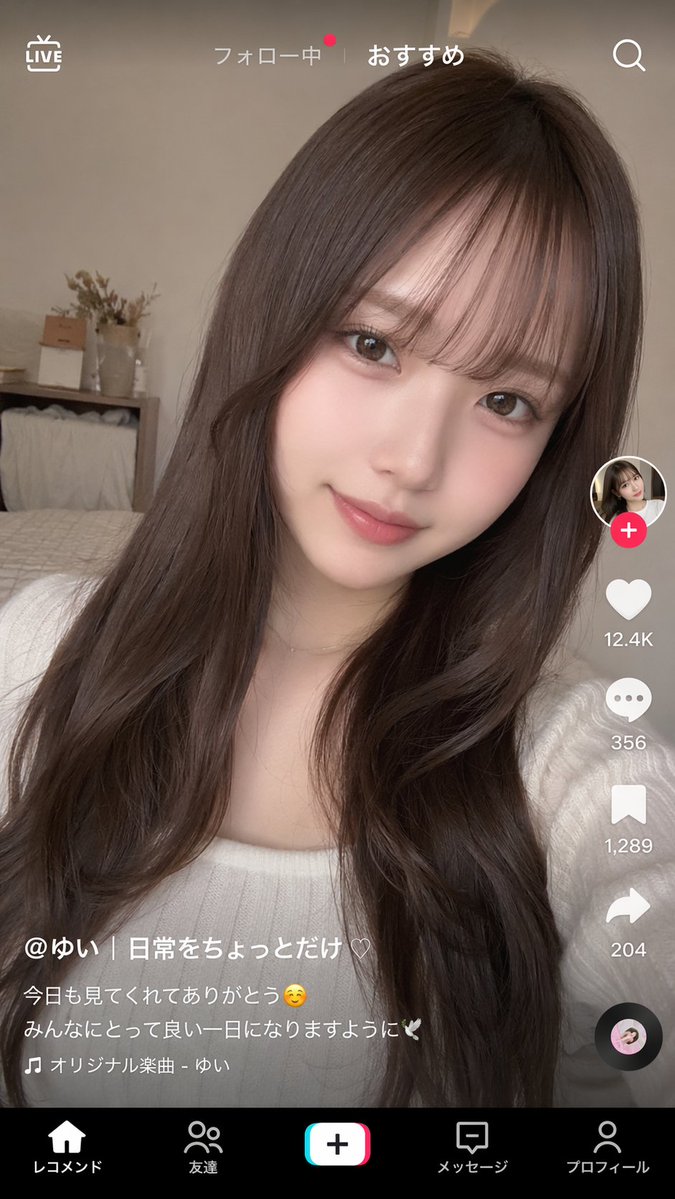
TikTok-Style Video UI Overlay — Sora 2 Prompt
Generate a realistic short-video app interface overlaid on any portrait photo, complete with TikTok-style UI elements and customizable captions.
提示词 · EN
type
短视频应用界面模型background_image
subject
{argument name="subject description" default="留着长波浪深棕色头发、留着空气刘海的年轻日本女性,身穿白色罗纹上衣,化着柔和的自然妆容,对着镜头温柔微笑"}setting
温馨的卧室,背景有床、木质搁板和干花,柔和的自然光,自拍视角ui_overlay
top_bar
left
LIVE 图标center
关注 | {argument name="active tab" default="推荐"}right
搜索图标right_sidebar
count
6elements
item 1
带有粉色加号徽章的头像item 2
带有 {argument name="like count" default="12.4K"} 的心形图标item 3
带有 356 的气泡图标item 4
带有 1,289 的书签图标item 5
带有 204 的分享箭头图标item 6
旋转的黑胶唱片图标bottom_left_caption
username
{argument name="username" default="@ゆい | 日常をちょっとだけ♡"}description
{argument name="caption text" default="感谢大家今天的观看☺️ 祝大家度过美好的一天🕊️"}audio_track
🎵 原创音乐 - ゆいbottom_navigation
count
5labels
item 1
推荐item 2
朋友item 3
创作按钮item 4
消息item 5
个人资料关于这个提示词
Generate a realistic short-video app interface overlaid on any portrait photo, complete with TikTok-style UI elements and customizable captions. 它更适合作为 GPT Image 2 的概念艺术起点:先保留画面结构、主体关系和风格约束,再替换成你的品牌、人物或场景。
这条提示词使用结构化 JSON 组织信息,包含 type、background image、ui overlay 等字段。保留这种层级能让模型更清楚地区分画面主题、布局、界面元素和细节约束。
使用时建议先小幅修改主体、场景、镜头和色调,再生成多个版本对比构图与细节。这样页面内容对用户有实际帮助,也避免把模型名或标签机械堆在正文里。
如何使用这个提示词
- Copy the entire prompt into your AI model (e.g., Sora, DALL·E 3, or a compatible text-to-image tool).
- Customize the background subject by modifying the
subject descriptionargument—use any portrait idea you like. - Tweak the UI variables such as
username,like count,caption text, andactive tabto fit your brand or project. - Generate the image; the model will composite the interface over the background automatically.
- Download and use the mockup for presentations, social media, or design iterations.


