
GPT Image 2AI 提示词
Visa App UI Before-After — Sora 2 Prompt
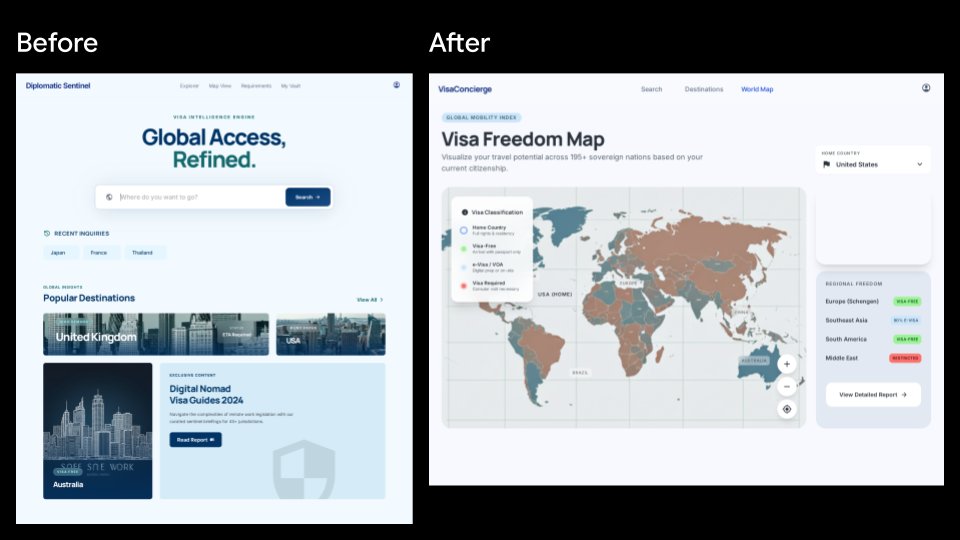
Generate a sleek SaaS-style comparison showing an old visa landing page redesigned into an interactive global mobility dashboard.
提示词 · EN
type
并排产品 UI 对比模型canvas
aspect_ratio
16:9 宽屏background
纯黑色style
简洁的 SaaS 展示幻灯片,清晰的矢量 UI,高保真 Web 应用截图layout
sections
item 1
title
改版前position
左侧count
1description
一个淡蓝色的旅行签证智能落地页,置于白色浏览器框架内,上方用白色大字标注“改版前”。item 2
title
改版后position
右侧count
1description
一个重新设计的签证自由度地图仪表盘,置于白色浏览器框架内,上方用白色大字标注“改版后”。comparison_count
2left_before_screen
brand
Diplomatic Sentinelnavigation_count
4navigation_labels
item 1
探索item 2
签证视图item 3
要求item 4
我的保险库main_badge
签证智能引擎headline
{argument name="before headline text" default="全球通行,精益求精。"}search_bar
placeholder
你想去哪里?button
搜索recent_inquiries_count
3recent_inquiries
item 1
日本item 2
法国item 3
泰国popular_destinations_count
3popular_destinations
item 1
英国item 2
美国item 3
澳大利亚feature_card
title
2024 年数字游民签证指南button
阅读报告visual
极简盾牌水印和淡蓝色编辑卡片visual_style
柔和阴影,圆角卡片,淡蓝色背景,海军蓝与青色排版,旅行目的地照片缩略图right_after_screen
brand
VisaConciergenavigation_count
3navigation_labels
item 1
搜索item 2
目的地item 3
世界地图main_badge
全球流动性指数headline
{argument name="after headline text" default="签证自由度地图"}subheading
根据您当前的国籍,可视化您在 195 个以上主权国家的旅行潜力。map_panel
description
仪表盘中央的大型交互式世界地图,采用柔和的青色、棕褐色、灰色和红色进行国家分类legend_count
4legend_labels
item 1
母国item 2
免签item 3
电子签 / 落地签item 4
需签证map_controls_count
3map_controls
item 1
放大item 2
缩小item 3
定位目标right_sidebar
cards_count
2cards
item 1
title
母国selected_value
{argument name="home country" default="美国"}item 2
title
区域自由度regions_count
4regions
item 1
欧洲(申根区)— 免签item 2
东南亚 — 免签item 3
南美洲 — 免签item 4
中东 — 受限button
查看详细报告visual_style
现代分析仪表盘,圆角白色卡片,柔和灰色背景,细微阴影,紧凑的无衬线字体overall_direction
生成一张精美的旅行签证 Web 产品改版前后对比幻灯片。左侧屏幕应呈现为通用的目的地搜索落地页,而右侧屏幕应看起来更实用且数据丰富,重点突出交互式全球签证自由度地图和侧边栏洞察。关于这个提示词
Generate a sleek SaaS-style comparison showing an old visa landing page redesigned into an interactive global mobility dashboard. 它更适合作为 GPT Image 2 的概念艺术起点:先保留画面结构、主体关系和风格约束,再替换成你的品牌、人物或场景。
这条提示词使用结构化 JSON 组织信息,包含 type、canvas、layout、left before screen、right after screen、overall direction 等字段。保留这种层级能让模型更清楚地区分画面主题、布局、界面元素和细节约束。
使用时建议先小幅修改主体、场景、镜头和色调,再生成多个版本对比构图与细节。这样页面内容对用户有实际帮助,也避免把模型名或标签机械堆在正文里。
如何使用这个提示词
- Copy the full prompt into your Sora 2 or compatible image generator.
- Choose a 16:9 widescreen setting for best results.
- Customize variables like
before headline text,after headline text, andhome countryto match your needs. - Generate and review — iterate by adjusting layout or color details if desired.


