
GPT Image 2AI 提示词
Aviation UI/UX Prompt — Dark Mode Flight Interface
Generate a sleek, dark mode aviation UI kit with glass textures, flight data panels, and glowing trajectories. Ideal for futuristic interface concepts.
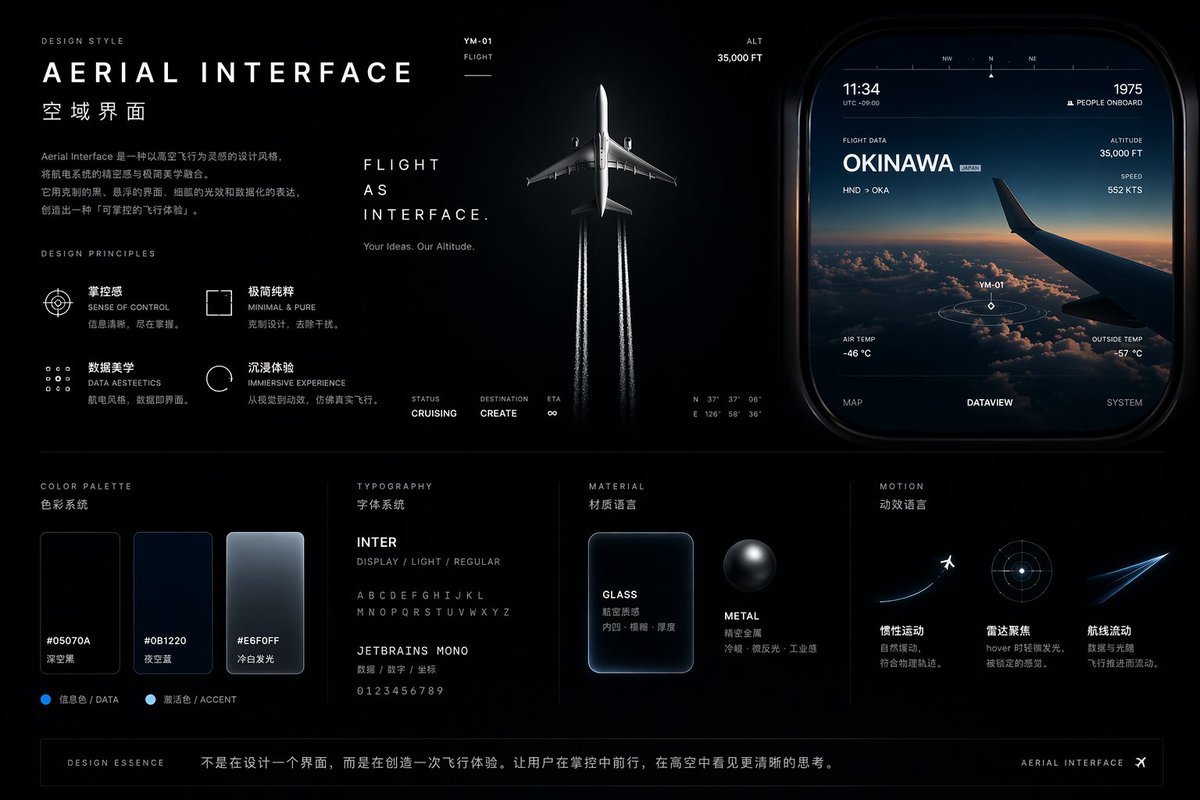
提示词 · EN
type
UI/UX 设计系统概念项目theme
航空与飞行界面overall_style
深色模式,时尚,现代,技术感,未来感,玻璃拟态layout
top_left
section
设计风格title
{argument name="main title" default="AERIAL INTERFACE"}subtitle
{argument name="subtitle" default="空域界面"}description
关于空域界面设计的介绍性段落principles
count
4labels
item 1
掌控感item 2
极简纯粹item 3
数据美学item 4
沉浸式体验top_center
imagery
商用飞机向上飞行的俯视图,在深色背景下留出两条白色尾迹text
item 1
飞行即界面。item 2
你的创意,我们的高度。metrics
item 1
状态:巡航中item 2
目的地:创作item 3
预计到达时间:∞top_right
section
UI 组件imagery
圆角矩形面板,展示日落时分云层上的飞机机翼data_points
item 1
11:34item 2
1975 人在机上item 3
飞行数据 {argument name="destination" default="冲绳"}item 4
高度 35,000 英尺item 5
速度 552 节tabs
count
3labels
item 1
地图item 2
数据视图item 3
系统bottom_left
section
配色方案swatches
count
3labels
item 1
#05070Aitem 2
#0B1220item 3
#E6F0FFbottom_mid_left
section
排版fonts
count
2labels
item 1
{argument name="primary font" default="INTER"}item 2
{argument name="secondary font" default="JETBRAINS MONO"}bottom_mid_right
section
材质examples
count
2labels
item 1
玻璃(磨砂矩形)item 2
金属(深色球体)bottom_right
section
动效concepts
count
3labels
item 1
飞机起飞item 2
雷达聚焦圆环item 3
发光的飞行轨迹footer
text
设计精髓:不仅是设计一个界面,更是创造一种飞行体验。关于这个提示词
Generate a sleek, dark mode aviation UI kit with glass textures, flight data panels, and glowing trajectories. Ideal for futuristic interface concepts. 它更适合作为 GPT Image 2 的概念艺术起点:先保留画面结构、主体关系和风格约束,再替换成你的品牌、人物或场景。
这条提示词使用结构化 JSON 组织信息,包含 type、theme、overall style、layout 等字段。保留这种层级能让模型更清楚地区分画面主题、布局、界面元素和细节约束。
使用时建议先小幅修改主体、场景、镜头和色调,再生成多个版本对比构图与细节。这样页面内容对用户有实际帮助,也避免把模型名或标签机械堆在正文里。
如何使用这个提示词
- Copy the prompt text from this page.
- Paste it into your preferred image generation AI (e.g., Midjourney, DALL·E 3, or Sora).
- Customize the variables in square brackets, such as destination or font, to fit your project.
- Generate the image and iterate by adjusting arguments or adding specific details.
- Use the resulting design as a foundation for your UI/UX project, refining it in design tools like Figma.


