
GPT Image 2AI 提示词
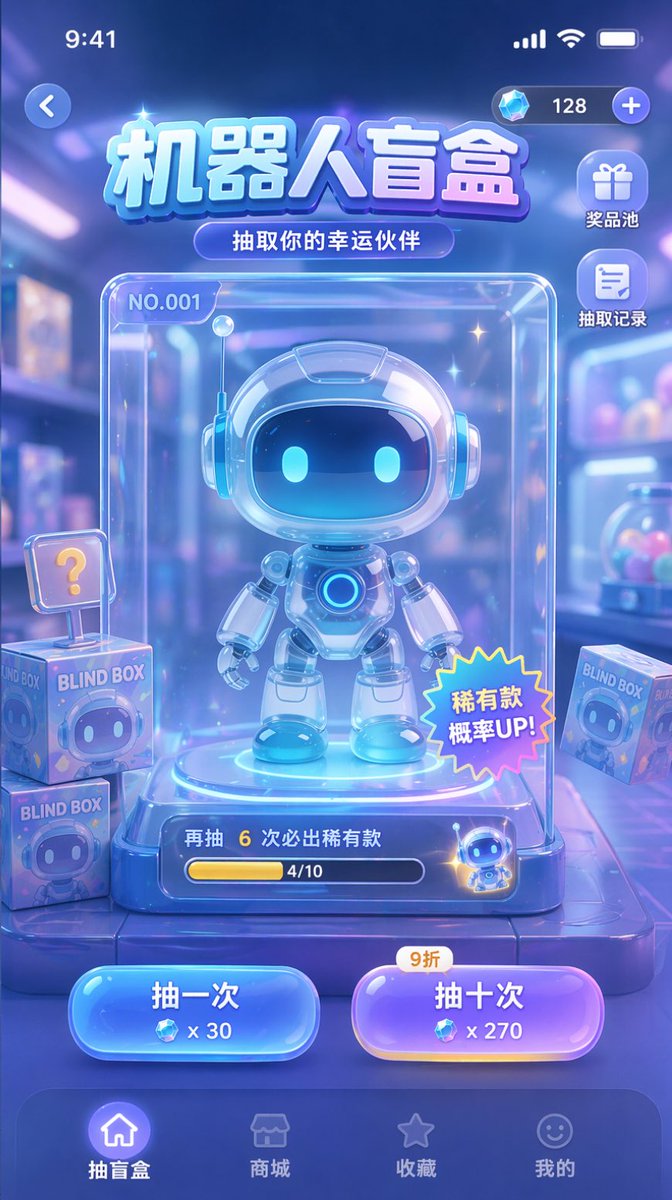
Sci-Fi Blind Box UI — Neon Glassmorphism Prompt for Sora 2
Craft a customizable sci-fi blind box UI with glassmorphism & neon colors, featuring a cute robot display. Ideal for app prototyping.
提示词 · EN
type
移动游戏 UI 原型theme
科幻、可爱、玻璃拟态、霓虹蓝与紫色配色方案header
status_bar
顶部标准 iOS 状态栏top_controls
左侧返回按钮,右侧显示带有钻石图标和“128”的货币栏title
{argument name="main title" default="机器人盲盒"}subtitle
{argument name="subtitle" default="抽取你的幸运伙伴"}layout
side_menu
position
货币栏下方右侧count
2items
item 1
icon
giftlabel
奖品池item 2
icon
documentlabel
抽取记录centerpiece
description
包含大奖的透明玻璃展示柜subject
{argument name="robot character description" default="可爱的 Q 版机器人,拥有发光的蓝色眼睛和白色光泽装甲"}case_details
item 1
左上角标注“NO.001”item 2
右下角带有“稀有款 概率 UP!”的星形贴纸item 3
底部进度条,文字显示“再抽 6 次必出稀有款”及“4/10”background_elements
description
模糊的玩具店背景floating_items
count
3description
带有机器人脸部图案、标注“BLIND BOX”的方形盒子,其中一个带有“?”标记action_buttons
position
底部导航栏上方的居中位置count
2buttons
item 1
color
bluetext
{argument name="left button text" default="抽一次"}cost
x 30item 2
color
purpletext
{argument name="right button text" default="抽十次"}cost
x 270tag
9 折bottom_navigation
count
4items
item 1
icon
homelabel
抽盲盒state
activeitem 2
icon
storelabel
商城item 3
icon
starlabel
收藏item 4
icon
smileylabel
我的关于这个提示词
Craft a customizable sci-fi blind box UI with glassmorphism & neon colors, featuring a cute robot display. Ideal for app prototyping. 它更适合作为 GPT Image 2 的概念艺术起点:先保留画面结构、主体关系和风格约束,再替换成你的品牌、人物或场景。
这条提示词使用结构化 JSON 组织信息,包含 type、theme、header、layout 等字段。保留这种层级能让模型更清楚地区分画面主题、布局、界面元素和细节约束。
使用时建议先小幅修改主体、场景、镜头和色调,再生成多个版本对比构图与细节。这样页面内容对用户有实际帮助,也避免把模型名或标签机械堆在正文里。
如何使用这个提示词
- Copy the prompt from Sora2Hub.com.
- Open your preferred AI design tool (e.g., Sora 2, Midjourney, DALL·E 3).
- Customize the variables in curly braces (like
main title,robot character description, button text) to match your project theme. - Paste the edited prompt into the AI and generate your UI prototype.
- Iterate on the result by adjusting the description for finer details.


