
GPT Image 2AI 提示词
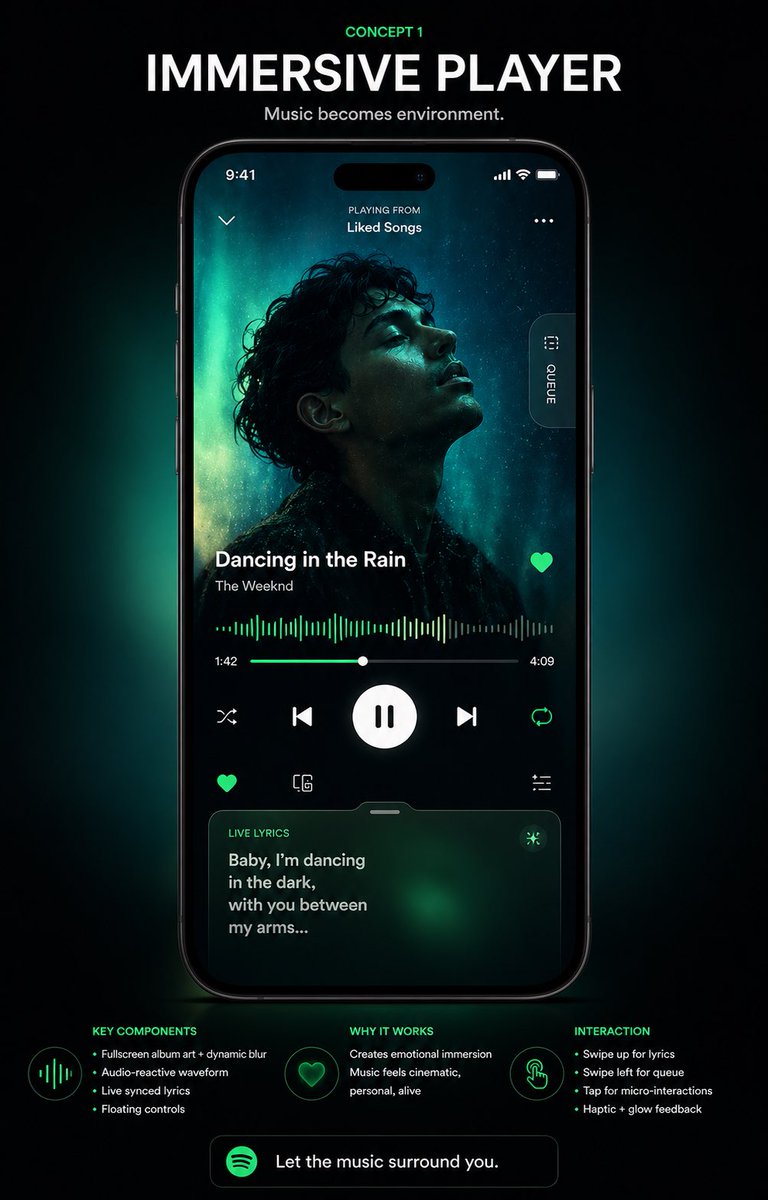
Neon Glow Music Player UI Concept — Sora 2 Prompt
Design a futuristic music player app poster with neon green glow, glassmorphism, and cinematic details — perfect for UI showcases.
提示词 · EN
type
音乐 App UI 概念海报style
高端未来感移动应用展示,深色模式,电影级产品演示,受 Spotify 启发的绿色霓虹光效,高对比度,时尚的玻璃拟态风格,精致的科技广告美学format
黑色背景下居中放置智能手机样机的竖版海报headline
kicker
概念 1title
沉浸式播放器subtitle
音乐即环境。device
type
现代黑色智能手机position
居中screen
app
沉浸式音乐播放器status_bar
time
9:41icons_count
3top_area
left_icon_count
1center_text_lines
2texts
item 1
正在播放item 2
我喜欢的音乐right_icon_count
1artwork
shape
大型全屏背景人像,叠加居中正方形专辑封面subject
在青色极光般灯光映衬下,卷发歌手的忧郁剪影人像dominant_colors
item 1
深黑item 2
青色item 3
翡翠绿item 4
青色光晕side_tab
count
1label
队列orientation
右侧边缘的垂直胶囊按钮track_info
song_title
{argument name="song title" default="Dancing in the Rain"}artist_name
{argument name="artist name" default="The Weeknd"}favorite_icon
trueplayback
waveform
横跨屏幕宽度的音频响应式霓虹绿波形图time_labels
item 1
1:42item 2
4:09progress_slider
truemain_controls
count
5items
item 1
随机播放item 2
上一首item 3
大型播放/暂停按钮item 4
下一首item 5
循环播放secondary_controls
count
4items
item 1
收藏item 2
设备或连接图标item 3
设置或滑块图标item 4
集成在歌词卡片上方的小型功能图标行lyrics_card
title
实时歌词text
{argument name="lyric text" default="Baby, I’m dancing in the dark, with you between my arms..."}style
带有绿色氛围光晕的圆角半透明卡片bottom_position
truelayout
sections
item 1
title
核心组件position
左下角count
4labels
item 1
全屏专辑封面 + 动态模糊item 2
音频响应式波形图item 3
实时同步歌词item 4
悬浮控制按钮item 2
title
设计亮点position
底部居中count
2labels
item 1
营造情感沉浸感item 2
音乐体验更具电影感、个性化且生动item 3
title
交互方式position
右下角count
4labels
item 1
上滑查看歌词item 2
左滑查看队列item 3
点击触发微交互item 4
触觉 + 光效反馈footer_cta
count
1text
{argument name="cta text" default="让音乐环绕你。"}icon
绿色圆形音乐 App 图标lighting
手机背后的柔和翡翠绿背光,微妙的暗角,发光的边缘,高端展厅质感color_palette
item 1
黑色item 2
炭灰色item 3
白色item 4
Spotify 绿item 5
翡翠绿item 6
青色quality
高端 UI 案例研究渲染图,清晰的排版,逼真的设备反射,简洁的间距,适合 Behance/Dribbble 展示的专业海报关于这个提示词
Design a futuristic music player app poster with neon green glow, glassmorphism, and cinematic details — perfect for UI showcases. 它更适合作为 GPT Image 2 的概念艺术起点:先保留画面结构、主体关系和风格约束,再替换成你的品牌、人物或场景。
这条提示词使用结构化 JSON 组织信息,包含 type、style、format、headline、device、layout、lighting 等字段。保留这种层级能让模型更清楚地区分画面主题、布局、界面元素和细节约束。
使用时建议先小幅修改主体、场景、镜头和色调,再生成多个版本对比构图与细节。这样页面内容对用户有实际帮助,也避免把模型名或标签机械堆在正文里。
如何使用这个提示词
- Copy the prompt body from this page.
- Open your preferred AI image generation tool (Sora, Midjourney, or DALL·E 3).
- Paste the prompt and customize the song title, artist name, and lyric text by replacing the {argument name} placeholders.
- Generate the image; adjust lighting or composition hints if needed.
- Download your high-end concept poster for use in app redesign presentations, portfolios, or social media.


