
GPT Image 2AI 提示词
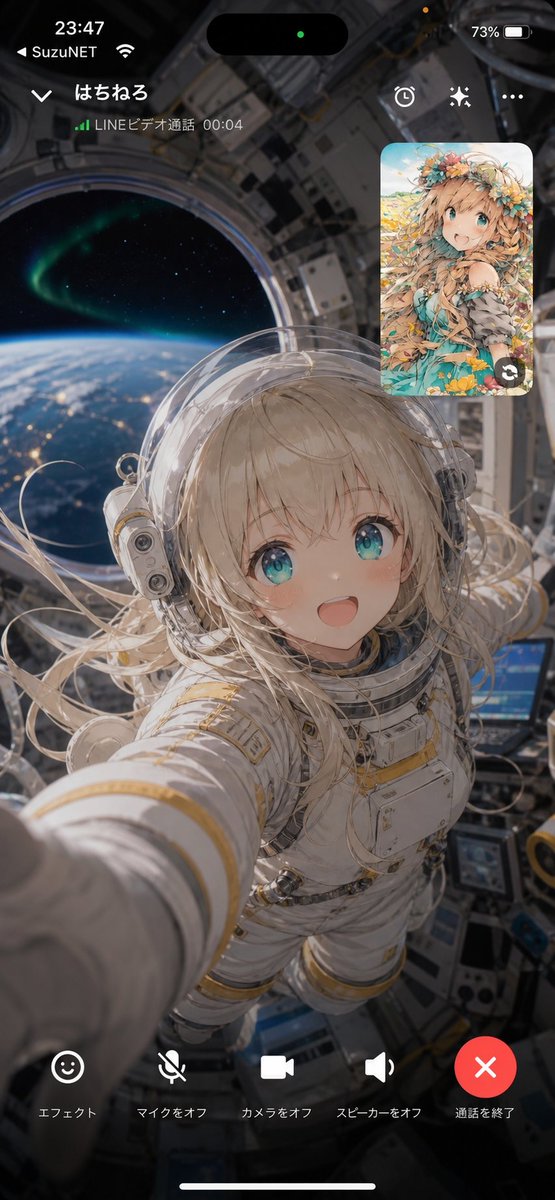
Orbit Video Call UI — Cinematic Sci-Fi Smartphone Mockup
Generate a vertical phone mockup of an astronaut on a space-station video call, complete with a realistic LINE-style interface, anime picture-in-picture, and a stunning Earth view.
提示词 · EN
type
竖屏智能手机视频通话截图样机aspect_ratio
9:16style
写实电影级科幻风格,叠加类似 iPhone 的通话界面scene
main_view
从空间站穹顶舱或轨道舱内部拍摄的第一人称自拍视角,展示一名年轻女性宇航员,身穿带有金色饰边的厚重白色 EVA 风格宇航服,佩戴透明气泡头盔,铂金色长发在微重力下漂浮,手臂向镜头伸出,仿佛正在手持手机;面部被一个纯色不透明矩形隐私遮挡块故意遮盖background
身后是巨大的圆形航天器舷窗,窗外可见地球弯曲的地平线、蓝色大气层、城市灯光、繁星以及绿色极光;画面周围环绕着精细的金属空间站内壁面板、电缆、屏幕和设备mood
梦幻、亲密、未来感,仿佛正在接收来自轨道的视频通话call_interface
top_status_bar
count
4items
item 1
左上角显示时间 23:47item 2
运营商文本 {argument name="carrier name" default="SuzuNET"} 及 Wi-Fi 图标item 3
顶部居中黑色灵动岛,带有一个绿色小隐私点item 4
右上角显示电量 73%caller_header
count
5items
item 1
左上角向下箭头item 2
通话者名称 {argument name="caller name" default="はちねる"}item 3
绿色信号条item 4
状态文本 {argument name="call status text" default="LINEビデオ通話 00:04"}item 5
右侧三个图标:计时器/时钟、闪光/特效、以及省略号菜单picture_in_picture
position
右上角description
圆角矩形小窗,显示另一位参会者,为明亮的动漫插画风格,角色拥有绿松石色双眼、沙金色长发、花环以及花卉奇幻风格连衣裙,背景为蓝天草地count
1overlay
小窗右下角带有圆形切换摄像头箭头图标bottom_controls
count
5labels
item 1
エフェクトitem 2
マイクをオフitem 3
カメラをオフitem 4
スピーカーをオフitem 5
通話を終了icons
item 1
笑脸特效按钮item 2
静音麦克风图标item 3
视频摄像头图标item 4
扬声器图标item 5
带有白色 X 的大型红色圆形挂断按钮layout
均匀分布在底部,位于 iPhone 主屏幕指示条上方composition
宇航员占据画面中心和下半部分,伸出的手臂在左下方营造出强烈的深度感,地球舷窗锚定左上方,动漫参会者卡片浮于右上角,所有 UI 文字在半透明深色遮罩上清晰可见parameters
astronaut hair color
{argument name="astronaut hair color" default="platinum blonde"}anime participant style
{argument name="anime participant style" default="flower-crowned fantasy girl"}关于这个提示词
Generate a vertical phone mockup of an astronaut on a space-station video call, complete with a realistic LINE-style interface, anime picture-in-picture, and a stunning Earth view. 它更适合作为 GPT Image 2 的概念艺术起点:先保留画面结构、主体关系和风格约束,再替换成你的品牌、人物或场景。
这条提示词使用结构化 JSON 组织信息,包含 type、aspect ratio、style、scene、call interface、composition、parameters 等字段。保留这种层级能让模型更清楚地区分画面主题、布局、界面元素和细节约束。
使用时建议先小幅修改主体、场景、镜头和色调,再生成多个版本对比构图与细节。这样页面内容对用户有实际帮助,也避免把模型名或标签机械堆在正文里。
如何使用这个提示词
- Copy the full prompt JSON and paste it into Sora 2 (or another compatible AI video/image model).
- Choose an output resolution that respects the 9:16 vertical aspect ratio.
- Swap in your own variables—caller name, carrier name, astronaut hair color, or anime participant style—to personalize the scene.
- Generate and review; adjust the call status text or background mood if needed, then re-run until satisfied.


