
GPT Image 2AI 提示词
Sporty Live Stream Shopping UI Design Prompt
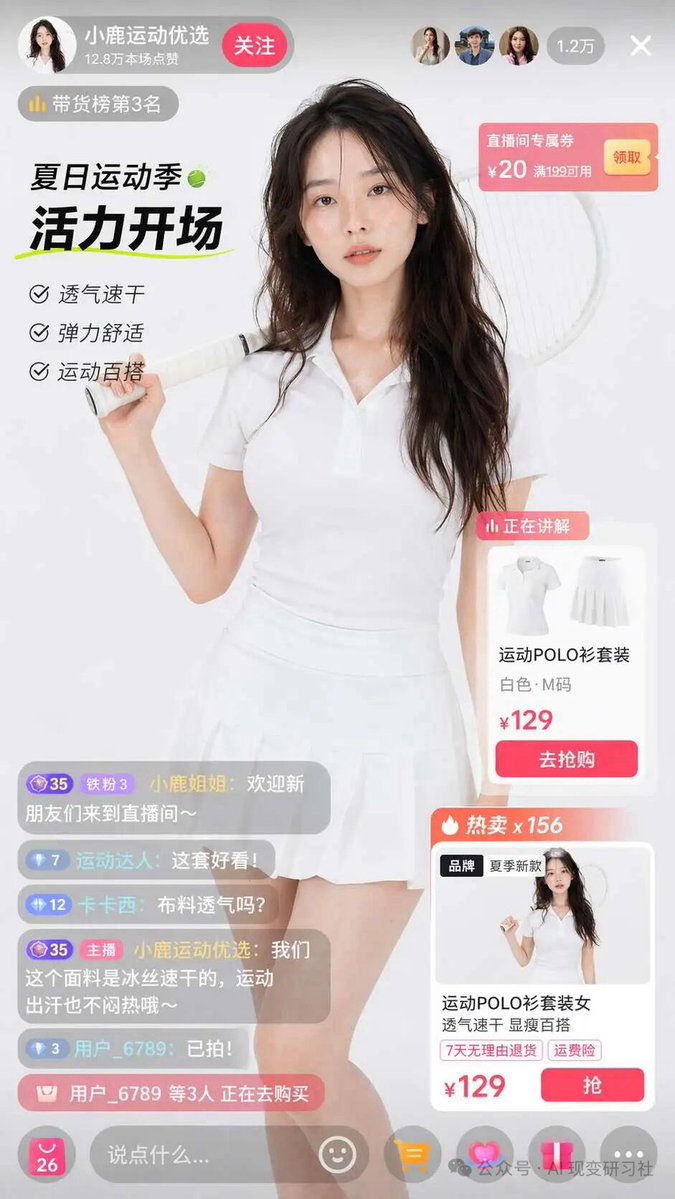
Generate a vibrant mobile live shopping interface with a sporty model, interactive product cards, coupons, and a lively chat overlay — perfect for e-commerce concepts.
提示词 · EN
type
电商直播界面设计稿subject
description
年轻亚裔女性,留着波浪长卷发,身穿白色短袖 Polo 衫和白色百褶网球裙,右肩扛着一支白色网球拍,面带柔和表情直视镜头background
柔和的浅灰色摄影棚背景layout
header
left
avatar
女性头像name
{argument name="host name" default="小鹿运动优选"}stats
12.8 万本场点赞button
关注badge
带货榜第 3 名right
viewer_avatars_count
3viewer_count
1.2 万close_icon
Xfloating_elements
item 1
position
右上角type
优惠券卡片title
直播间专属券details
¥20 满 199 可用button
领取item 2
position
中左侧type
活动文案subtitle
夏日运动季headline
{argument name="main headline" default="活力开场"}bullet_points_count
3bullet_points
item 1
透气速干item 2
弹力舒适item 3
运动百搭item 3
position
中右侧type
当前讲解商品卡片badge
正在讲解image
白色 Polo 衫和裙子平铺图title
{argument name="product name" default="运动 POLO 衫套装"}details
白色·M 码price
{argument name="price" default="¥129"}button
去抢购item 4
position
右下角type
次要商品卡片badge
热卖 x 156image
模特穿着该套装title
运动 POLO 衫套装女 透气速干 显瘦百搭tags
item 1
7 天无理由退货item 2
运费险price
¥129button
抢chat_overlay
position
左下角message_count
5messages
item 1
小鹿姐姐: 欢迎新朋友们来到直播间~item 2
运动达人: {argument name="chat message" default="这套好看!"}item 3
卡卡西: 布料透气吗?item 4
小鹿运动优选: 我们这个面料是冰丝速干的,运动出汗也不闷热哦~item 5
用户_6789: 已拍!purchase_alert
用户_6789 等 3 人 正在去购买footer
input_bar
说点什么...icons_count
5icons
item 1
smileitem 2
shopping cartitem 3
heartitem 4
shareitem 5
more关于这个提示词
Generate a vibrant mobile live shopping interface with a sporty model, interactive product cards, coupons, and a lively chat overlay — perfect for e-commerce concepts. 它更适合作为 GPT Image 2 的概念艺术起点:先保留画面结构、主体关系和风格约束,再替换成你的品牌、人物或场景。
这条提示词使用结构化 JSON 组织信息,包含 type、subject、layout 等字段。保留这种层级能让模型更清楚地区分画面主题、布局、界面元素和细节约束。
使用时建议先小幅修改主体、场景、镜头和色调,再生成多个版本对比构图与细节。这样页面内容对用户有实际帮助,也避免把模型名或标签机械堆在正文里。
如何使用这个提示词
- Copy the prompt text from the page.
- Open your AI image generator (e.g., Sora, Midjourney, DALL·E 3).
- Paste the prompt and customize variables like host name, product, price, and chat messages.
- Generate the image. If needed, adjust the background or model description for your brand.
- Use the output as a UI mockup for presentations or further design.


