GPT Image 2AI 提示词
Neumorphic Mobile Dashboard UI — Sora 2 Prompt
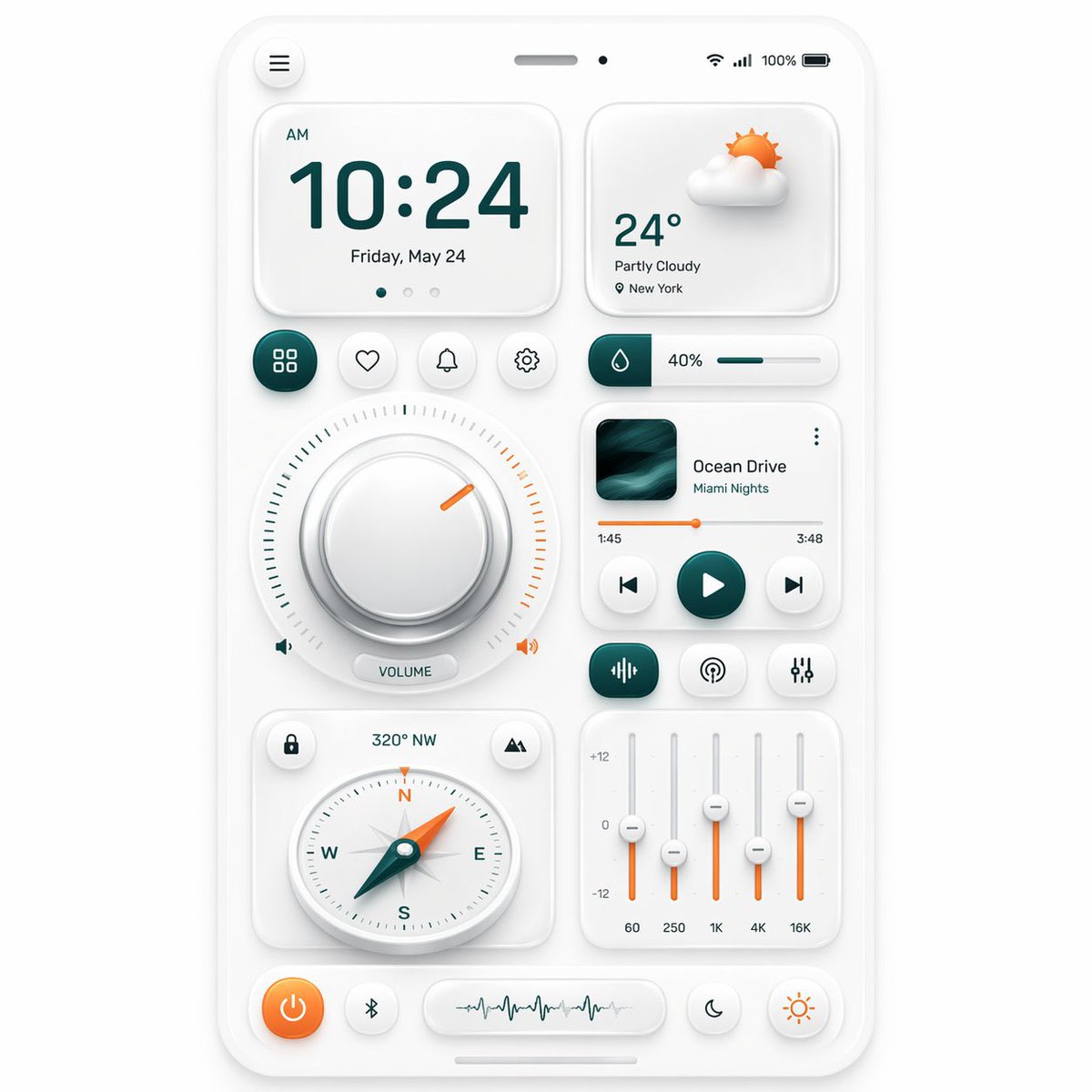
Generate a stunning smartphone control dashboard with soft neumorphic widgets, perfect for UI concept art, design inspiration, and app prototyping.
提示词 · EN
type
新拟态移动端仪表盘 UI 展示style
theme
简洁柔和的新拟态background
浅暖灰色primary color
深青色accent color
橙色material
哑光白色塑料卡片,带有细腻的内外阴影、圆角及柔和高光rendering
高分辨率精美 3D UI 原型,正视图,居中构图device
kind
智能手机屏幕原型frame
纤薄白色圆角边框status bar
count
5items
item 1
左上角汉堡菜单按钮item 2
顶部中央扬声器槽item 3
小型前置摄像头点item 4
右上角无线信号图标item 5
100% 电量指示器layout
sections
item 1
title
时钟卡片position
左上count
4labels
item 1
上午item 2
10:24item 3
5 月 24 日,星期五item 4
3 个页面指示点item 2
title
天气卡片position
右上count
4labels
item 1
多云 3D 太阳与云朵图标item 2
24°item 3
局部多云item 4
纽约item 3
title
快捷按钮行position
中上左count
4labels
item 1
网格/应用item 2
心形/收藏item 3
铃铛/通知item 4
设置item 4
title
湿度滑块position
中上右count
3labels
item 1
水滴图标块item 2
40%item 3
水平进度条item 5
title
音量旋钮模块position
中左count
5labels
item 1
大型圆形旋钮item 2
周围刻度item 3
橙色指示缺口item 4
左侧扬声器图标item 5
VOLUME 胶囊标签及右侧扬声器图标item 6
title
音乐播放器卡片position
中右count
8labels
item 1
专辑封面item 2
Ocean Driveitem 3
Miami Nightsitem 4
三点菜单item 5
1:45item 6
3:48item 7
橙色进度条item 8
上一曲/播放/下一曲控制item 7
title
音频控制行position
音乐播放器下方count
3labels
item 1
均衡器/波形图标按钮item 2
广播/播客图标按钮item 3
滑块/设置图标按钮item 8
title
指南针卡片position
左下count
5labels
item 1
锁定图标按钮item 2
320° NWitem 3
山脉/位置图标按钮item 4
圆形指南针表盘(标有 N E S W)item 5
带有橙色尖端的青色指针item 9
title
均衡器卡片position
右下count
8labels
item 1
+12item 2
0item 3
-12item 4
60item 5
250item 6
1Kitem 7
4Kitem 8
16Kitem 10
title
底部停靠栏position
底部count
4labels
item 1
橙色电源按钮item 2
蓝牙按钮item 3
波形显示胶囊item 4
两个圆形模式按钮:月亮与太阳centerpiece
在智能手机仪表盘上均衡排列的新拟态小组件网格composition
spacing
均匀的边距与充裕的留白perspective
正视shadow behavior
极柔和的环境阴影,呈现触感浮雕效果iconography
带有青色与橙色高光的极简线条图标关于这个提示词
Generate a stunning smartphone control dashboard with soft neumorphic widgets, perfect for UI concept art, design inspiration, and app prototyping. 它更适合作为 GPT Image 2 的概念艺术起点:先保留画面结构、主体关系和风格约束,再替换成你的品牌、人物或场景。
这条提示词使用结构化 JSON 组织信息,包含 type、style、device、layout、composition 等字段。保留这种层级能让模型更清楚地区分画面主题、布局、界面元素和细节约束。
使用时建议先小幅修改主体、场景、镜头和色调,再生成多个版本对比构图与细节。这样页面内容对用户有实际帮助,也避免把模型名或标签机械堆在正文里。
如何使用这个提示词
- Copy the full prompt body below.
- Choose a high-resolution image or video model (e.g., Sora 2, Midjourney, or DALL·E 3).
- Tweak variables like color palette, widget labels, or device frame to match your brand.
- Generate the image or video.
- Use the output for UI mockups, client pitches, or social media showcases.