
GPT Image 2AI 提示词
Iridescent UI Design System Prompt — Sora 2
Generate a complete light-mode UI design system with iridescent gradients, futuristic components, and responsive mockups for optical science and prism-themed projects.
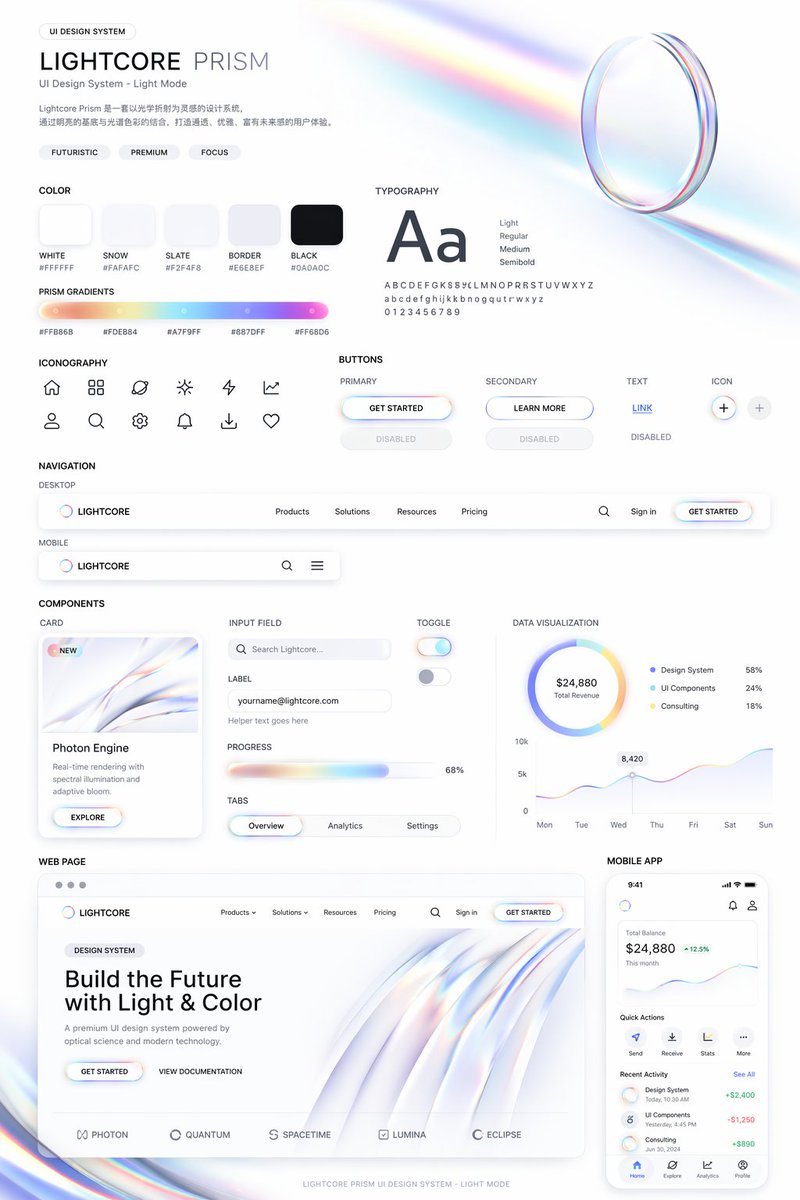
提示词 · EN
type
UI 设计系统演示项目theme
{argument name="visual theme" default="光学科学与光折射"}overall_aesthetic
干净的白色背景,浅色模式,未来感,高级感,特色在于 {argument name="primary gradient colors" default="虹彩、柔和橙色、黄色、青色、紫色、粉色"} 点缀header
title
{argument name="system name" default="LIGHTCORE PRISM"}subtitle
UI 设计系统 - 浅色模式tags
item 1
未来感item 2
高级感item 3
专注hero_graphic
折射虹彩光线的 3D 透明玻璃环layout
sections
item 1
title
色彩count
5labels
item 1
白色 #FFFFFFitem 2
雪色 #FAFAFCitem 3
板岩色 #F2F4F8item 4
边框色 #E6E8EFitem 5
黑色 #0A0A0Cdescription
5 个圆角方形的纯色色块item 2
title
棱镜渐变count
1description
1 条长水平渐变条,下方附有 5 个十六进制颜色代码item 3
title
排版description
大号 'Aa' 字体,列出 4 种字重(Light, Regular, Medium, Semibold)以及完整的字母表/数字item 4
title
图标count
12description
12 个极简线条风格图标,以 2x6 网格排列item 5
title
按钮count
8categories
item 1
主要item 2
次要item 3
文本item 4
图标description
总计 8 个按钮,展示每种分类的正常和禁用状态。主要按钮具有虹彩边框和 {argument name="primary button text" default="开始使用"} 文本。item 6
title
导航count
2variants
item 1
桌面端item 2
移动端description
桌面端导航包含 Logo、4 个文本链接、搜索、登录和一个按钮。移动端导航包含 Logo、搜索和汉堡菜单。item 7
title
组件count
6items
item 1
卡片:带有抽象虹彩图形和按钮的 'Photon Engine'item 2
输入框:带标签的搜索栏和电子邮件输入框item 3
进度条:68% 的虹彩进度条item 4
标签页:概览、分析、设置item 5
开关:2 个开关(开/关)item 6
数据可视化:1 个带 3 个图例项的环形图,1 个 7 天折线图item 8
title
网页description
桌面浏览器模型,包含标题 '{argument name="hero headline" default="用光与色彩构建未来"}'、2 个按钮、流动的 3D 虹彩波浪图形以及底部的 5 个合作伙伴 Logo。item 9
title
移动应用description
智能手机模型,显示 24,880 美元的余额、折线图、4 个快速操作图标、包含 3 个项目的近期活动列表以及带有 4 个图标的底部导航栏。关于这个提示词
Generate a complete light-mode UI design system with iridescent gradients, futuristic components, and responsive mockups for optical science and prism-themed projects. 它更适合作为 GPT Image 2 的概念艺术起点:先保留画面结构、主体关系和风格约束,再替换成你的品牌、人物或场景。
这条提示词使用结构化 JSON 组织信息,包含 type、theme、overall aesthetic、header、layout 等字段。保留这种层级能让模型更清楚地区分画面主题、布局、界面元素和细节约束。
使用时建议先小幅修改主体、场景、镜头和色调,再生成多个版本对比构图与细节。这样页面内容对用户有实际帮助,也避免把模型名或标签机械堆在正文里。
如何使用这个提示词
- Copy the prompt text.
- Paste into Sora 2 or any text-to-design AI model.
- Customize the input arguments (e.g., visual theme, gradient colors, button text) to match your brand.
- Generate the comprehensive UI design system.
- Export individual components for use in your design tool.


