
GPT Image 2AI 提示词
Livestream Screenshot: Sam Altman & OpenAI — Sora 2 Prompt
Generate a realistic livestream screenshot featuring Sam Altman, complete with chat, product card, and interactive UI — perfect for e-commerce and AI demos.
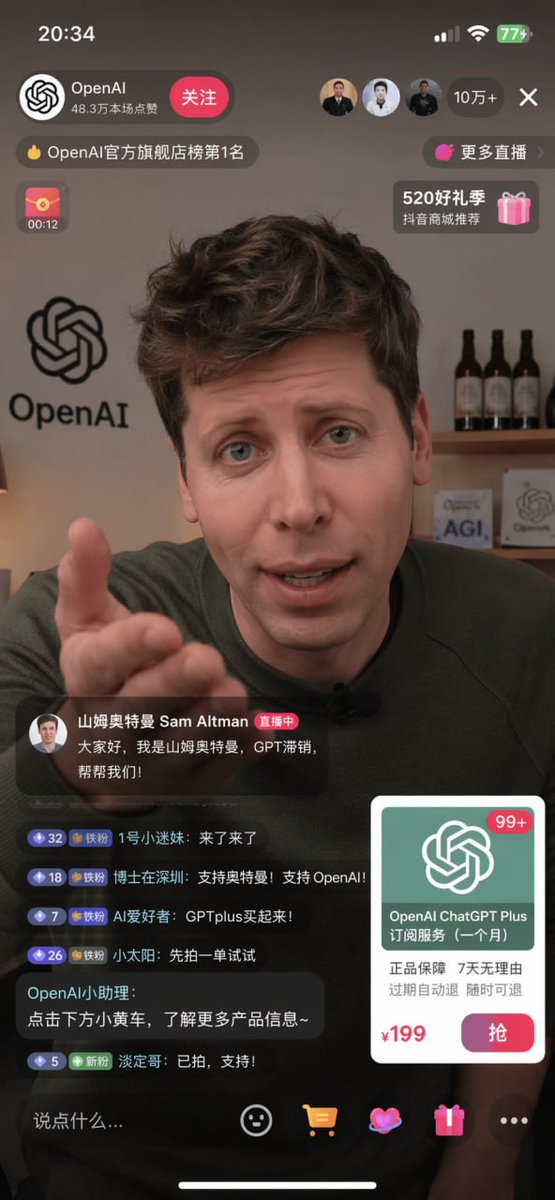
提示词 · EN
type
移动端直播截图subject
person
Sam Altmanaction
直视镜头,右手向前伸出做手势clothing
深绿色毛衣background
房间背景,架子上摆放着 3 瓶红酒,墙上有一个写着 'AGI' 的标志和 OpenAI 的 Logolayout
top_bar
time
20:34battery
77+streamer_info
name
{argument name="streamer name" default="OpenAI"}likes
48.3万本场点赞button
关注viewer_stats
viewers
10万+avatars_count
3banners
count
4labels
item 1
OpenAI 官方旗舰店榜第 1 名item 2
更多直播item 3
00:12item 4
520 好礼季host_label
name
{argument name="host name" default="山姆奥特曼 Sam Altman"}status
直播中subtitle
{argument name="host quote" default="大家好,我是山姆奥特曼,GPT 滞销,帮帮我们!"}chat_box
message_count
6messages
item 1
1 号小迷妹: 来了来了item 2
博士在深圳: 支持奥特曼!支持 OpenAI!item 3
AI 爱好者: GPT Plus 买起来!item 4
小太阳: 先拍一单试试item 5
OpenAI 小助理: 点击下方小黄车,了解更多产品信息~item 6
淡定哥: 已拍,支持!product_card
title
{argument name="product name" default="OpenAI ChatGPT Plus 订阅服务 (一个月)"}features
正品保障 7 天无理由 过期自动退 随时可退price
{argument name="product price" default="¥199"}button
抢bottom_bar
input_placeholder
说点什么...icons_count
4关于这个提示词
Generate a realistic livestream screenshot featuring Sam Altman, complete with chat, product card, and interactive UI — perfect for e-commerce and AI demos. 它更适合作为 GPT Image 2 的概念艺术起点:先保留画面结构、主体关系和风格约束,再替换成你的品牌、人物或场景。
这条提示词使用结构化 JSON 组织信息,包含 type、subject、background、layout 等字段。保留这种层级能让模型更清楚地区分画面主题、布局、界面元素和细节约束。
使用时建议先小幅修改主体、场景、镜头和色调,再生成多个版本对比构图与细节。这样页面内容对用户有实际帮助,也避免把模型名或标签机械堆在正文里。
如何使用这个提示词
- Copy the prompt from this page.
- Open your preferred AI image generator (Sora 2, DALL·E, etc.) and paste the prompt.
- Customize the template variables in curly braces (e.g.,
{argument name="streamer name" default="OpenAI"}) to match your brand. - Generate the image; try different seeds or aspect ratios if needed.
- Use the output as a UI mockup for e-commerce, social media, or presentations.


