
GPT Image 2AI 提示词
Live E-commerce UI Mockup with Custom Host & Chat — Sora 2 Prompt
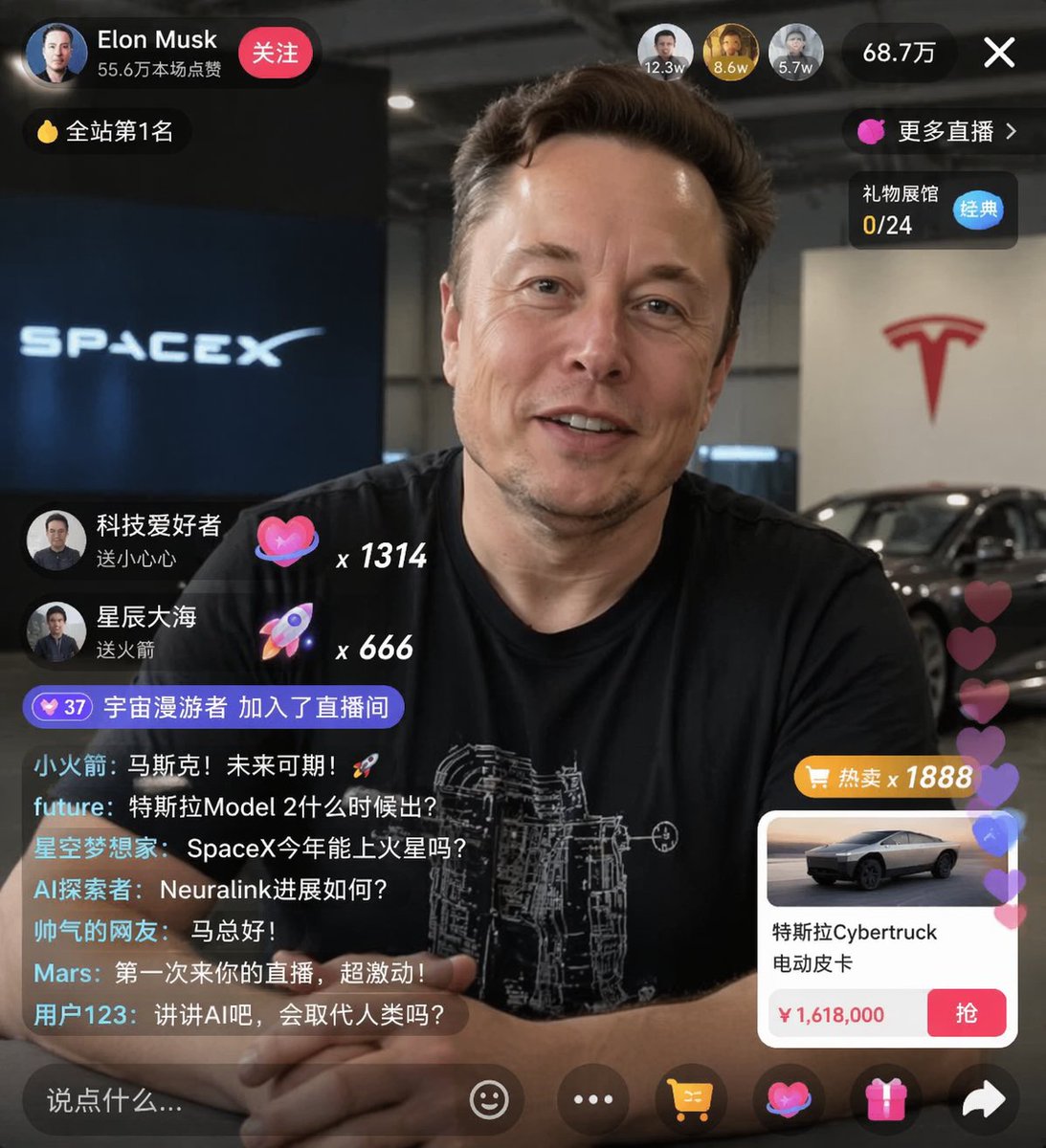
Generate a lifelike live streaming UI mockup over a portrait, with animated chat, gift notifications, viewer stats, and a product card—ideal for e-commerce concept designs.
提示词 · EN
type
直播 UI 样机subject
description
{argument name="host name" default="Elon Musk"} 的肖像,面带微笑,身穿印有白色技术示意图的黑色 T 恤background
左侧显示带有 '{argument name="left background logo" default="SPACEX"}' 文字的屏幕,右侧显示红色的 '{argument name="right background logo" default="Tesla T logo"}' 和一辆深色汽车ui_overlay
top_header
host_info
头像,名称 '{argument name="host name" default="Elon Musk"}',副标题 '55.6万本场点赞',红色 '关注' 按钮rank_badge
带有 '全站第1名' 的金币图标viewer_stats
3 个顶部观众头像,显示 '12.3w'、'8.6w'、'5.7w',总计 '68.7万','X' 关闭按钮right_links
'更多直播 >','礼物展馆 0/24'(带有蓝色 '经典' 标签)mid_left_gifts
count
2items
item 1
头像 '科技爱好者','送小心心',爱心图标 x 1314item 2
头像 '星辰大海','送火箭',火箭图标 x 666bottom_left_chat
system_message
37 级勋章 '宇宙漫游者 加入了直播间'message_count
7messages
item 1
小火箭: 马斯克!未来可期!🚀item 2
future: 特斯拉Model 2什么时候出?item 3
星空梦想家: SpaceX今年能上火星吗?item 4
AI探索者: Neuralink进展如何?item 5
帅气的网友: 马总好!item 6
Mars: 第一次来你的直播,超激动!item 7
用户123: 讲讲AI吧,会取代人类吗?bottom_right_product_card
hot_tag
橙色 '热卖 x 1888'image
Tesla Cybertrucktitle
{argument name="product name" default="特斯拉Cybertruck 电动皮卡"}price
{argument name="product price" default="¥ 1,618,000"}button
红色 '抢' 按钮floating_animation
半透明爱心沿右侧边缘向上浮动bottom_bar
input_field
'说点什么...'icons
item 1
笑脸item 2
三个点item 3
购物车item 4
礼物盒item 5
分享关于这个提示词
Generate a lifelike live streaming UI mockup over a portrait, with animated chat, gift notifications, viewer stats, and a product card—ideal for e-commerce concept designs. 它更适合作为 GPT Image 2 的概念艺术起点:先保留画面结构、主体关系和风格约束,再替换成你的品牌、人物或场景。
这条提示词使用结构化 JSON 组织信息,包含 type、subject、ui overlay 等字段。保留这种层级能让模型更清楚地区分画面主题、布局、界面元素和细节约束。
使用时建议先小幅修改主体、场景、镜头和色调,再生成多个版本对比构图与细节。这样页面内容对用户有实际帮助,也避免把模型名或标签机械堆在正文里。
如何使用这个提示词
- Copy the prompt from this page.
- Paste it into your AI image generator (e.g., Sora 2, DALL·E 3, or Midjourney).
- Adjust the
{argument}variables like host name, product, and price to match your brand. - Generate the image. For best results, use a high-quality portrait base.
- Iterate on UI elements by tweaking colors or text as needed.


