
GPT Image 2AI 提示词
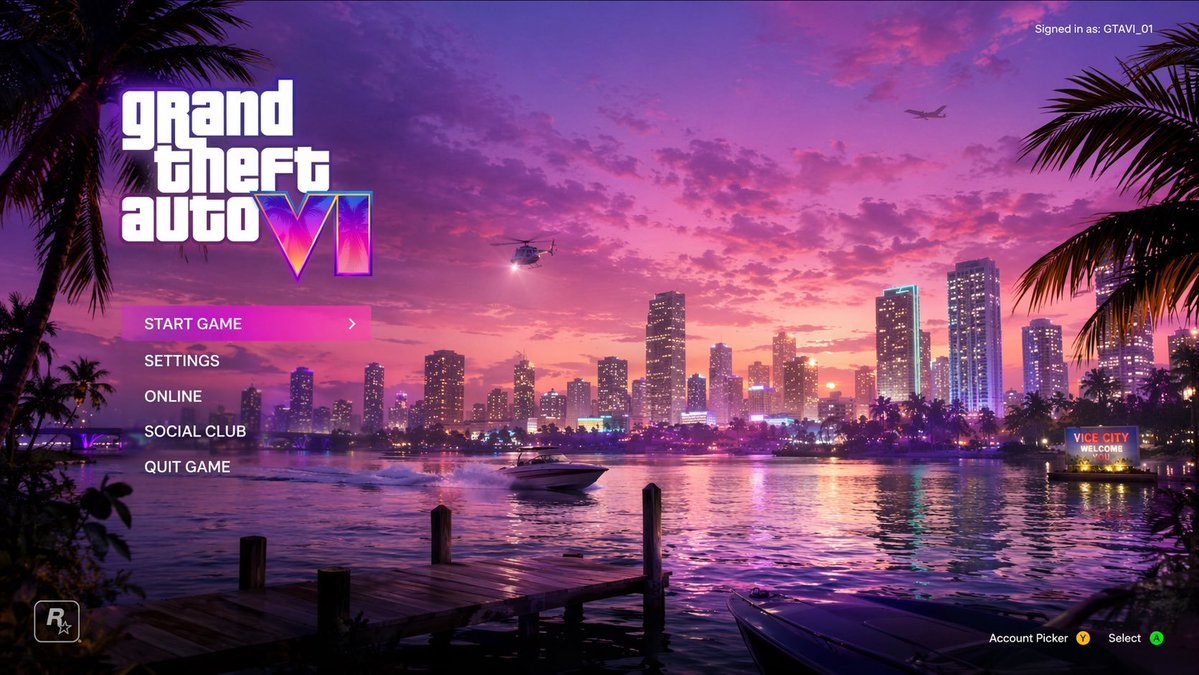
Synthwave Vice City Game Menu UI — Sora 2 Prompt
Generate a stunning synthwave-style game menu UI prompt featuring a sunset coastal city, neon accents, palm trees, and fully customizable menu text and logo.
提示词 · EN
type
电子游戏主菜单 UI 模型background_scene
setting
日落时分的海滨城市天际线,类似迈阿密风格,天空呈现鲜艳的粉色和紫色,平静的水面反射着城市灯光foreground
左下角有木质码头,右下角停靠着一艘深色快艇,左右两侧有棕榈树剪影作为边框midground
快艇在水面上行驶并留下尾迹,右侧岸边的霓虹灯招牌显示为 '{argument name="city sign" default="VICE CITY WELCOME"}'sky
零星云朵,带有明亮探照灯的直升机,远处的飞机ui_elements
main_logo
position
左上角text
{argument name="game title" default="grand theft auto VI"}style
主标题采用经典的白色小写字体,巨大的罗马数字样式,内部带有霓虹粉/紫/橙渐变色及棕榈树剪影main_menu
position
左侧中部,主 Logo 下方count
5items
item 1
{argument name="menu option 1" default="START GAME"} (高亮显示,带有亮粉色背景和白色向右箭头)item 2
{argument name="menu option 2" default="SETTINGS"}item 3
ONLINEitem 4
SOCIAL CLUBitem 5
QUIT GAMEuser_info
position
右上角text
当前登录用户:{argument name="username" default="GTAVI_01"}developer_logo
position
左下角description
R* Logo (带星星的 R)button_prompts
position
右下角count
2items
item 1
账户选择 (带有黄色 Y 按钮图标)item 2
选择 (带有绿色 A 按钮图标)关于这个提示词
Generate a stunning synthwave-style game menu UI prompt featuring a sunset coastal city, neon accents, palm trees, and fully customizable menu text and logo. 它更适合作为 GPT Image 2 的概念艺术起点:先保留画面结构、主体关系和风格约束,再替换成你的品牌、人物或场景。
这条提示词使用结构化 JSON 组织信息,包含 type、background scene、ui elements 等字段。保留这种层级能让模型更清楚地区分画面主题、布局、界面元素和细节约束。
使用时建议先小幅修改主体、场景、镜头和色调,再生成多个版本对比构图与细节。这样页面内容对用户有实际帮助,也避免把模型名或标签机械堆在正文里。
如何使用这个提示词
- Copy the prompt from the page.
- Paste it into your chosen AI model (Sora 2, Midjourney, DALL-E, etc.).
- Adjust the customizable arguments (e.g.,
city sign,game title,menu option 1) to match your vision. - Run the generation to see the vibrant menu appear.
- Refine variables and regenerate as needed for the perfect result.


