
GPT Image 2AI 提示词
Synthwave Game Menu UI — Sunset Cityscape Mockup
Creates a stunning, customizable video game main menu screen with a vibrant synthwave city skyline and retro UI elements.
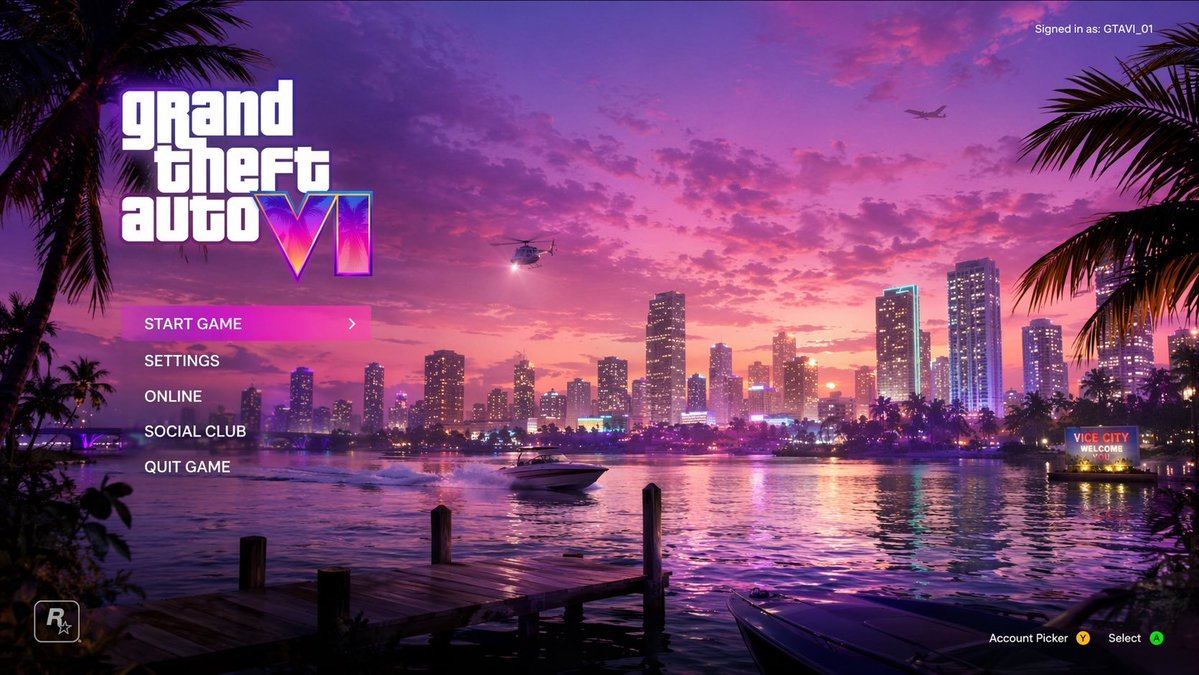
提示词 · EN
type
video game main menu UI mockuptheme
{argument name="color palette" default="purple, pink, and orange synthwave"}background
setting
coastal city skyline at {argument name="time of day" default="sunset"}elements
item 1
water reflecting city lightsitem 2
wooden dock in foregrounditem 3
speedboat on the wateritem 4
helicopter with spotlightitem 5
airplane in the skyitem 6
palm trees framing left and right edgesitem 7
neon sign reading '{argument name="city name" default="VICE CITY"} WELCOME'ui_layout
top_left
Large logo '{argument name="game title" default="grand theft auto VI"}' with neon gradient roman numeralsmiddle_left
type
vertical menucount
5items
item 1
START GAME (highlighted with pink gradient and > arrow)item 2
SETTINGSitem 3
ONLINEitem 4
SOCIAL CLUBitem 5
QUIT GAMEtop_right
Text 'Signed in as: {argument name="username" default="GTAVI_01"}'bottom_left
Developer star logo 'R*'bottom_right
Controller prompts 'Account Picker Y, Select A'关于这个提示词
Creates a stunning, customizable video game main menu screen with a vibrant synthwave city skyline and retro UI elements. 它更适合作为 GPT Image 2 的概念艺术起点:先保留画面结构、主体关系和风格约束,再替换成你的品牌、人物或场景。
这条提示词使用结构化 JSON 组织信息,包含 type、theme、background、ui layout 等字段。保留这种层级能让模型更清楚地区分画面主题、布局、界面元素和细节约束。
使用时建议先小幅修改主体、场景、镜头和色调,再生成多个版本对比构图与细节。这样页面内容对用户有实际帮助,也避免把模型名或标签机械堆在正文里。
如何使用这个提示词
- Copy the prompt and paste it into a compatible AI image or video generator like Sora 2.
- Replace the default variables (like color palette, city name, or username) with your own creative choices.
- Adjust the time of day from "sunset" to "night" or "dawn" for a different mood.
- Generate the image to get a complete, stylized menu mockup you can use for concept art or inspiration.


