
GPT Image 2AI 提示词
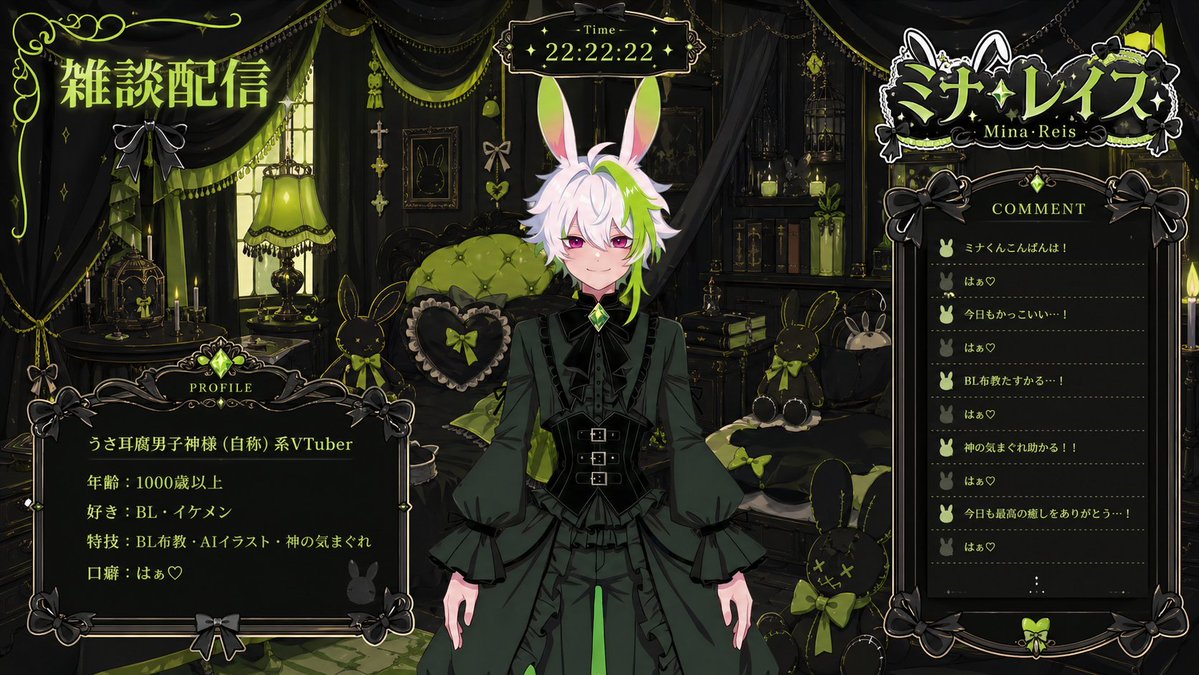
Custom VTuber Stream Overlay Prompt — Logo, Chat & Profile Layout
Design a complete VTuber live-stream screen with integrated chat, profile stats, and themed logo using customizable color and motif variables.
1 / 4
提示词 · EN
请使用图像中的角色创建一个虚拟 VTuber。姓名:'argname: name',主题:'argmotif: motif',基于 'argfavorite color: favorite color' 和“喜爱氛围”的 VTuber 直播屏幕。一个基于 'argfavorite color: favorite color' 和“喜爱氛围”的房间背景。将角色放置在中心,右侧放置评论区,右上角放置基于角色主题的 VTuber Logo,左上角放置“Chat Stream”文字,左下角放置角色个人资料(类型、年龄、喜好、技能、口头禅)。顶部中心放置时间。图像尺寸:16:9。
关于这个提示词
Design a complete VTuber live-stream screen with integrated chat, profile stats, and themed logo using customizable color and motif variables. 它更适合作为 GPT Image 2 的概念艺术起点:先保留画面结构、主体关系和风格约束,再替换成你的品牌、人物或场景。
使用时优先替换 name、motif、favorite color 等占位符,并保持镜头、构图和材质描述的顺序不变。这样更容易获得稳定的画面结果,也方便继续做多版本对比。
如何使用这个提示词
- Copy the entire prompt text.
- Choose an AI image generator that supports layered, detailed layouts (e.g., Sora 2 or similar).
- Replace the default variables (
name,motif,favorite color) with your VTuber's specific details. - Adjust the "loved atmosphere" description to match your desired vibe (e.g., cozy, cyberpunk).
- Generate the image; it will be in a 16:9 ratio, optimized for streaming software.


