
GPT Image 2AI 提示词
VTuber Debut Stream Thumbnail: Customizable Prompt
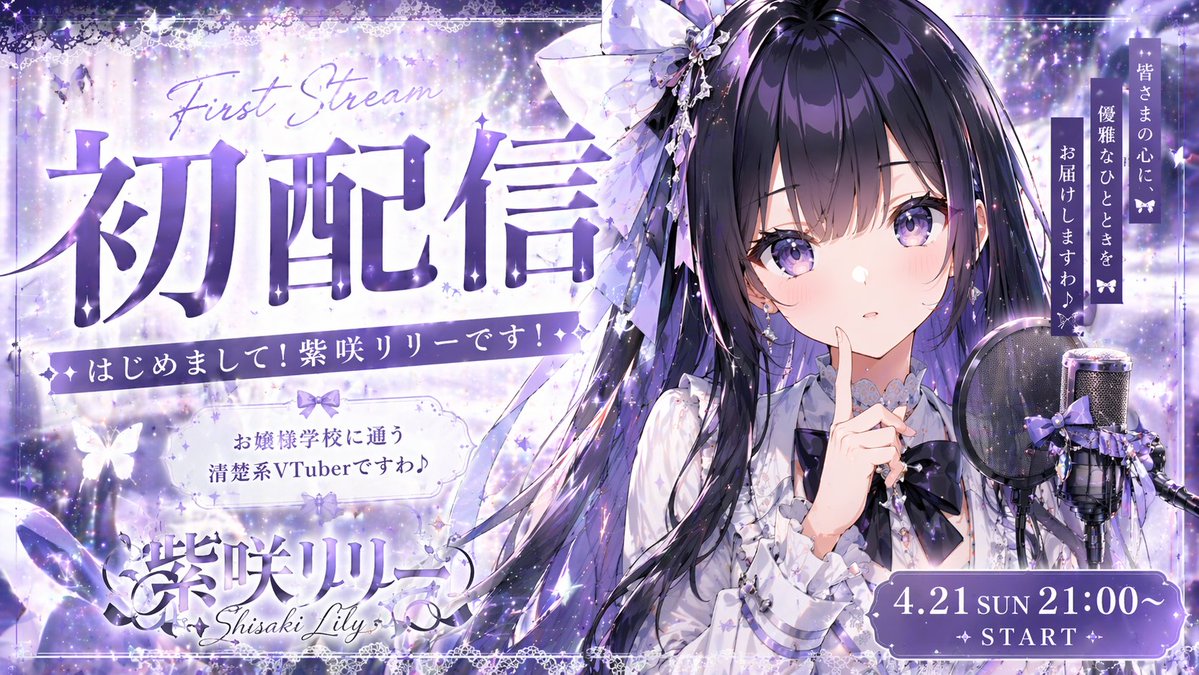
Generate a magical VTuber debut stream thumbnail with a starry background, cute character, and customizable typography for your live stream announcement.
提示词 · EN
type
VTuber 初配信缩略图character
appearance
动漫少女,深紫色长发,紫色眼睛,荷叶边白衬衫,深紫色领结,巨大的发饰pose
手指抵唇,可爱的表情props
右侧配有带防喷罩和紫色丝带的电容麦克风background
魔法星空,闪光特效,发光的蝴蝶,紫色与白色调layout
typography
item 1
position
左上角style
大号粗体文字,上方配有英文连体字text
{argument name="main title" default="初配信"}subtext_1
First Streamsubtext_2
初次见面!我是紫咲莉莉 (Shisaki Lily)!item 2
position
中左侧style
装饰性边框text
{argument name="character description" default="お嬢様学校に通う清楚系VTuberですわ♪"}item 3
position
左下角style
Logo 风格text
{argument name="character name" default="紫咲リリー"}subtext
Shisaki Lilyitem 4
position
右上角style
竖排文字text
{argument name="catchphrase" default="皆さまの心に、優雅なひとときをお届けしますわ♪"}item 5
position
右下角style
装饰性胶囊形状text
{argument name="stream date and time" default="4.21 SUN 21:00~"}subtext
✦ START ✦关于这个提示词
Generate a magical VTuber debut stream thumbnail with a starry background, cute character, and customizable typography for your live stream announcement. 它更适合作为 GPT Image 2 的概念艺术起点:先保留画面结构、主体关系和风格约束,再替换成你的品牌、人物或场景。
这条提示词使用结构化 JSON 组织信息,包含 type、character、background、layout 等字段。保留这种层级能让模型更清楚地区分画面主题、布局、界面元素和细节约束。
使用时建议先小幅修改主体、场景、镜头和色调,再生成多个版本对比构图与细节。这样页面内容对用户有实际帮助,也避免把模型名或标签机械堆在正文里。
如何使用这个提示词
- Copy the prompt and paste it into an AI image generator like Sora 2, DALL-E 3, or Midjourney.
- Choose a model that excels at anime-style art and typography generation.
- Replace placeholder arguments in curly braces (e.g., {argument name="main title" default="初配信"}) with your own text.
- Adjust the background or character description to fit your VTuber's theme if desired.
- Generate and iterate to perfect your debut thumbnail.


