
GPT Image 2AI 提示词
wikiHow Article Mockup Prompt — Realistic Tutorial Page
Generates a text-heavy, step-by-step tutorial webpage in the classic wikiHow layout, complete with UI mockups.
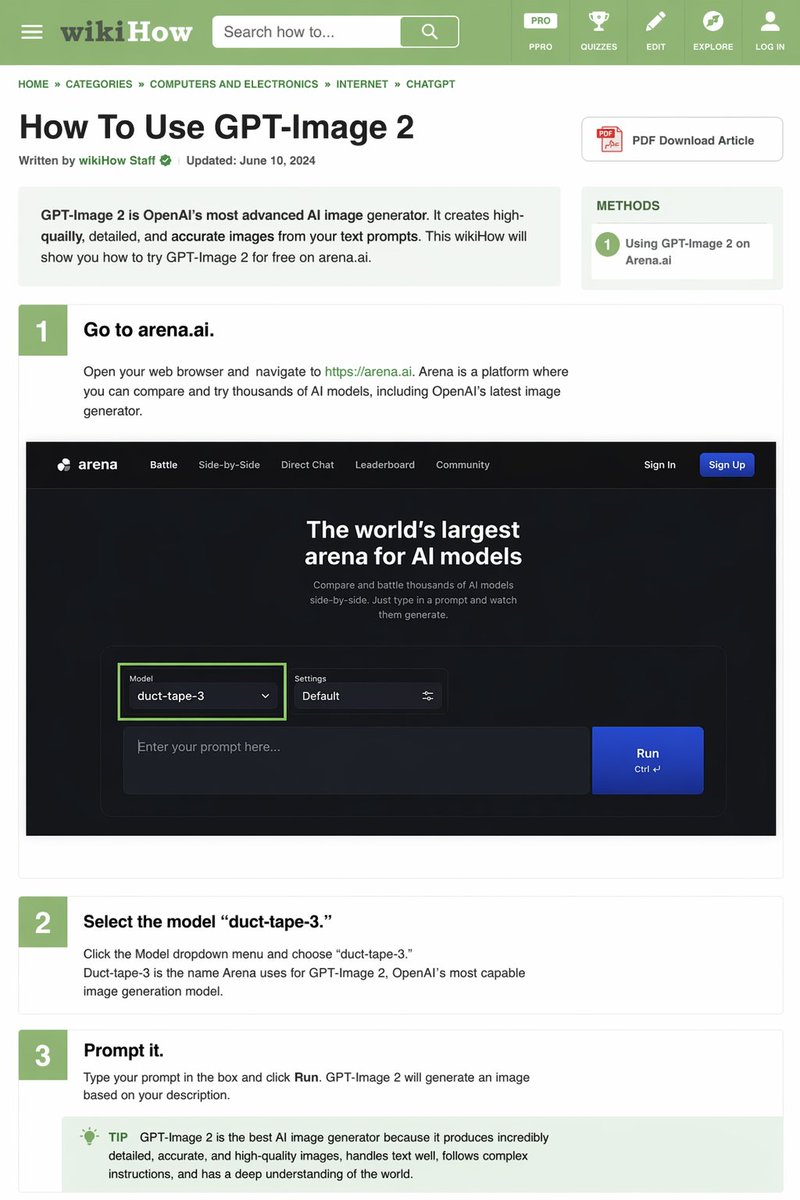
提示词 · EN
type
wikiHow article mockupheader
background
greenelements
item 1
hamburger menu iconitem 2
wikiHow logoitem 3
search bar with 'Search how to...' textitem 4
5 navigation icons: PRO/PPRO, QUIZZES, EDIT, EXPLORE, LOG INbreadcrumbs
HOME » CATEGORIES » COMPUTERS AND ELECTRONICS » INTERNET » CHATGPTarticle_info
title
{argument name="article title" default="How To Use GPT-Image 2"}metadata
Written by wikiHow Staff | Updated: June 10, 2024sidebar
item 1
PDF Download Article buttonitem 2
METHODS box: 1 Using GPT-Image 2 on Arena.aiintro_box
GPT-Image 2 is OpenAI's most advanced AI image generator. It creates high-quailly, detailed, and accurate images from your text prompts. This wikiHow will show you how to try GPT-Image 2 for free on arena.ai.steps
item 1
number
1title
{argument name="step 1 title" default="Go to arena.ai."}description
Open your web browser and navigate to https://arena.ai. Arena is a platform where you can compare and try thousands of AI models, including OpenAI's latest image generator.embedded_image
type
dark mode website UI mockuplogo
arenanavigation
item 1
Battleitem 2
Side-by-Sideitem 3
Direct Chatitem 4
Leaderboarditem 5
Communityitem 6
Sign Initem 7
Sign Up buttonhero_text
The world's largest arena for AI modelsinput_ui
model_dropdown
Model: {argument name="model name" default="duct-tape-3"}settings
Defaulttext_input
Enter your prompt here...button
Runitem 2
number
2title
{argument name="step 2 title" default="Select the model 'duct-tape-3.'"}description
Click the Model dropdown menu and choose 'duct-tape-3.' Duct-tape-3 is the name Arena uses for GPT-Image 2, OpenAI's most capable image generation model.item 3
number
3title
{argument name="step 3 title" default="Prompt it."}description
Type your prompt in the box and click Run. GPT-Image 2 will generate an image based on your description.tip_box
TIP GPT-Image 2 is the best AI image generator because it produces incredibly detailed, accurate, and high-quality images, handles text well, follows complex instructions, and has a deep understanding of the world.关于这个提示词
Generates a text-heavy, step-by-step tutorial webpage in the classic wikiHow layout, complete with UI mockups. 它更适合作为 GPT Image 2 的概念艺术起点:先保留画面结构、主体关系和风格约束,再替换成你的品牌、人物或场景。
这条提示词使用结构化 JSON 组织信息,包含 type、header、breadcrumbs、article info、intro box、steps 等字段。保留这种层级能让模型更清楚地区分画面主题、布局、界面元素和细节约束。
使用时建议先小幅修改主体、场景、镜头和色调,再生成多个版本对比构图与细节。这样页面内容对用户有实际帮助,也避免把模型名或标签机械堆在正文里。
如何使用这个提示词
- Copy the entire prompt template.
- Paste it into a compatible AI image generator (e.g., Sora 2, DALL·E 3).
- Look for variables like
{argument name="article title"}and replace the default text in quotes with your own topic. - Adjust the prompt's 'type' or 'intro_box' fields for a different tutorial subject.
- Generate and use the output as a unique concept, educational asset, or design inspiration.


