
GPT Image 2AI 提示词
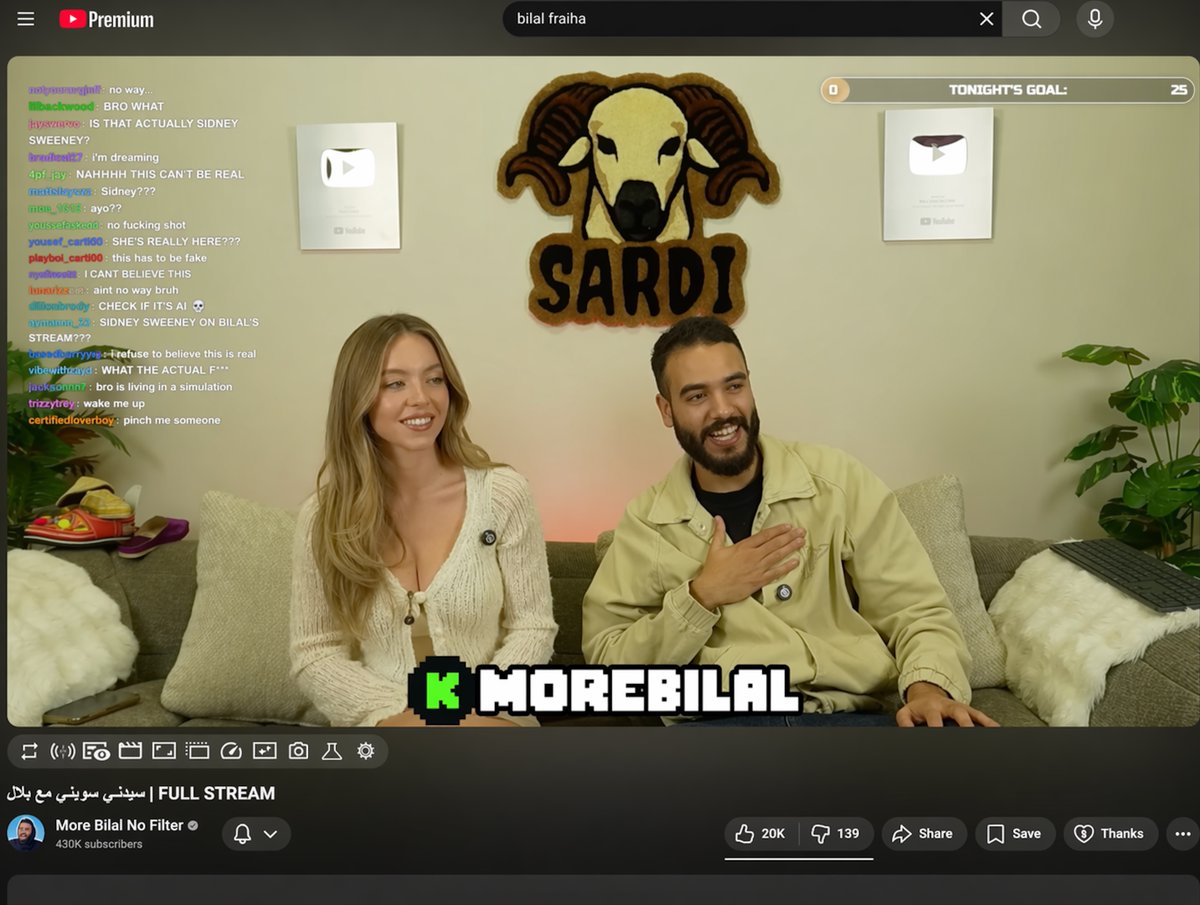
YouTube Live UI with Chat & Channel Overlays — Sora 2 Prompt
Generate a realistic YouTube Live stream interface with customizable chat overlay, channel details, and video player, perfect for mockups or AI video scenes.
提示词 · EN
type
YouTube 直播 UItop_nav
logo
YouTube Premiumsearch
{argument name="search query" default="bilal fraiha"}icons
3player
subjects
item 1
{argument name="female guest" default="Sydney Sweeney"} 身穿白色开衫item 2
留胡子的男子身穿米色夹克正在大笑bg
沙发,2 个银色播放按钮,公羊标志 'SARDI'overlays
chat
pos
左侧count
15desc
彩色用户名,白色文本goal
pos
右上角text
今晚目标:0 到 25banner
pos
底部中央text
K {argument name="streamer name" default="MOREBILAL"}controls
count
10details
title
{argument name="video title" default="FULL STREAM | سيدني سويني مع بلال"}channel
{argument name="channel name" default="More Bilal No Filter"}buttons
5关于这个提示词
Generate a realistic YouTube Live stream interface with customizable chat overlay, channel details, and video player, perfect for mockups or AI video scenes. 它更适合作为 GPT Image 2 的概念艺术起点:先保留画面结构、主体关系和风格约束,再替换成你的品牌、人物或场景。
这条提示词使用结构化 JSON 组织信息,包含 type、top nav、player、details 等字段。保留这种层级能让模型更清楚地区分画面主题、布局、界面元素和细节约束。
使用时建议先小幅修改主体、场景、镜头和色调,再生成多个版本对比构图与细节。这样页面内容对用户有实际帮助,也避免把模型名或标签机械堆在正文里。
如何使用这个提示词
- Copy the full prompt text.
- Paste into Sora 2 or a compatible AI video model.
- Customize the arguments (e.g., guest name, streamer name, search query).
- Generate the video clip.
- Download or iterate on the output as needed.


