
GPT Image 2AI 提示词
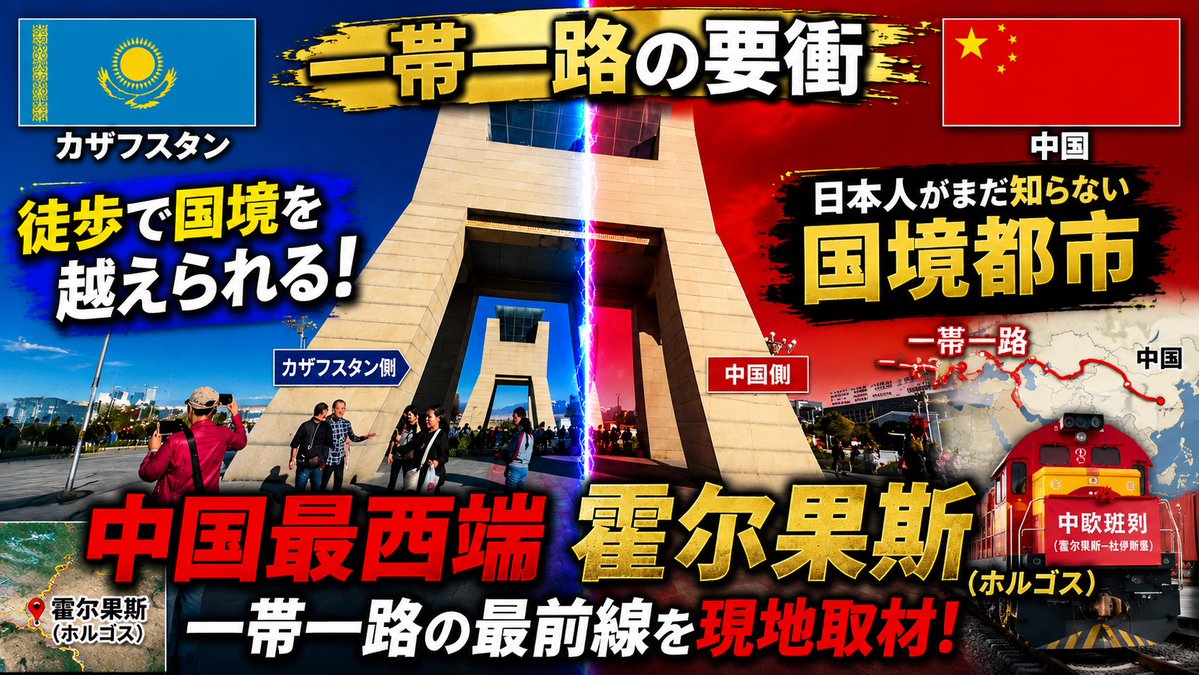
Dramatic Border City YouTube Thumbnail — Sora 2 Prompt
Create a bold, Japanese documentary-style YouTube thumbnail featuring a Kazakhstan-China border crossing with dramatic lighting, maps, flags, and bold typography.
提示词 · EN
以提供的参考图片为基础,将其重新设计为一张极具视觉冲击力的日式 YouTube 旅行/新闻缩略图。保持边境口岸位置的可辨识度,但需围绕中心纪念碑进行更紧凑的裁剪;增强对比度和饱和度;在画面中间添加蓝红对比的戏剧性光影,并用一道垂直闪电光束标记边境线,营造出紧迫的纪录片缩略图氛围。将哈萨克斯坦国旗置于左上角,中国国旗置于右上角,并为它们添加带投影的边框。在顶部添加一条黑金配色的笔触横幅,并填入主标题 argmain title: 一帯一路の要衝。添加带有重阴影和色彩对比的大号粗体日文排版;需包含 16 个可见文本元素:1) "カザフスタン", 2) "中国", 3) argleft hook: 徒歩で国境を越えられる!, 4) "カザフスタン側", 5) "中国側", 6) "日本人がまだ知らない", 7) argright headline: 国境都市, 8) "一帯一路", 9) "中国", 10) argbottom red headline: 中国最西端, 11) argcity name: 霍尔果斯, 12) "(ホルゴス)", 13) "一帯一路の最前線を", 14) "現地取材!", 15) "霍尔果斯 (ホルゴス)", 16) "中欧班列"。在左下角添加一个小型卫星地图插图,标注红色定位点及霍尔果斯标签。在右侧添加地图图形,显示红色的“一带一路”路线及点位,使其部分位于标题后方。在右下角添加红色货运火车插图/照片合成,并在车头标注“中欧班列”。采用爆炸式缩略图设计风格:粗黑色轮廓、黄/红/白文字层级、镜头光晕、暗角效果、文字背后的脏迹笔刷背景以及强烈的投影效果。最终输出为 16:9 的缩略图构图。
关于这个提示词
Create a bold, Japanese documentary-style YouTube thumbnail featuring a Kazakhstan-China border crossing with dramatic lighting, maps, flags, and bold typography. 它更适合作为 GPT Image 2 的概念艺术起点:先保留画面结构、主体关系和风格约束,再替换成你的品牌、人物或场景。
使用时优先替换 main title、left hook、right headline、bottom red headline 等占位符,并保持镜头、构图和材质描述的顺序不变。这样更容易获得稳定的画面结果,也方便继续做多版本对比。
如何使用这个提示词
- Copy the full prompt and paste it into your preferred AI image generator (e.g., Sora 2, Midjourney, DALL·E).
- Choose a model that supports high-resolution, detailed outputs and 16:9 aspect ratio.
- Customize the bracketed variables like
{main title},{left hook},{right headline},{bottom red headline}, and{city name}to fit your video's topic. - Generate the image and review the output. Adjust lighting or text elements in your prompt if needed.
- Download the final thumbnail in 16:9 format and upload it to your YouTube video.


