
Sora2 Hub
Sora2 Hub
  • プロンプトライブラリ
  • 料金
  • ショーケース
Sora2 Hub
Sora2 Hub
Sora2 Hub

Sora2 Hub

Sora 2、Veo 3.1、Nano Banana Proを搭載したプロフェッショナルAI制作プラットフォーム。高度な制御、HD画質、透かしなしで、魅力的な動画とスタジオ品質の画像を作成できます。

Email:support@sora2hub.org

AI動画生成

  • テキストから動画
  • 画像から動画
  • Veo 3.1
  • Sora 2
  • Kling 3.0
  • Kling 2.6
  • Kling 2.5
  • Runway
  • Wan 2.6
  • Seedance 2.0
  • Hailuo 2.3
  • Grok Imagine
  • HappyHorse-1.0

AI画像生成

  • テキストから画像
  • 画像から画像
  • Nano Banana Pro
  • Nano Banana
  • 4o Image
  • Flux Kontext
  • Z Image
  • Seedream 4.5
  • Seedream 5.0 Lite
  • Nano Banana 2
  • GPT Image 2
  • AI画像アップスケーラー

AIエフェクト

  • AI年齢フィルター
  • AI性別変換
  • AIキス
  • AIハグ
  • ジブリ画像
  • AI人魚フィルター
  • AIボディシェイク
  • スマイルフィルター
  • AI太る
  • アクションフィギュア

製品

  • 機能
  • ショーケース
  • 価格

会社情報

  • 会社概要
  • お問い合わせ

© 2025 • Sora2 Hub ORG All rights reserved.

  • プライバシーポリシー
  • 利用規約
  • 返金ポリシー
  1. ホーム
  2. /
  3. プロンプト
  4. /
  5. GPT Image 2
  6. /
  7. 18-Panel Brand Identity & 3D Mascot Design Prompt — Full Guide
GPT Image 2AIプロンプト

18-Panel Brand Identity & 3D Mascot Design Prompt — Full Guide

Generate a comprehensive 18-section brand identity and 3D mascot design sheet, from sketches to turnaround views and mockups.
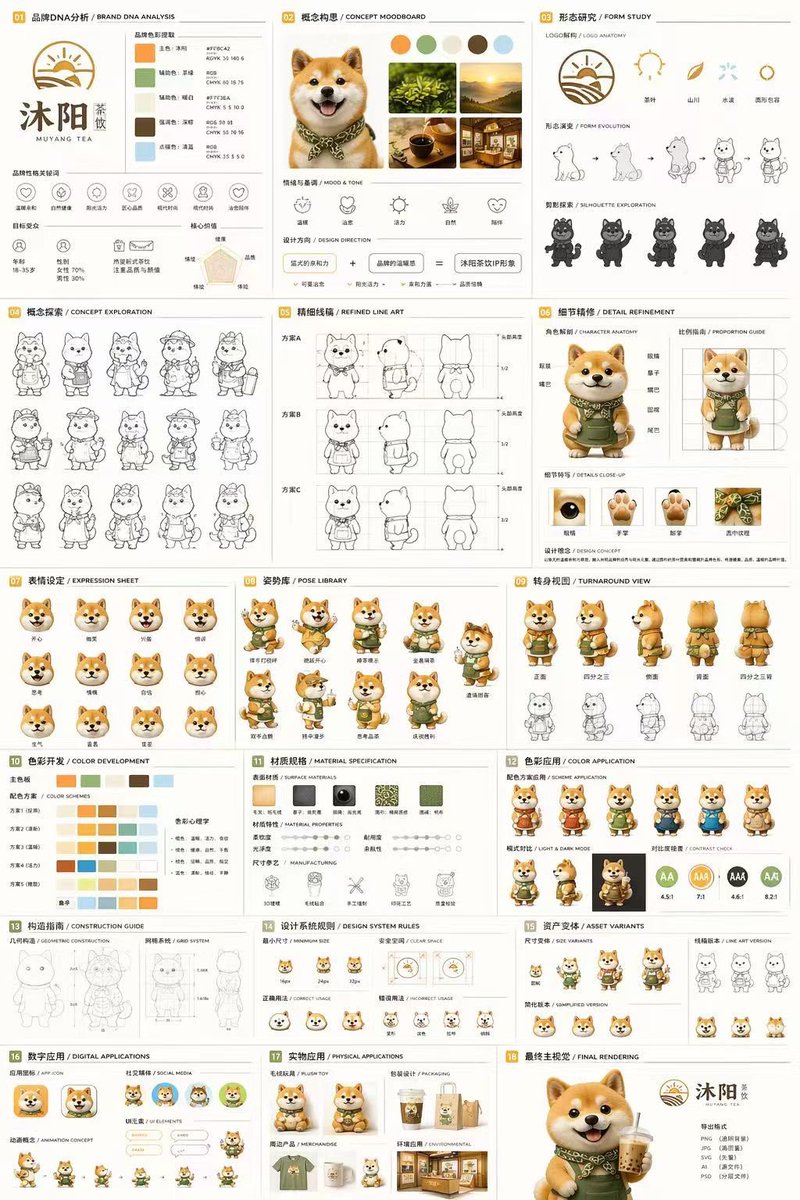
18-Panel Brand Identity & 3D Mascot Design Prompt — Full Guide
プロンプト · EN
type
18 面板品牌识别与角色设计文档
brand
name
{argument name="brand name" default="沐阳 MUYANG TEA"}
industry
{argument name="industry" default="茶饮店"}
colors
item 1
{argument name="primary color" default="黄色"}
item 2
{argument name="secondary color" default="绿色"}
item 3
白色
item 4
棕色
item 5
深绿色
subject
{argument name="character description" default="佩戴绿色围裙的 3D 渲染可爱柴犬吉祥物"}
layout
grid
3 列 6 行
sections
item 1
title
01 品牌 DNA 分析 / BRAND DNA ANALYSIS
elements
item 1
Logo
item 2
5 个色卡
item 3
6 个图标
item 4
目标受众图表
item 2
title
02 概念构思 / CONCEPT MOODBOARD
elements
item 1
5 张参考照片
item 2
4 个情绪图标
item 3
设计公式
item 3
title
03 形态研究 / FORM STUDY
elements
item 1
4 个 Logo 解构图标
item 2
4 个演变步骤
item 3
4 个轮廓图
item 4
title
04 概念探索 / CONCEPT EXPLORATION
elements
item 1
12 个角色线稿草图
item 5
title
05 精细线稿 / REFINED LINE ART
elements
item 1
3 行带有比例参考的正侧面线稿
item 6
title
06 细节精修 / DETAIL REFINEMENT
elements
item 1
2 个带标注的全身渲染图
item 2
4 个圆形特写图
item 7
title
07 表情设定 / EXPRESSION SHEET
elements
item 1
11 个 3D 渲染头部表情
item 8
title
08 姿势库 / POSE LIBRARY
elements
item 1
9 个全身 3D 渲染姿势
item 9
title
09 转身视图 / TURNAROUND VIEW
elements
item 1
5 个全身 3D 渲染图
item 2
5 个对应的线稿视图
item 10
title
10 色彩开发 / COLOR DEVELOPMENT
elements
item 1
5 行 5 色配色方案
item 2
色彩心理学文字
item 11
title
11 材质规格 / MATERIAL SPECIFICATION
elements
item 1
5 个纹理色卡
item 2
属性滑块
item 3
4 个制造工艺图标
item 12
title
12 色彩应用 / COLOR APPLICATION
elements
item 1
4 个配色变体渲染图
item 2
2 个明暗渲染图
item 3
4 个对比度评分圆圈
item 13
title
13 构造指南 / CONSTRUCTION GUIDE
elements
item 1
2 个几何结构与网格线稿图
item 14
title
14 设计系统规则 / DESIGN SYSTEM RULES
elements
item 1
最小尺寸图标
item 2
安全空间示意图
item 3
4 个使用示例
item 15
title
15 资产变体 / ASSET VARIANTS
elements
item 1
3 个尺寸变体
item 2
3 个线稿变体
item 3
3 个简化扁平化头像
item 16
title
16 数字应用 / DIGITAL APPLICATIONS
elements
item 1
1 个 App 图标
item 2
2 个社交媒体头像
item 3
UI 元素
item 4
3 帧动画循环
item 17
title
17 实物应用 / PHYSICAL APPLICATIONS
elements
item 1
毛绒玩具样机
item 2
包装样机
item 3
周边商品样机
item 4
店面样机
item 18
title
18 最终主视觉 / FINAL RENDERING
elements
item 1
吉祥物手持茶饮的大尺寸高分辨率 3D 渲染图
item 2
Logo
item 3
文件格式列表

このプロンプトについて

Generate a comprehensive 18-section brand identity and 3D mascot design sheet, from sketches to turnaround views and mockups. Use it as a コンセプトアート starting point for GPT Image 2: keep the visual structure and style constraints intact, then swap in your own subject, brand, or scene.

This prompt is organized as structured JSON with fields such as type, brand, subject, and layout. Keeping that hierarchy helps the model separate the subject, layout, interface elements, and detail constraints.

Start with small changes to subject, scene, camera, and color, then generate a few variations to compare composition and detail without turning the page copy into keyword stuffing.

このプロンプトの使い方

  1. Copy the full prompt text from this page.
  2. Paste it into an advanced AI image generator like Sora, Midjourney, or DALL-E.
  3. Customize the brand name, colors, and character description within the prompt to match your project.
  4. Generate the initial multi-panel output, then refine individual panels if needed.
  5. Use the complete design sheet to kickstart your branding or character design project.

FAQ

Lee Colin

@Colin_Leeee→

公開日
2026年4月25日
元の言語
EN
モデル
GPT Image 2
カテゴリ
コンセプトアート
GPT Image 2コンセプトアートgpt-image-2twitter
閲覧
3.6K
コピー
485
いいね
281

共有

GPT Image 2 のその他

すべて見る
Anime Reaction Thumbnail Prompt — Neon Edgy VTuber

Anime Reaction Thumbnail Prompt — Neon Edgy VTuber

@abdiisan
Ultra-Realistic 3D Exploded View Prompt: Sony BRAVIA 8K TV

Ultra-Realistic 3D Exploded View Prompt: Sony BRAVIA 8K TV

@Ankit_patel211
Shenzhen Golden Hour City Prompt: Futuristic Heritage Poster

Shenzhen Golden Hour City Prompt: Futuristic Heritage Poster

@ivanalog_com

Sora2Hubプロンプトで制作を速く。

検索できるプロンプトページから始め、適切なモデル文脈のまま生成へ進めます。

プロンプトを探す

