GPT Image 2AIプロンプト

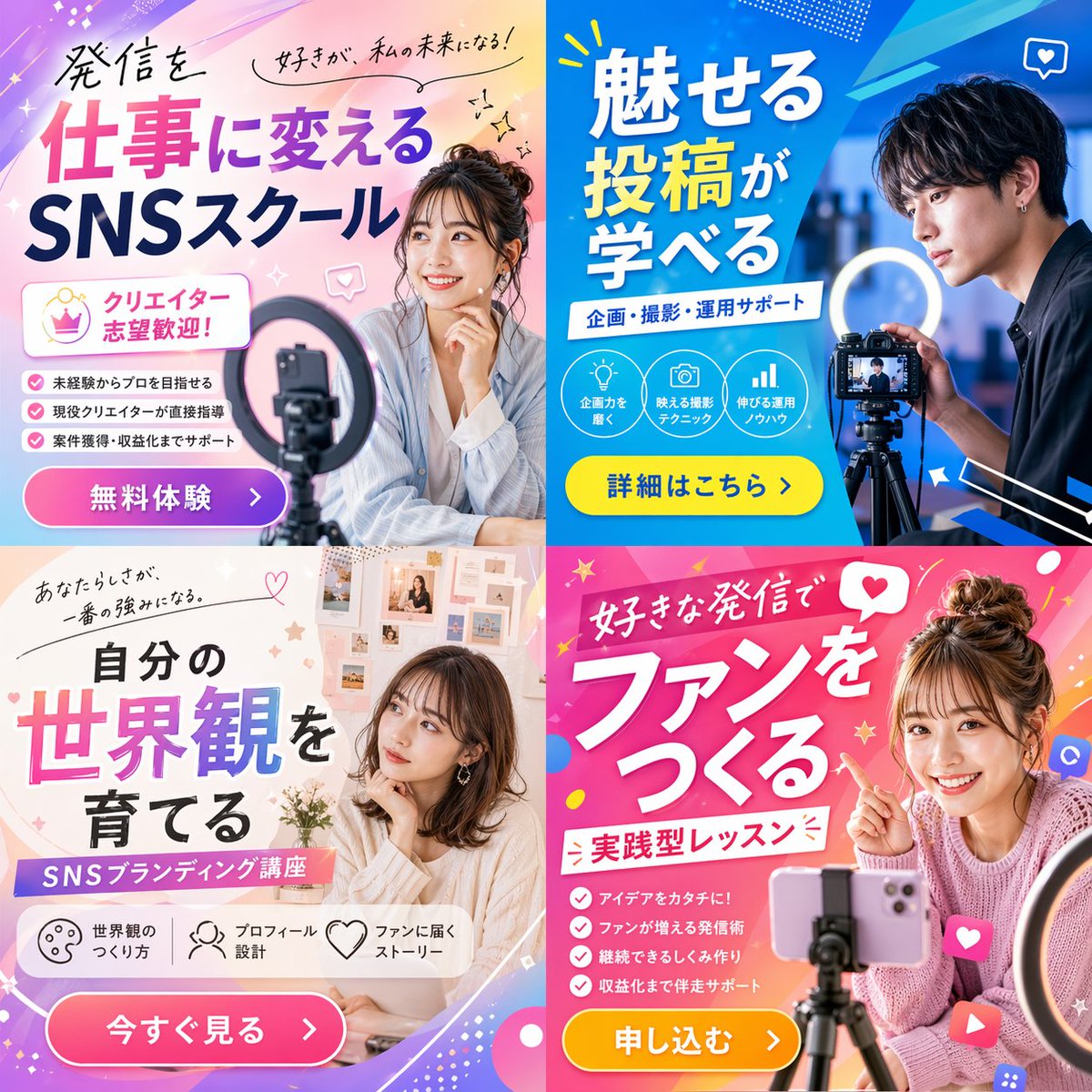
2x2 Social Media Course Promotional Banner Ad

Generate a vibrant 2x2 grid banner ad for a social media or content creation school, featuring diverse models, dynamic layouts, and customizable typography for any campaign.
2x2 Social Media Course Promotional Banner Ad
プロンプト · EN
type
2x2 网格宣传横幅广告
theme
{argument name="course theme" default="社交媒体内容创作学校"}
panels
item 1
position
左上
color_palette
浅蓝与粉色柔和渐变
subject
年轻女性微笑着,手托下巴,前景有智能手机和环形补光灯
typography
headline
{argument name="top left headline" default="将发布内容转化为工作,SNS 学院"}
subheadings
item 1
热爱,成就我的未来!
item 2
欢迎有志成为创作者的你!
layout_elements
bullet_points_count
3
call_to_action_button
粉色按钮,标注为 '免费体验 >'
item 2
position
右上
color_palette
深蓝与青色几何风格
subject
年轻男性专注地看着三脚架上的专业相机,配有环形补光灯
typography
headline
{argument name="top right headline" default="学习如何制作吸睛贴文"}
subheadings
item 1
策划、拍摄、运营支持
layout_elements
circular_icons_count
3
icon_types
item 1
灯泡
item 2
相机
item 3
柱状图
call_to_action_button
黄色按钮,标注为 '查看详情 >'
item 3
position
左下
color_palette
柔和米色与白色美学
subject
年轻女性若有所思地看向侧面,背景为情绪板
typography
headline
{argument name="bottom left headline" default="培养属于你的世界观"}
subheadings
item 1
你的个性,就是最大的优势。
item 2
SNS 品牌塑造课程
layout_elements
horizontal_icons_count
3
icon_types
item 1
调色板
item 2
人物
item 3
爱心
call_to_action_button
粉色按钮,标注为 '立即查看 >'
item 4
position
右下
color_palette
活力粉与洋红色波普设计
subject
年轻女性灿烂微笑,指向文字,扎着丸子头,三脚架上架着智能手机
typography
headline
{argument name="bottom right headline" default="通过热爱的内容建立粉丝群"}
subheadings
item 1
实践型课程
layout_elements
bullet_points_count
4
call_to_action_button
黄色按钮,标注为 '立即报名 >'

このプロンプトについて

Generate a vibrant 2x2 grid banner ad for a social media or content creation school, featuring diverse models, dynamic layouts, and customizable typography for any campaign. Use it as a コンセプトアート starting point for GPT Image 2: keep the visual structure and style constraints intact, then swap in your own subject, brand, or scene.

This prompt is organized as structured JSON with fields such as type, theme, and panels. Keeping that hierarchy helps the model separate the subject, layout, interface elements, and detail constraints.

Start with small changes to subject, scene, camera, and color, then generate a few variations to compare composition and detail without turning the page copy into keyword stuffing.

このプロンプトの使い方

  1. Copy the entire prompt JSON object. 2. Paste it into your chosen AI image generator (like Sora 2, Midjourney, or DALL-E). 3. Customize the variables in curly braces {}—such as course theme or the headline text—to match your specific school or offer. 4. Adjust the default values inside the quotes for instant customization. 5. Generate the image to create a professional, multi-panel promotional banner.

FAQ

GPT Image 2 のその他

すべて見る

Sora2Hubプロンプトで制作を速く。

検索できるプロンプトページから始め、適切なモデル文脈のまま生成へ進めます。