
GPT Image 2AIプロンプト
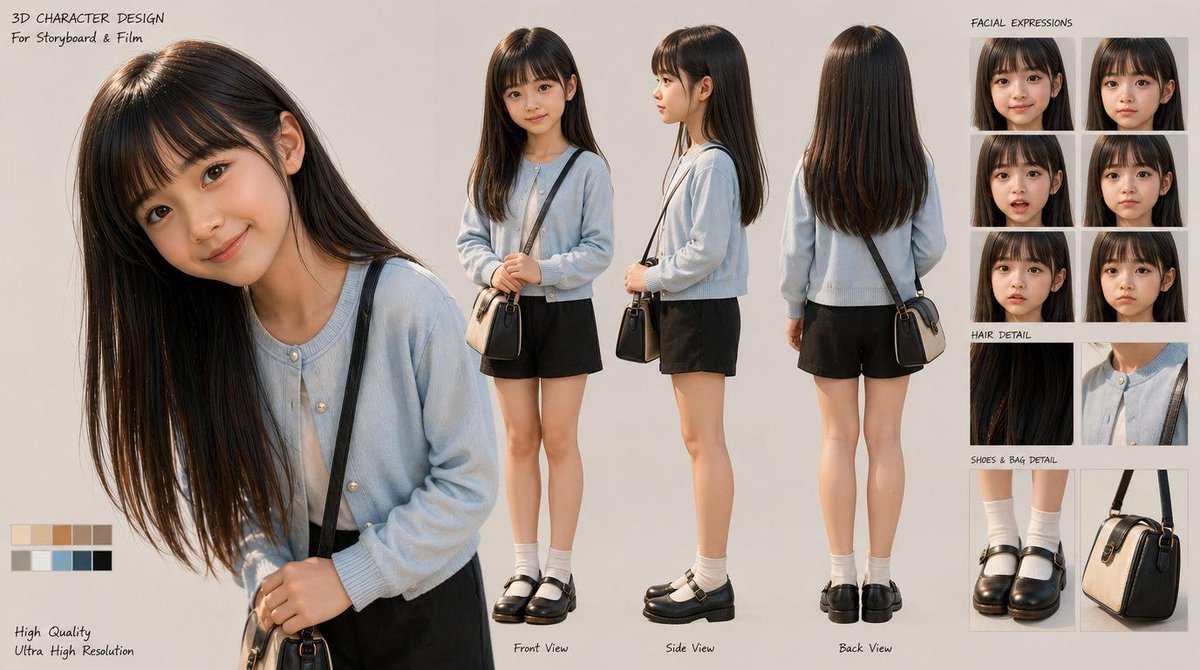
3D 女学生角色设计 — 表情与服装细节展示
生成专业级 3D 角色设计图,包含多视角、表情库和服装细节,适用于分镜脚本与电影预制作。
プロンプト · EN
type
3D 角色设计图style
适用于分镜脚本和电影开发的写实风格 3D 角色模型展示subject
gender presentation
年轻女孩,小学年龄build
苗条,娇小ethnicity
东亚外貌character role
安静的日常学龄角色face
柔和的青春特征,自然肤色,中性表情hair
color
{argument name="hair color" default="深棕色"}style
超长直发,顺滑,中分,带有细微光泽,前部垂至胸下,后部垂至上背部outfit
count
6items
item 1
浅粉蓝色圆领开衫,带有珍珠质感小纽扣item 2
领口可见白色内搭item 3
黑色短裤,剪裁简洁利落item 4
白色中筒袜item 5
黑色皮革玛丽珍鞋,厚底带绑带item 6
米色与黑色拼接的小巧结构化斜挎包,配深色肩带layout
background
干净的暖浅灰色摄影棚背景sections
item 1
title
主肖像position
左侧count
1labels
item 1
大型特写四分之三侧面肖像,头部略微低垂item 2
title
三视图position
中间count
3labels
item 1
正面视图item 2
侧面视图item 3
背面视图item 3
title
面部表情position
右上count
6labels
item 1
正面中性item 2
正面柔和微笑item 3
正面轻微担忧item 4
四分之三侧面浅笑item 5
四分之三侧面平静低头item 6
四分之三侧面害羞内敛item 4
title
头发细节position
中右count
2labels
item 1
顺滑光泽发丝特写item 2
开衫领口与肩带特写item 5
title
鞋包细节position
右下count
2labels
item 1
袜子与玛丽珍鞋特写item 2
结构化斜挎包特写item 6
title
调色板position
左下count
10labels
item 1
奶油色item 2
浅米色item 3
棕褐色item 4
驼色item 5
暖棕色item 6
橄榄灰item 7
柔灰色item 8
灰蓝色item 9
炭灰色item 10
黑色text elements
count
7labels
item 1
3D 角色设计item 2
适用于分镜与电影item 3
面部表情item 4
头发细节item 5
鞋包细节item 6
高质量item 7
超高分辨率composition
左侧为大型主肖像,中间为三个全身三视图渲染,右侧为堆叠的参考面板,左下角为小型色卡lighting
柔和的摄影棚灯光,均匀照明,柔和阴影,逼真的材质渲染rendering notes
高分辨率精致角色设计图展示,逼真的布料纹理,光泽发丝,细腻的皮肤阴影,简洁的产品设计布局,专业的前期制作风格camera
全身视图采用类似正交投影的角色图构图,特写部分采用人像镜头感このプロンプトについて
生成专业级 3D 角色设计图,包含多视角、表情库和服装细节,适用于分镜脚本与电影预制作。 Use it as a コンセプトアート starting point for GPT Image 2: keep the visual structure and style constraints intact, then swap in your own subject, brand, or scene.
This prompt is organized as structured JSON with fields such as type, style, subject, layout, composition, lighting, and rendering notes. Keeping that hierarchy helps the model separate the subject, layout, interface elements, and detail constraints.
Start with small changes to subject, scene, camera, and color, then generate a few variations to compare composition and detail without turning the page copy into keyword stuffing.
このプロンプトの使い方
- 复制此提示词并粘贴到支持的 AI 模型(如 Sora 2)中。
- 根据需要调整变量,例如
{hair color}可改为“金色”或“黑色”以改变角色发色。 - 生成图像后,检查是否符合预期,可针对光线、背景或服装等细节进行微调。
- 将输出用于角色参考、故事板或艺术项目的前期开发。


