
GPT Image 2AIプロンプト
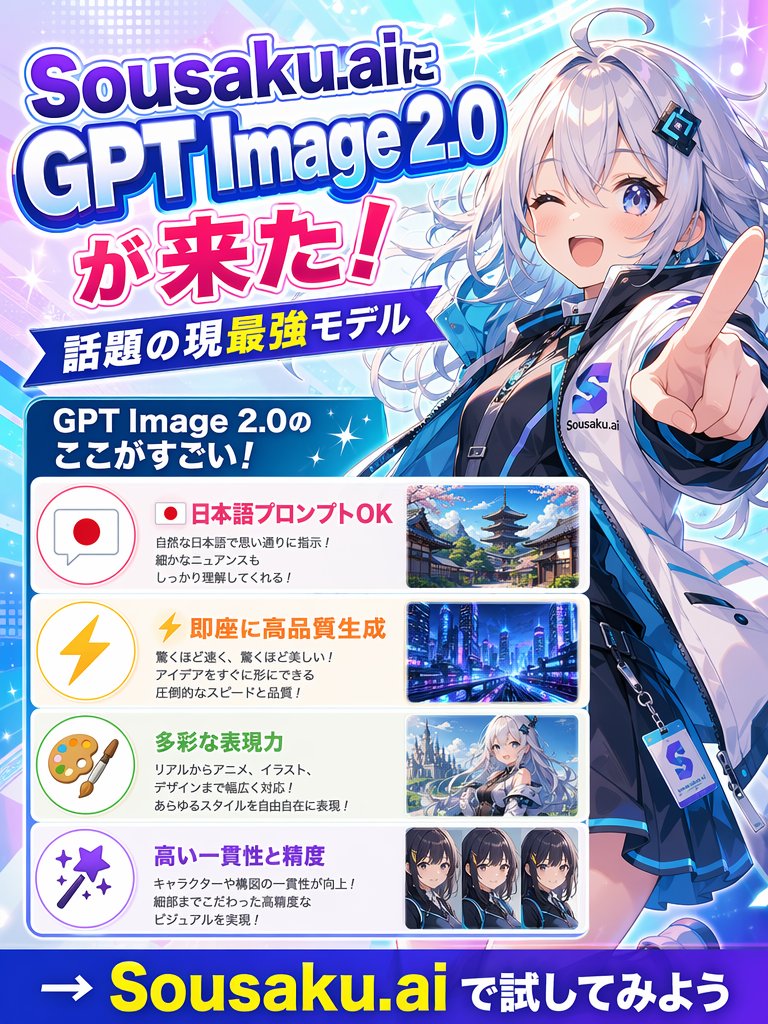
Japanese Anime AI Launch Poster — Sousaku.ai GPT Image 2.0
A vibrant, anime-styled promotional poster with bold typography, glowing effects, and a tech-savvy mascot perfect for AI product announcements.
プロンプト · EN
为 argbrand name: Sousaku.ai 创作一张充满活力的日式宣传海报,宣布 argproduct name: GPT Image 2.0 的发布。采用 3:4 竖版布局,呈现炫酷的动漫科技广告风格,使用亮青色、蓝色、紫色、粉色和白色的渐变,辅以发光的火花、镜头光晕、半调网点和动态的对角线光束。右侧展示一位大型半身动漫少女吉祥物,身穿未来感街头服饰,留着银白色长波浪卷发,带有冷蓝色挑染,皮肤白皙,蓝色双眸,面带自信微笑,一只手向前伸出,手指指向观众,呈现强烈的透视感。她身穿亮面蓝白夹克,内搭深色服饰,佩戴黑色颈圈和多层配饰,胸前有明显的徽章或标签,上面印有 S 标志和 Sousaku.ai 字样。她的面部区域被一个简单的方形遮挡块覆盖。左侧放置醒目的堆叠式标题,采用粗体日式展示字体,带有粗边框和投影,文字内容为:"Sousaku.aiに"、"GPT Image 2.0"、"が来た!"。下方添加一条蓝色丝带横幅,白色文字写着 "話題の現最強モデル"。再下方添加一个圆角蓝色标题框,白色文字写着 "GPT Image 2.0のここがすごい!"。在标题下方,垂直堆叠 4 个圆角矩形功能面板,每个面板左侧为一个柔和色彩的图标圆圈,中间为日文文本,右侧为一个示例图像缩略图。面板 1:图标为带有日本国旗的对话气泡,标题文字为粉红色 "日本語プロンプトOK",下方为 3 行较小的黑色说明文字,缩略图为带有宝塔和樱花的传统日本街道。面板 2:图标为黄色闪电,标题文字为橙色 "即座に高品質生成",下方为 3 行较小的黑色说明文字,缩略图为未来感十足的夜间霓虹城市。面板 3:图标为艺术家调色板和画笔,标题文字为绿色 "多彩な表現力",下方为 3 行较小的黑色说明文字,缩略图为雪景或明亮场景中的动漫奇幻少女,面部轻微遮挡。面板 4:图标为带有火花的魔法棒,标题文字为紫色 "高い一貫性と精度",下方为 2 行较小的黑色说明文字,缩略图为并排的 3 个动漫角色肖像特写,每张面部均被遮挡。在最底部,添加一个深蓝色条带,上面写着醒目的号召性用语:"→ argcall to action: Sousaku.ai で試してみよう",其中品牌名称使用醒目的黄色大字,其余文字为白色。整体构图紧凑、精致、光泽感强,打造出如同社交媒体 AI 图像模型发布海报般引人注目的效果。
このプロンプトについて
A vibrant, anime-styled promotional poster with bold typography, glowing effects, and a tech-savvy mascot perfect for AI product announcements. Use it as a コンセプトアート starting point for GPT Image 2: keep the visual structure and style constraints intact, then swap in your own subject, brand, or scene.
Start by replacing brand name, product name, and call to action, then keep the camera, composition, and material cues in the same order. This makes the output easier to compare across variations.
このプロンプトの使い方
- Copy the full prompt and paste it into your preferred AI image generator.
- Select a model that handles anime or illustration styles well (e.g., Midjourney, DALL·E 3, or Stable Diffusion).
- Customize the variables: change the brand name, product name, and call to action to match your own launch.
- Adjust any specific details like colors, text content, or character appearance as needed.
- Generate the image and iterate by refining prompt wording or regenerating for variations.


