
Sora2 Hub
Sora2 Hub
  • プロンプトライブラリ
  • 料金
  • ショーケース
Sora2 Hub
Sora2 Hub
Sora2 Hub

Sora2 Hub

Sora 2、Veo 3.1、Nano Banana Proを搭載したプロフェッショナルAI制作プラットフォーム。高度な制御、HD画質、透かしなしで、魅力的な動画とスタジオ品質の画像を作成できます。

Email:support@sora2hub.org

AI動画生成

  • テキストから動画
  • 画像から動画
  • Veo 3.1
  • Sora 2
  • Kling 3.0
  • Kling 2.6
  • Kling 2.5
  • Runway
  • Wan 2.6
  • Seedance 2.0
  • Hailuo 2.3
  • Grok Imagine
  • HappyHorse-1.0

AI画像生成

  • テキストから画像
  • 画像から画像
  • Nano Banana Pro
  • Nano Banana
  • 4o Image
  • Flux Kontext
  • Z Image
  • Seedream 4.5
  • Seedream 5.0 Lite
  • Nano Banana 2
  • GPT Image 2
  • AI画像アップスケーラー

AIエフェクト

  • AI年齢フィルター
  • AI性別変換
  • AIキス
  • AIハグ
  • ジブリ画像
  • AI人魚フィルター
  • AIボディシェイク
  • スマイルフィルター
  • AI太る
  • アクションフィギュア

製品

  • 機能
  • ショーケース
  • 価格

会社情報

  • 会社概要
  • お問い合わせ

© 2025 • Sora2 Hub ORG All rights reserved.

  • プライバシーポリシー
  • 利用規約
  • 返金ポリシー
  1. ホーム
  2. /
  3. プロンプト
  4. /
  5. GPT Image 2
  6. /
  7. Anime Art Process Infographic — Sora 2 Prompt
GPT Image 2AIプロンプト

Anime Art Process Infographic — Sora 2 Prompt

Generate a detailed 7-step digital art tutorial sheet showing an anime girl's creation from sketch to final effects, complete with thumbnails and color swatches.
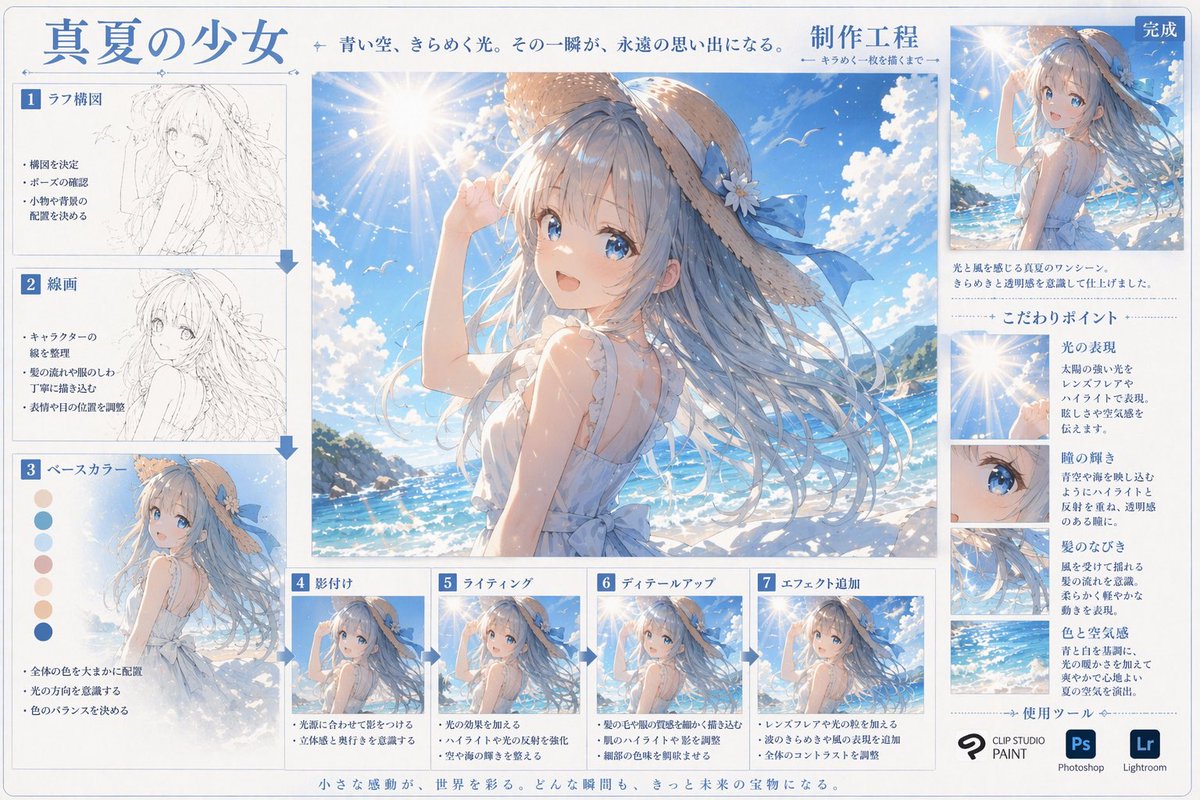
Anime Art Process Infographic — Sora 2 Prompt
プロンプト · EN
type
digital art production process infographic
header
title
{argument name="main title" default="真夏の少女"}
subtitle
青い空、きらめく光。その一瞬が、永遠の思い出になる。
process_label
{argument name="process title" default="制作工程"}
centerpiece
description
Large high-quality anime illustration of {argument name="character appearance" default="an anime girl with long flowing blue hair, a straw hat with a blue ribbon, and a white sleeveless summer dress"} standing in front of a {argument name="setting" default="bright sunny beach, sparkling blue ocean, clear sky with lens flare"}.
layout
left_column
count
3
steps
item 1
label
1 ラフ構図
image_type
rough pencil sketch
bullet_points
3
item 2
label
2 線画
image_type
clean monochrome line art
bullet_points
3
item 3
label
3 ベースカラー
image_type
flat colors
extra_elements
7 circular color swatches
bullet_points
3
bottom_row
count
4
steps
item 1
label
4 影付け
image_type
basic cell shading
bullet_points
2
item 2
label
5 ライティング
image_type
lighting and highlights added
bullet_points
2
item 3
label
6 ディテールアップ
image_type
fine details rendered
bullet_points
2
item 4
label
7 エフェクト追加
image_type
final post-processing effects
bullet_points
3
right_column
top_section
label
完成
image_type
scaled down final illustration
description_text
2 lines of text
focus_points
title
こだわりポイント
count
4
items
item 1
label
光の表現
image_crop
lens flare and sun
description_text
short paragraph
item 2
label
瞳の輝き
image_crop
close-up of the girl's blue eye
description_text
short paragraph
item 3
label
髪のなびき
image_crop
close-up of flowing hair
description_text
short paragraph
item 4
label
色と空気感
image_crop
ocean and sky background
description_text
short paragraph
tools_used
title
使用ツール
count
3
logos
item 1
{argument name="primary software" default="CLIP STUDIO PAINT"}
item 2
Photoshop (Ps)
item 3
Lightroom (Lr)
footer
text
小さな感動が、世界を彩る。どんな瞬間も、きっと未来の宝物になる。

このプロンプトについて

Generate a detailed 7-step digital art tutorial sheet showing an anime girl's creation from sketch to final effects, complete with thumbnails and color swatches. Use it as a コンセプトアート starting point for GPT Image 2: keep the visual structure and style constraints intact, then swap in your own subject, brand, or scene.

This prompt is organized as structured JSON with fields such as type, header, centerpiece, and layout. Keeping that hierarchy helps the model separate the subject, layout, interface elements, and detail constraints.

Start with small changes to subject, scene, camera, and color, then generate a few variations to compare composition and detail without turning the page copy into keyword stuffing.

このプロンプトの使い方

  1. Copy the entire JSON prompt structure.
  2. Choose a powerful generative AI model like Sora 2 or a compatible diffusion model that can handle complex layouts.
  3. Customize the 'argument' variables (e.g., character appearance, setting) in the JSON to match your desired scene.
  4. Input the modified prompt into your chosen AI platform and generate.
  5. Review the output, which will be an infographic-style image depicting the art production process.


FAQ

art55@リス駆動人生

@prompts→

公開日
2026年4月30日
元の言語
EN
モデル
GPT Image 2
カテゴリ
コンセプトアート
GPT Image 2コンセプトアートgpt-image-2gptimage2api promptsgptimage2apien
閲覧
12.9K
コピー
1.4K
いいね
997

共有

GPT Image 2 のその他

すべて見る
Gothic Anime Girl Bites Playground Rail — Sora 2 Prompt

Gothic Anime Girl Bites Playground Rail — Sora 2 Prompt

@hoshi122221
Japanese Cinematic Poster Prompt — 4-Panel Agency Ad

Japanese Cinematic Poster Prompt — 4-Panel Agency Ad

@kantamizutamari
Dark Anime Devil Girl Mario Kart Poster — Sora 2 Prompt

Dark Anime Devil Girl Mario Kart Poster — Sora 2 Prompt

@opener_ai

Sora2Hubプロンプトで制作を速く。

検索できるプロンプトページから始め、適切なモデル文脈のまま生成へ進めます。

プロンプトを探す
