
Sora2 Hub
Sora2 Hub
  • プロンプトライブラリ
  • 料金
  • ショーケース
Sora2 Hub
Sora2 Hub
Sora2 Hub

Sora2 Hub

Sora 2、Veo 3.1、Nano Banana Proを搭載したプロフェッショナルAI制作プラットフォーム。高度な制御、HD画質、透かしなしで、魅力的な動画とスタジオ品質の画像を作成できます。

Email:support@sora2hub.org

AI動画生成

  • テキストから動画
  • 画像から動画
  • Veo 3.1
  • Sora 2
  • Kling 3.0
  • Kling 2.6
  • Kling 2.5
  • Runway
  • Wan 2.6
  • Seedance 2.0
  • Hailuo 2.3
  • Grok Imagine
  • HappyHorse-1.0

AI画像生成

  • テキストから画像
  • 画像から画像
  • Nano Banana Pro
  • Nano Banana
  • 4o Image
  • Flux Kontext
  • Z Image
  • Seedream 4.5
  • Seedream 5.0 Lite
  • Nano Banana 2
  • GPT Image 2
  • AI画像アップスケーラー

AIエフェクト

  • AI年齢フィルター
  • AI性別変換
  • AIキス
  • AIハグ
  • ジブリ画像
  • AI人魚フィルター
  • AIボディシェイク
  • スマイルフィルター
  • AI太る
  • アクションフィギュア

製品

  • 機能
  • ショーケース
  • 価格

会社情報

  • 会社概要
  • お問い合わせ

© 2025 • Sora2 Hub ORG All rights reserved.

  • プライバシーポリシー
  • 利用規約
  • 返金ポリシー
  1. ホーム
  2. /
  3. プロンプト
  4. /
  5. GPT Image 2
  6. /
  7. Anime Character Reference Sheet Generator — Sora 2 Prompt
GPT Image 2AIプロンプト

Anime Character Reference Sheet Generator — Sora 2 Prompt

Turn one character image into a complete anime reference sheet with full turnarounds, expressions, outfit details, props, and color palettes.
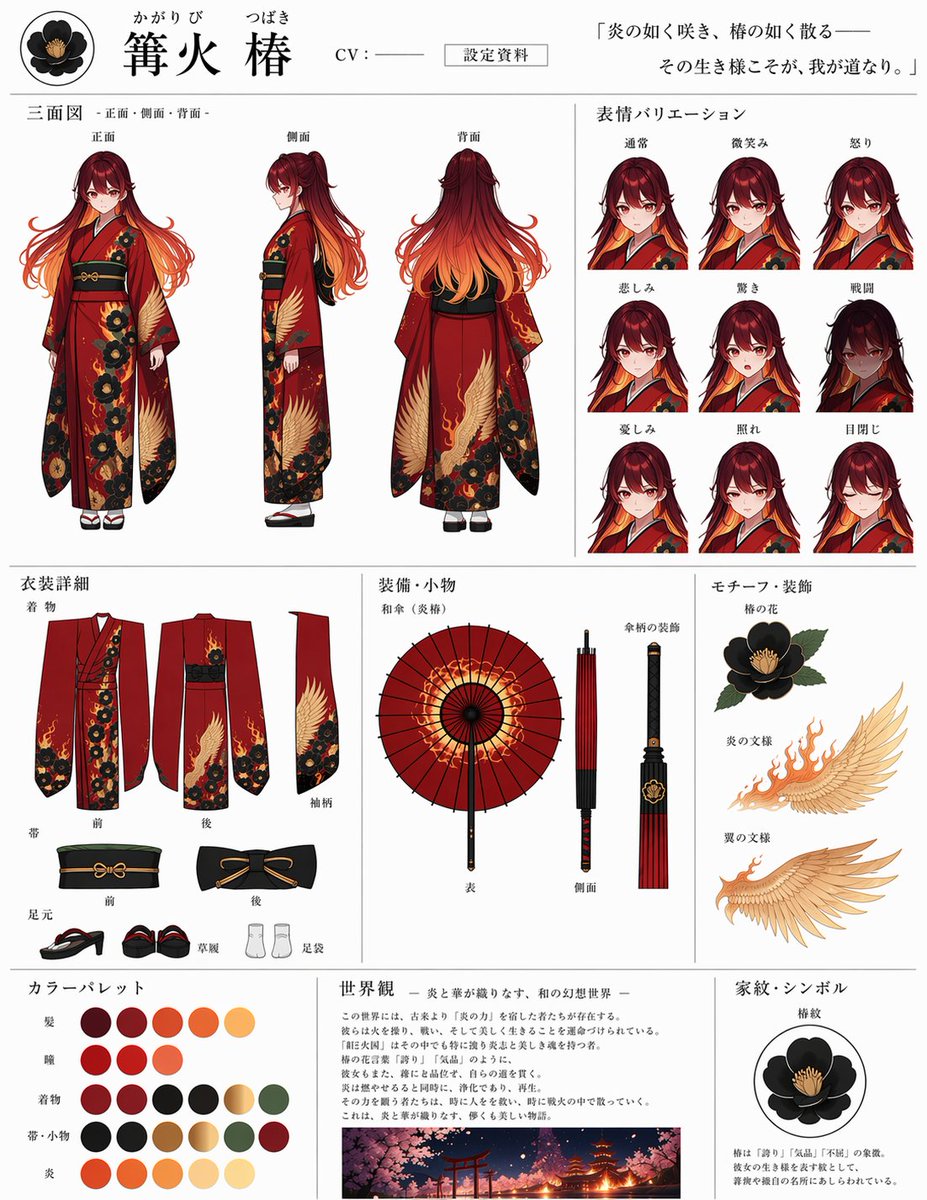
Anime Character Reference Sheet Generator — Sora 2 Prompt
プロンプト · EN
instruction
Using REFERENCE_0 as the base character design, generate a comprehensive, multi-section anime character reference sheet on a white background. Extract and isolate the clothing, accessories, and motifs from the reference image to populate the technical sections.
type
anime character reference sheet
header
name
{argument name="character name" default="篝火 椿"}
furigana
かがりび つばき
tag
CV : ───
document_type
設定資料
quote
{argument name="character quote" default="「炎の如く咲き、椿の如く散る――その生き様こそが、我が道なり。」"}
icon
black camellia crest
layout
sections
item 1
title
三面図 -正面・側面・背面-
position
top-left
description
Three-view full body turnaround
count
3
labels
item 1
正面
item 2
側面
item 3
背面
item 2
title
表情バリエーション
position
top-right
description
Headshot expression sheet
count
9
labels
item 1
通常
item 2
微笑み
item 3
怒り
item 4
悲しみ
item 5
驚き
item 6
戦闘
item 7
憂しみ
item 8
照れ
item 9
目閉じ
item 3
title
衣装詳細
position
mid-left
description
Flat layout of clothing components
count
7
labels
item 1
着物
item 2
前
item 3
後
item 4
袖柄
item 5
帯
item 6
足元
item 7
草履
item 8
足袋
item 4
title
装備・小物
position
center
description
Weapon/prop details showing the umbrella
count
3
labels
item 1
和傘(炎椿)
item 2
表
item 3
側面
item 4
傘柄の装飾
item 5
title
モチーフ・装飾
position
mid-right
description
Isolated design motifs
count
3
labels
item 1
椿の花
item 2
炎の文様
item 3
翼の文様
item 6
title
カラーパレット
position
bottom-left
description
Color swatches arranged in rows
count
20
labels
item 1
髪
item 2
瞳
item 3
着物
item 4
帯・小物
item 5
炎
item 7
title
世界観
position
bottom-center
description
Lore text block with a small landscape illustration of a traditional Japanese shrine at night with cherry blossoms and fire
count
1
labels
item 1
{argument name="lore subtitle" default="- 炎と華が織りなす、和の幻想世界 -"}
item 8
title
家紋・シンボル
position
bottom-right
description
Isolated family crest graphic with descriptive text
count
1
labels
item 1
椿紋

このプロンプトについて

Turn one character image into a complete anime reference sheet with full turnarounds, expressions, outfit details, props, and color palettes. Use it as a コンセプトアート starting point for GPT Image 2: keep the visual structure and style constraints intact, then swap in your own subject, brand, or scene.

This prompt is organized as structured JSON with fields such as instruction, type, header, and layout. Keeping that hierarchy helps the model separate the subject, layout, interface elements, and detail constraints.

Start with small changes to subject, scene, camera, and color, then generate a few variations to compare composition and detail without turning the page copy into keyword stuffing.

このプロンプトの使い方

  1. Copy the entire prompt from this page.
  2. Customize the character name and quote by editing the {argument} fields.
  3. Upload your base character design as REFERENCE_0.
  4. Use a capable AI image generator that follows multi-section instructions to generate your sheet.

FAQ

篝火 椿 ( ⑉• •⑉)꜆🍵🍡

@prompts→

公開日
2026年4月30日
元の言語
EN
モデル
GPT Image 2
カテゴリ
コンセプトアート
GPT Image 2コンセプトアートgpt-image-2gptimage2api promptsgptimage2apien
閲覧
84
コピー
8
いいね
3

共有

GPT Image 2 のその他

すべて見る
Anime Schoolgirls Sharing Transparent Umbrella — Sora 2 Prompt

Anime Schoolgirls Sharing Transparent Umbrella — Sora 2 Prompt

@yB7CqdfoDmrbhgD
Minimalist Skincare Brand Manual — Sora 2 Prompt

Minimalist Skincare Brand Manual — Sora 2 Prompt

@FranromeGraph
Sacred Dragon Dome Ceiling Mural — Sora 2 Prompt

Sacred Dragon Dome Ceiling Mural — Sora 2 Prompt

@KanaWorks_AI

Sora2Hubプロンプトで制作を速く。

検索できるプロンプトページから始め、適切なモデル文脈のまま生成へ進めます。

プロンプトを探す

