
GPT Image 2AIプロンプト

Japanese Anime Noodle Ad Banner — Sora 2 Prompt

Create a vibrant, customizable Japanese promotional banner with an anime mascot, product mockup, and steaming ramen bowl, perfect for marketing mockups.
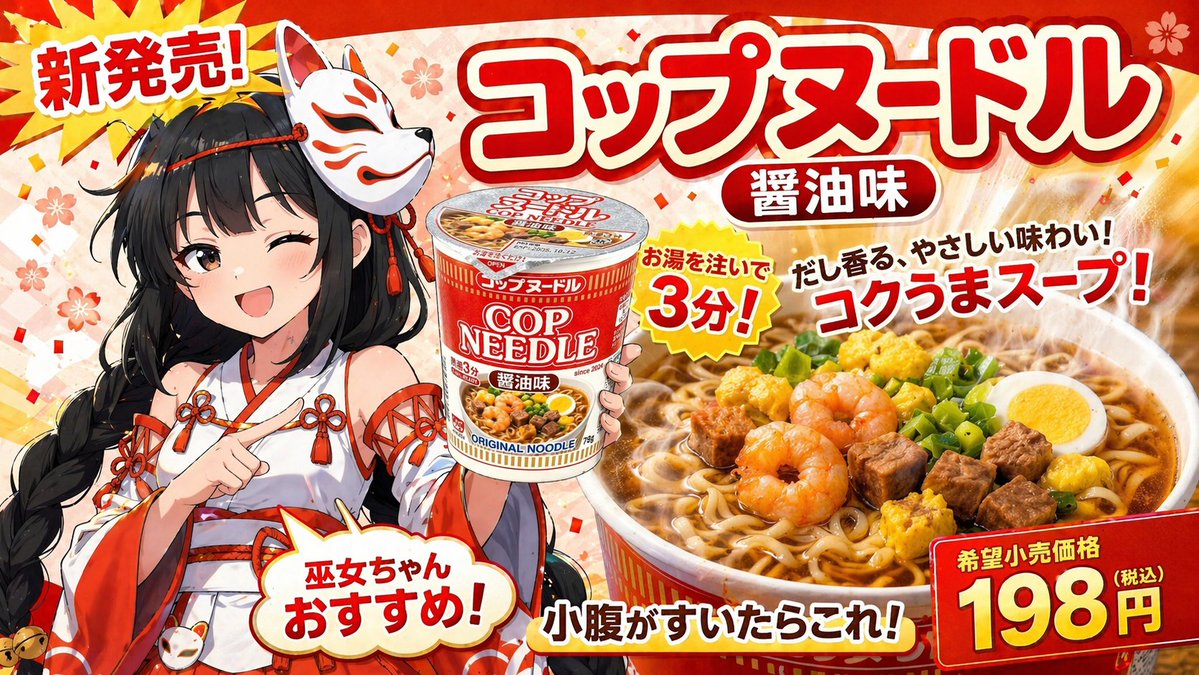
Japanese Anime Noodle Ad Banner — Sora 2 Prompt
プロンプト · EN
type
Japanese promotional banner advertisement
background
vibrant red with subtle sakura cherry blossom patterns and gold confetti
character
style
anime
appearance
young woman with long black braided hair, wearing a fox mask on the side of her head
outfit
{argument name="character outfit" default="red and white miko shrine maiden dress with decorative knots"}
pose
winking, smiling energetically, pointing at the product cup
product
description
instant noodle cup mockup
design
red and white packaging with 'COP NEEDLE' and '醤油味' text
food_shot
description
large steaming bowl of ramen noodles
toppings
item 1
3 shrimp
item 2
cubed meat
item 3
half boiled egg
item 4
scallions
item 5
yellow egg bits
typography_and_layout
text_elements_count
8
elements
item 1
position
top-left starburst
text
{argument name="top left burst text" default="新発売!"}
item 2
position
top-center huge 3D title
text
{argument name="main product name" default="コップヌードル"}
item 3
position
below main title pill
text
醤油味
item 4
position
center yellow jagged burst
text
お湯を注いで 3分!
item 5
position
mid-right floating text
text
{argument name="catchphrase text" default="だし香る、やさしい味わい!コクうまスープ!"}
item 6
position
bottom-left speech bubble
text
巫女ちゃんおすすめ!
item 7
position
bottom-center text
text
小腹がすいたらこれ!
item 8
position
bottom-right red price box
text
{argument name="price text" default="198円"}

このプロンプトについて

Create a vibrant, customizable Japanese promotional banner with an anime mascot, product mockup, and steaming ramen bowl, perfect for marketing mockups. Use it as a コンセプトアート starting point for GPT Image 2: keep the visual structure and style constraints intact, then swap in your own subject, brand, or scene.

This prompt is organized as structured JSON with fields such as type, background, character, product, food shot, and typography and layout. Keeping that hierarchy helps the model separate the subject, layout, interface elements, and detail constraints.

Start with small changes to subject, scene, camera, and color, then generate a few variations to compare composition and detail without turning the page copy into keyword stuffing.

このプロンプトの使い方

  1. Copy the prompt JSON from the page.
  2. Choose a compatible AI model like Sora 2 or another image generator.
  3. Edit the argument values (e.g., character outfit, main product name) to customize text and style.
  4. Submit the prompt to generate your unique promotional banner.

FAQ

GPT Image 2 のその他

すべて見る

Sora2Hubプロンプトで制作を速く。

検索できるプロンプトページから始め、適切なモデル文脈のまま生成へ進めます。

