Sora2 Hub
Sora2 Hub
  • プロンプトライブラリ
  • 料金
  • ショーケース
Sora2 Hub
Sora2 Hub
Sora2 Hub

Sora2 Hub

Sora 2、Veo 3.1、Nano Banana Proを搭載したプロフェッショナルAI制作プラットフォーム。高度な制御、HD画質、透かしなしで、魅力的な動画とスタジオ品質の画像を作成できます。

Email:support@sora2hub.org

AI動画生成

  • テキストから動画
  • 画像から動画
  • Veo 3.1
  • Sora 2
  • Kling 3.0
  • Kling 2.6
  • Kling 2.5
  • Runway
  • Wan 2.6
  • Seedance 2.0
  • Hailuo 2.3
  • Grok Imagine
  • HappyHorse-1.0

AI画像生成

  • テキストから画像
  • 画像から画像
  • Nano Banana Pro
  • Nano Banana
  • 4o Image
  • Flux Kontext
  • Z Image
  • Seedream 4.5
  • Seedream 5.0 Lite
  • Nano Banana 2
  • GPT Image 2
  • AI画像アップスケーラー

AIエフェクト

  • AI年齢フィルター
  • AI性別変換
  • AIキス
  • AIハグ
  • ジブリ画像
  • AI人魚フィルター
  • AIボディシェイク
  • スマイルフィルター
  • AI太る
  • アクションフィギュア

製品

  • 機能
  • ショーケース
  • 価格

会社情報

  • 会社概要
  • お問い合わせ

© 2025 • Sora2 Hub ORG All rights reserved.

  • プライバシーポリシー
  • 利用規約
  • 返金ポリシー
  1. ホーム
  2. /
  3. プロンプト
  4. /
  5. GPT Image 2
  6. /
  7. Brand Identity System Board — Sora 2 Prompt
GPT Image 2AIプロンプト

Brand Identity System Board — Sora 2 Prompt

Generates a professional brand identity presentation board with logo construction, mockups, color palettes, and usage guidelines for a cohesive visual system.
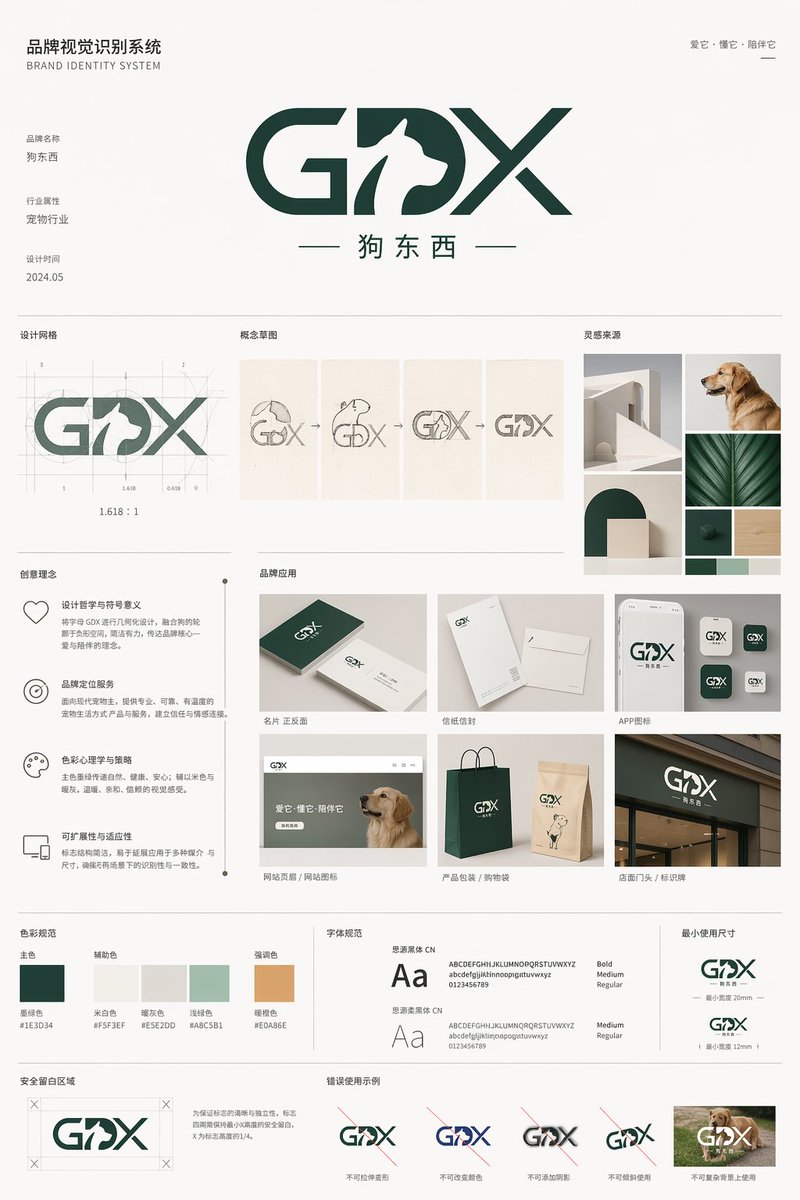
Brand Identity System Board — Sora 2 Prompt
プロンプト · EN
type
brand identity system presentation board
header
title
品牌视觉识别系统 BRAND IDENTITY SYSTEM
slogan
爱它·懂它·陪伴它
main_logo
text
{argument name="brand name" default="GDX"}
subtitle
{argument name="brand chinese name" default="狗东西"}
design_feature
{argument name="main subject" default="Dog profile in negative space of the letter D"}
metadata
item 1
品牌名称
item 2
行业属性 {argument name="industry" default="宠物行业"}
item 3
设计时间 2024.05
layout
sections
item 1
title
设计网格
count
1
description
Logo with architectural grid lines and golden ratio measurements
item 2
title
概念草图
count
4
description
Evolution steps from rough dog sketch to final geometric logo
item 3
title
灵感来源
count
4
description
Moodboard images including minimalist architecture, a golden retriever, and dark green geometric shapes
item 4
title
创意理念
count
4
description
Text blocks with minimalist icons explaining design philosophy, positioning, color psychology, and scalability
item 5
title
品牌应用
count
6
labels
item 1
名片 正反面
item 2
信纸信封
item 3
APP图标
item 4
网站页眉 / 网站图标
item 5
产品包装 / 购物袋
item 6
店面门头 / 标识牌
description
Mockups of business cards, envelopes, app icons, website header with a dog, paper shopping bags, and a storefront sign
item 6
title
色彩规范
count
5
labels
item 1
主色
item 2
辅助色
item 3
强调色
colors
item 1
{argument name="primary color" default="#1E3D34"}
item 2
#F5F3EF
item 3
#E5E2DD
item 4
#A8C5B1
item 5
#E0A86E
item 7
title
字体规范
count
2
labels
item 1
思源黑体 CN
item 2
思源柔黑体 CN
description
Typography specimens showing 'Aa', alphabet, and numbers
item 8
title
最小使用尺寸
count
2
description
Minimum logo size specifications at 20mm and 12mm
item 9
title
安全留白区域
count
1
description
Logo surrounded by a bounding box with 'X' indicating clear space margins
item 10
title
错误使用示例
count
5
labels
item 1
不可拉伸变形
item 2
不可改变颜色
item 3
不可添加阴影
item 4
不可倾斜使用
item 5
不可复杂背景上使用
description
Examples of incorrect logo usage: stretched, wrong color, drop shadow, tilted, and placed on a busy photographic background

このプロンプトについて

Generates a professional brand identity presentation board with logo construction, mockups, color palettes, and usage guidelines for a cohesive visual system. Use it as a コンセプトアート starting point for GPT Image 2: keep the visual structure and style constraints intact, then swap in your own subject, brand, or scene.

This prompt is organized as structured JSON with fields such as type, header, main logo, and layout. Keeping that hierarchy helps the model separate the subject, layout, interface elements, and detail constraints.

Start with small changes to subject, scene, camera, and color, then generate a few variations to compare composition and detail without turning the page copy into keyword stuffing.

このプロンプトの使い方

  1. Copy the prompt and paste it into your preferred AI image generator. 2. Customize the argument variables like brand name, industry, and primary color to match your project. 3. Select a model that excels at structured, graphic design outputs. 4. Generate the image and review the comprehensive presentation board. 5. Adjust variables and regenerate if needed for different brand applications.
FAQ

沐阳

@prompts→

公開日
2026年4月30日
元の言語
EN
モデル
GPT Image 2
カテゴリ
コンセプトアート
GPT Image 2コンセプトアートgpt-image-2gptimage2api promptsgptimage2apien
閲覧
203
コピー
11
いいね
16

共有

GPT Image 2 のその他

すべて見る
Dynamic Nike Ad Poster — Sora 2 Prompt with Sydney Sweeney

Dynamic Nike Ad Poster — Sora 2 Prompt with Sydney Sweeney

@im_shahid7
Minimalist Mother's Day Wallpaper — Sora 2 Prompt with Calligraphy & Carnations

Minimalist Mother's Day Wallpaper — Sora 2 Prompt with Calligraphy & Carnations

@EdimakorJP
Anime Schoolgirls Sharing Transparent Umbrella — Sora 2 Prompt

Anime Schoolgirls Sharing Transparent Umbrella — Sora 2 Prompt

@yB7CqdfoDmrbhgD

Sora2Hubプロンプトで制作を速く。

検索できるプロンプトページから始め、適切なモデル文脈のまま生成へ進めます。

プロンプトを探す