Sora2 Hub
Sora2 Hub
  • プロンプトライブラリ
  • 料金
  • ショーケース
Sora2 Hub
Sora2 Hub
Sora2 Hub

Sora2 Hub

Sora 2、Veo 3.1、Nano Banana Proを搭載したプロフェッショナルAI制作プラットフォーム。高度な制御、HD画質、透かしなしで、魅力的な動画とスタジオ品質の画像を作成できます。

Email:support@sora2hub.org

AI動画生成

  • テキストから動画
  • 画像から動画
  • Veo 3.1
  • Sora 2
  • Kling 3.0
  • Kling 2.6
  • Kling 2.5
  • Runway
  • Wan 2.6
  • Seedance 2.0
  • Hailuo 2.3
  • Grok Imagine
  • HappyHorse-1.0

AI画像生成

  • テキストから画像
  • 画像から画像
  • Nano Banana Pro
  • Nano Banana
  • 4o Image
  • Flux Kontext
  • Z Image
  • Seedream 4.5
  • Seedream 5.0 Lite
  • Nano Banana 2
  • GPT Image 2
  • AI画像アップスケーラー

AIエフェクト

  • AI年齢フィルター
  • AI性別変換
  • AIキス
  • AIハグ
  • ジブリ画像
  • AI人魚フィルター
  • AIボディシェイク
  • スマイルフィルター
  • AI太る
  • アクションフィギュア

製品

  • 機能
  • ショーケース
  • 価格

会社情報

  • 会社概要
  • お問い合わせ

© 2025 • Sora2 Hub ORG All rights reserved.

  • プライバシーポリシー
  • 利用規約
  • 返金ポリシー
  1. ホーム
  2. /
  3. プロンプト
  4. /
  5. GPT Image 2
  6. /
  7. ChatGPT Image Generation Cheat Sheet — Japanese Infographic Prompt
GPT Image 2AIプロンプト

ChatGPT Image Generation Cheat Sheet — Japanese Infographic Prompt

Generate a structured Japanese infographic covering ChatGPT image tips, workflows, and examples with this corporate, flat-design prompt.
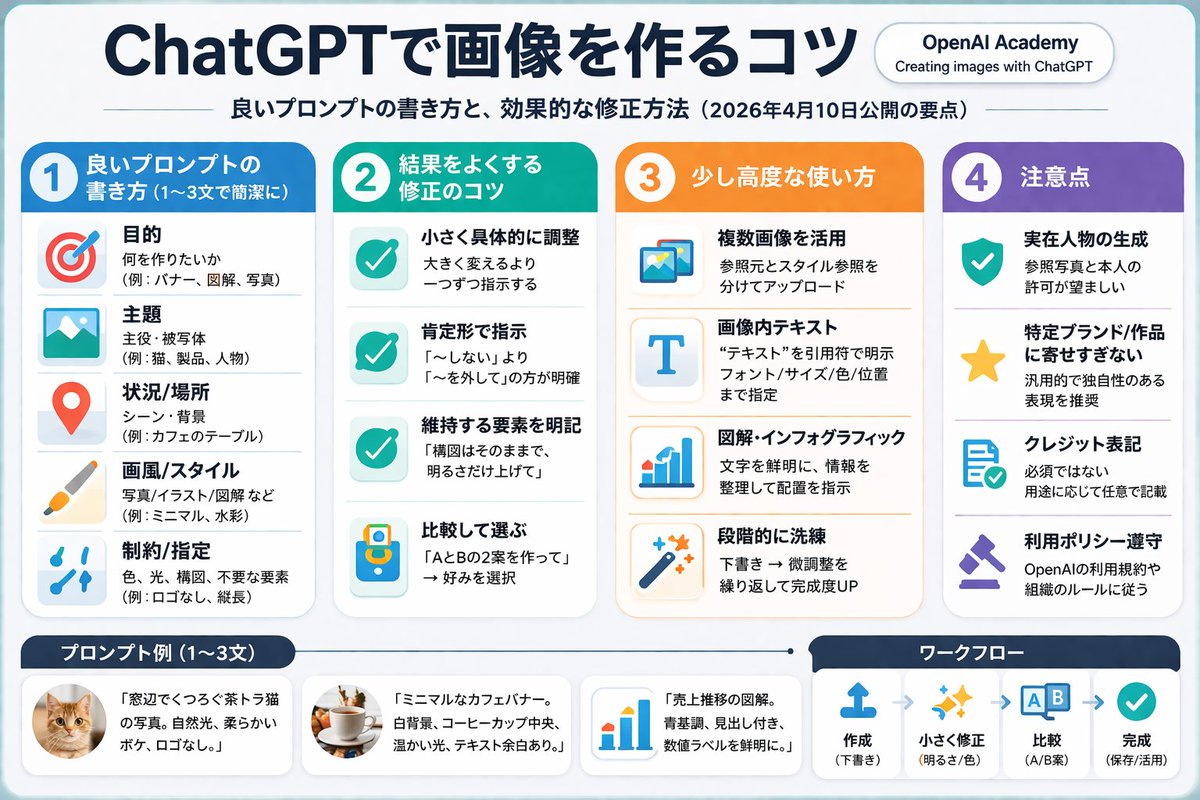
ChatGPT Image Generation Cheat Sheet — Japanese Infographic Prompt
プロンプト · EN
type
信息图速查表
style
简洁、现代、扁平化设计、企业风格、日语文本
header
main_title
{argument name="main title" default="ChatGPT 图像生成技巧"}
subtitle
{argument name="subtitle" default="优质提示词写法与高效修正方法(2026 年 4 月 10 日发布要点)"}
badge
OpenAI Academy / 使用 ChatGPT 创建图像
layout
main_grid
columns
4
sections
item 1
column
1
color_theme
blue
header
1 {argument name="column 1 title" default="优质提示词写法(1-3 句简明扼要)"}
item_count
5
labels
item 1
目的
item 2
主题
item 3
场景/地点
item 4
画风/风格
item 5
约束/指定
item 2
column
2
color_theme
teal green
header
2 {argument name="column 2 title" default="优化结果的修正技巧"}
item_count
4
labels
item 1
微调具体细节
item 2
使用肯定句指令
item 3
明确需保留的元素
item 4
对比选择
item 3
column
3
color_theme
orange
header
3 进阶用法
item_count
4
labels
item 1
利用多张图像
item 2
图像内文本
item 3
图解/信息图
item 4
逐步精炼
item 4
column
4
color_theme
purple
header
4 注意事项
item_count
4
labels
item 1
真实人物生成
item 2
避免过度模仿特定品牌/作品
item 3
署名标注
item 4
遵守使用政策
bottom_section
left_panel
title
{argument name="examples title" default="提示词示例 (1-3 句)"}
item_count
3
thumbnails
item 1
橘猫
item 2
桌上的咖啡杯
item 3
蓝色柱状图
right_panel
title
工作流程
step_count
4
labels
item 1
创建
item 2
微调
item 3
对比
item 4
完成

このプロンプトについて

Generate a structured Japanese infographic covering ChatGPT image tips, workflows, and examples with this corporate, flat-design prompt. Use it as a コンセプトアート starting point for GPT Image 2: keep the visual structure and style constraints intact, then swap in your own subject, brand, or scene.

This prompt is organized as structured JSON with fields such as type, style, header, and layout. Keeping that hierarchy helps the model separate the subject, layout, interface elements, and detail constraints.

Start with small changes to subject, scene, camera, and color, then generate a few variations to compare composition and detail without turning the page copy into keyword stuffing.

このプロンプトの使い方

  1. Copy the entire prompt template.
  2. Paste it into ChatGPT (with DALL·E or image generation enabled).
  3. Customize the arguments (e.g., main title, column names, example items) to fit your content.
  4. Generate the image; if needed, refine with specific instructions like 'make the blue darker'.
  5. Download and use the infographic as a visual guide or cheat sheet.
FAQ

炎鎮🔥 - ₿onochin -

@super_bonochin→

公開日
2026年4月25日
元の言語
EN
モデル
GPT Image 2
カテゴリ
コンセプトアート
GPT Image 2コンセプトアートgpt-image-2twitter
閲覧
2.6K
コピー
345
いいね
67

共有

GPT Image 2 のその他

すべて見る
Gothic Anime Girl Bites Playground Rail — Sora 2 Prompt

Gothic Anime Girl Bites Playground Rail — Sora 2 Prompt

@hoshi122221
AI-Generated Japanese Travel Ad Grid — Sora Prompt

AI-Generated Japanese Travel Ad Grid — Sora Prompt

@jblogpham
Japanese Cinematic Poster Prompt — 4-Panel Agency Ad

Japanese Cinematic Poster Prompt — 4-Panel Agency Ad

@kantamizutamari

Sora2Hubプロンプトで制作を速く。

検索できるプロンプトページから始め、適切なモデル文脈のまま生成へ進めます。

プロンプトを探す