
Chinese Beauty in Modern City Sunset — Sora 2 Prompt
Generate a stunning fusion of classical Chinese elegance and modern urban sunset, featuring rich textures, warm amber tones, and poetic negative space.
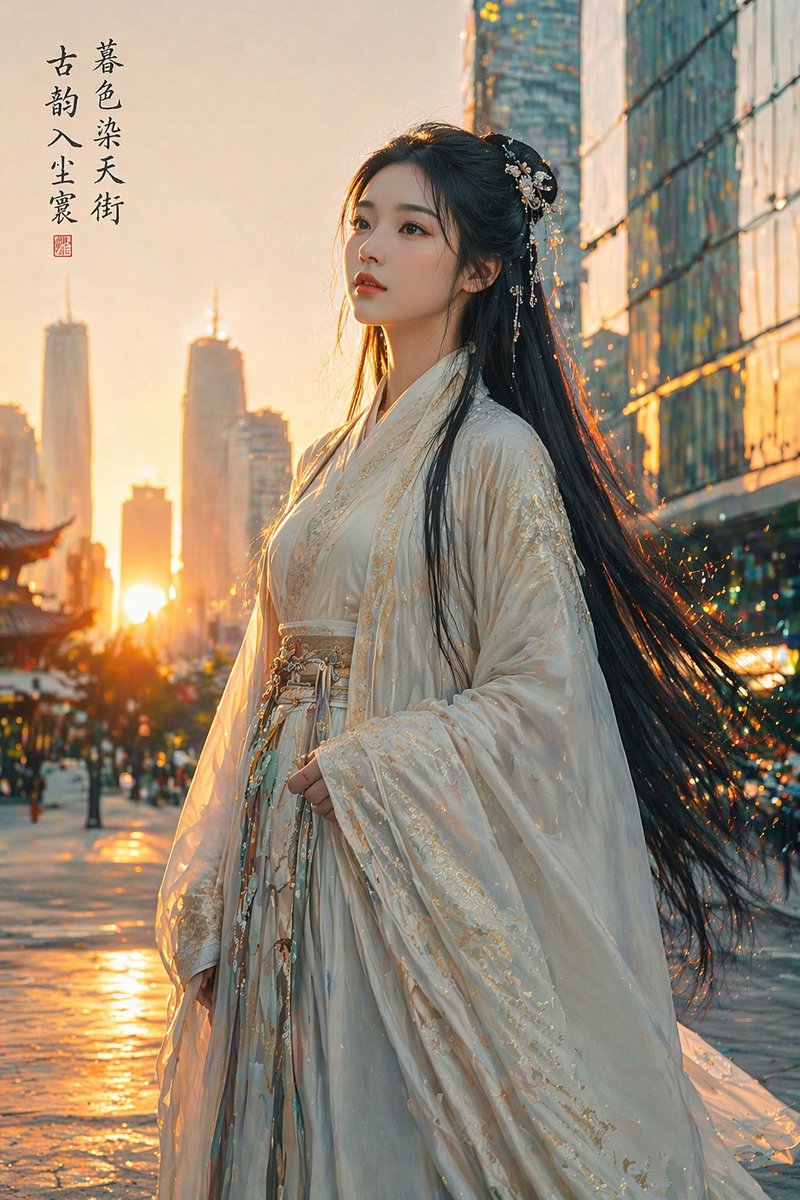
A argsubject: graceful lady with hair like a waterfall of smooth black silk stands contemplatively, her eyes reflecting a classical, reserved charm. Her argattire: wide-sleeved robes made of moon-white brocade and intricate floral embroidery hang elegantly, while traditional silk ribbons and warm jade pendants sway gently with her steps. The golden sunset glow pours across the sky, casting a soft amber halo around her figure. argbackground scene: Modern buildings with cold glass reflections and geometric structures fade into the depth of field, using a traditional ink-wash "negative space" technique to create an airy composition of dialogue between the past and present. A long-lasting oriental poetic atmosphere, blending reality and illusion, quietly melds into the city streets, capturing a serene scroll of time out of place amidst the interplay of warm and cold tones.
このプロンプトについて
Generate a stunning fusion of classical Chinese elegance and modern urban sunset, featuring rich textures, warm amber tones, and poetic negative space. Use it as a コンセプトアート starting point for GPT Image 2: keep the visual structure and style constraints intact, then swap in your own subject, brand, or scene.
Common directions include gptimage2api prompts, gptimage2api, and zh. Treat these tags as creative cues; the prompt structure and preview image are the more useful guide.
Start by replacing subject, attire, and background scene, then keep the camera, composition, and material cues in the same order. This makes the output easier to compare across variations.
このプロンプトの使い方
- Copy the prompt text and paste it into your preferred AI image generator (e.g., Sora 2, Midjourney).
- Choose a model that excels in photorealistic or cinematic styles for best results.
- Customize the variables in curly braces—subject, attire, and background scene—to fit your creative vision.
- Generate the image and iterate by adjusting the model's settings like aspect ratio or style strength.


