
Sora2 Hub
Sora2 Hub
  • プロンプトライブラリ
  • 料金
  • ショーケース
Sora2 Hub
Sora2 Hub
Sora2 Hub

Sora2 Hub

Sora 2、Veo 3.1、Nano Banana Proを搭載したプロフェッショナルAI制作プラットフォーム。高度な制御、HD画質、透かしなしで、魅力的な動画とスタジオ品質の画像を作成できます。

Email:support@sora2hub.org

AI動画生成

  • テキストから動画
  • 画像から動画
  • Veo 3.1
  • Sora 2
  • Kling 3.0
  • Kling 2.6
  • Kling 2.5
  • Runway
  • Wan 2.6
  • Seedance 2.0
  • Hailuo 2.3
  • Grok Imagine
  • HappyHorse-1.0

AI画像生成

  • テキストから画像
  • 画像から画像
  • Nano Banana Pro
  • Nano Banana
  • 4o Image
  • Flux Kontext
  • Z Image
  • Seedream 4.5
  • Seedream 5.0 Lite
  • Nano Banana 2
  • GPT Image 2
  • AI画像アップスケーラー

AIエフェクト

  • AI年齢フィルター
  • AI性別変換
  • AIキス
  • AIハグ
  • ジブリ画像
  • AI人魚フィルター
  • AIボディシェイク
  • スマイルフィルター
  • AI太る
  • アクションフィギュア

製品

  • 機能
  • ショーケース
  • 価格

会社情報

  • 会社概要
  • お問い合わせ

© 2025 • Sora2 Hub ORG All rights reserved.

  • プライバシーポリシー
  • 利用規約
  • 返金ポリシー
  1. ホーム
  2. /
  3. プロンプト
  4. /
  5. GPT Image 2
  6. /
  7. Viral Marketing Case Study UI — Dark Mode Glassmorphism Prompt
GPT Image 2AIプロンプト

Viral Marketing Case Study UI — Dark Mode Glassmorphism Prompt

Generate a sleek, data-rich dark mode landing page mockup with neon accents, timelines, and performance charts for a viral campaign.
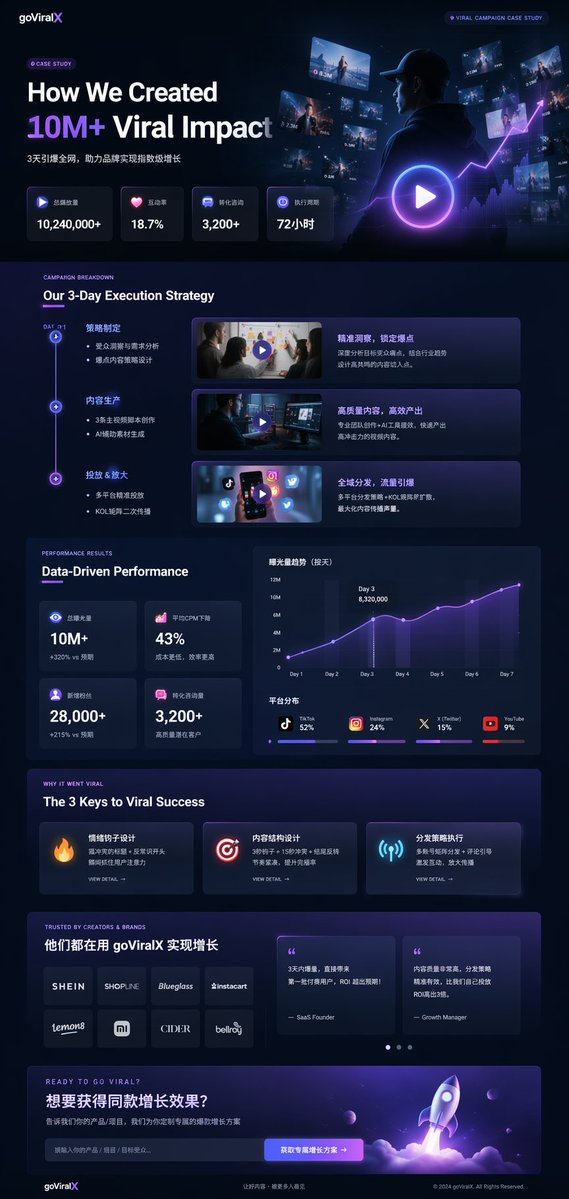
Viral Marketing Case Study UI — Dark Mode Glassmorphism Prompt
プロンプト · EN
type
UI/UX landing page mockup
theme
dark mode, sleek modern aesthetic, glassmorphism, {argument name="primary accent color" default="neon purple and blue"} glowing accents
header
logo
{argument name="brand name" default="goViralX"}
top_right_tag
VIRAL CAMPAIGN CASE STUDY
layout
sections
item 1
name
Hero
headline
{argument name="hero headline" default="How We Created 10M+ Viral Impact"}
subheadline
3天引爆全网, 助力品牌实现指数级增长
stats_row
count
4
labels
item 1
总播放量
item 2
互动率
item 3
转化咨询
item 4
执行周期
values
item 1
{argument name="main statistic" default="10,240,000+"}
item 2
18.7%
item 3
3,200+
item 4
72小时
visual
cinematic shot of a person in a hoodie looking at glowing digital screens and graphs, large play button overlay
item 2
name
Strategy
title
Our 3-Day Execution Strategy
layout_type
vertical timeline
steps_count
3
elements_per_step
item 1
timeline node
item 2
title
item 3
bullet points
item 4
video thumbnail with play button
item 5
description box
item 3
name
Performance
title
Data-Driven Performance
left_column
stat_cards_count
4
values
item 1
10M+
item 2
43%
item 3
28,000+
item 4
3,200+
right_column
charts_count
2
chart_1
line graph showing 7-day growth peaking at Day 3
chart_2
horizontal segmented bar chart showing platform distribution (TikTok 52%, Instagram 24%, X 15%, YouTube 9%)
item 4
name
Keys to Success
title
The 3 Keys to Viral Success
cards_count
3
card_elements
item 1
glowing icon (fire, target, antenna)
item 2
title
item 3
description
item 4
VIEW DETAIL link
item 5
name
Social Proof
title
TRUSTED BY CREATORS & BRANDS
left_column
logos_count
8
grid
2x4
brands
item 1
SHEIN
item 2
SHOPLINE
item 3
Blueglass
item 4
instacart
item 5
lemon8
item 6
mi
item 7
CIDER
item 8
bellroy
right_column
testimonial_cards_count
2
elements
item 1
quote
item 2
author title (SaaS Founder, Growth Manager)
item 6
name
Call to Action
title
READY TO GO VIRAL?
interactive_elements
item 1
text input field
item 2
glowing button with text '{argument name="call to action text" default="获取专属增长方案 ->"}'
visual
3D render of a rocket ship taking off with purple and blue flames

このプロンプトについて

Generate a sleek, data-rich dark mode landing page mockup with neon accents, timelines, and performance charts for a viral campaign. Use it as a コンセプトアート starting point for GPT Image 2: keep the visual structure and style constraints intact, then swap in your own subject, brand, or scene.

This prompt is organized as structured JSON with fields such as type, theme, header, and layout. Keeping that hierarchy helps the model separate the subject, layout, interface elements, and detail constraints.

Start with small changes to subject, scene, camera, and color, then generate a few variations to compare composition and detail without turning the page copy into keyword stuffing.

このプロンプトの使い方

  1. Copy the entire prompt object into your preferred AI image generator (e.g., Sora, Midjourney).
  2. Replace the placeholder variables like {brand name} and {hero headline} with your own text.
  3. Adjust the primary accent color argument if a different color scheme is desired.
  4. Generate the image, iterating on the prompt if needed to refine the layout or data.

FAQ

开发者Hailey

@prompts→

公開日
2026年4月30日
元の言語
EN
モデル
GPT Image 2
カテゴリ
コンセプトアート
GPT Image 2コンセプトアートgpt-image-2gptimage2api promptsgptimage2apien
閲覧
50
コピー
3
いいね
2

共有

GPT Image 2 のその他

すべて見る
Anime Idol Profile Page — Lavender Art Style Prompt

Anime Idol Profile Page — Lavender Art Style Prompt

@uzuyanurp
Gothic Anime Girl with Hidden Face — Sora 2 Prompt

Gothic Anime Girl with Hidden Face — Sora 2 Prompt

@hoshi122221
Minimalist Skincare Brand Manual — Sora 2 Prompt

Minimalist Skincare Brand Manual — Sora 2 Prompt

@FranromeGraph

Sora2Hubプロンプトで制作を速く。

検索できるプロンプトページから始め、適切なモデル文脈のまま生成へ進めます。

プロンプトを探す

