
Sora2 Hub
Sora2 Hub
  • プロンプトライブラリ
  • 料金
  • ショーケース
Sora2 Hub
Sora2 Hub
Sora2 Hub

Sora2 Hub

Sora 2、Veo 3.1、Nano Banana Proを搭載したプロフェッショナルAI制作プラットフォーム。高度な制御、HD画質、透かしなしで、魅力的な動画とスタジオ品質の画像を作成できます。

Email:support@sora2hub.org

AI動画生成

  • テキストから動画
  • 画像から動画
  • Veo 3.1
  • Sora 2
  • Kling 3.0
  • Kling 2.6
  • Kling 2.5
  • Runway
  • Wan 2.6
  • Seedance 2.0
  • Hailuo 2.3
  • Grok Imagine
  • HappyHorse-1.0

AI画像生成

  • テキストから画像
  • 画像から画像
  • Nano Banana Pro
  • Nano Banana
  • 4o Image
  • Flux Kontext
  • Z Image
  • Seedream 4.5
  • Seedream 5.0 Lite
  • Nano Banana 2
  • GPT Image 2
  • AI画像アップスケーラー

AIエフェクト

  • AI年齢フィルター
  • AI性別変換
  • AIキス
  • AIハグ
  • ジブリ画像
  • AI人魚フィルター
  • AIボディシェイク
  • スマイルフィルター
  • AI太る
  • アクションフィギュア

製品

  • 機能
  • ショーケース
  • 価格

会社情報

  • 会社概要
  • お問い合わせ

© 2025 • Sora2 Hub ORG All rights reserved.

  • プライバシーポリシー
  • 利用規約
  • 返金ポリシー
  1. ホーム
  2. /
  3. プロンプト
  4. /
  5. GPT Image 2
  6. /
  7. Dual-Axis Crime Data Chart — Editorial Infographic Prompt
GPT Image 2AIプロンプト

Dual-Axis Crime Data Chart — Editorial Infographic Prompt

Creates a journalistic line chart comparing actual US crime rates with public perception, complete with headlines and data callouts.
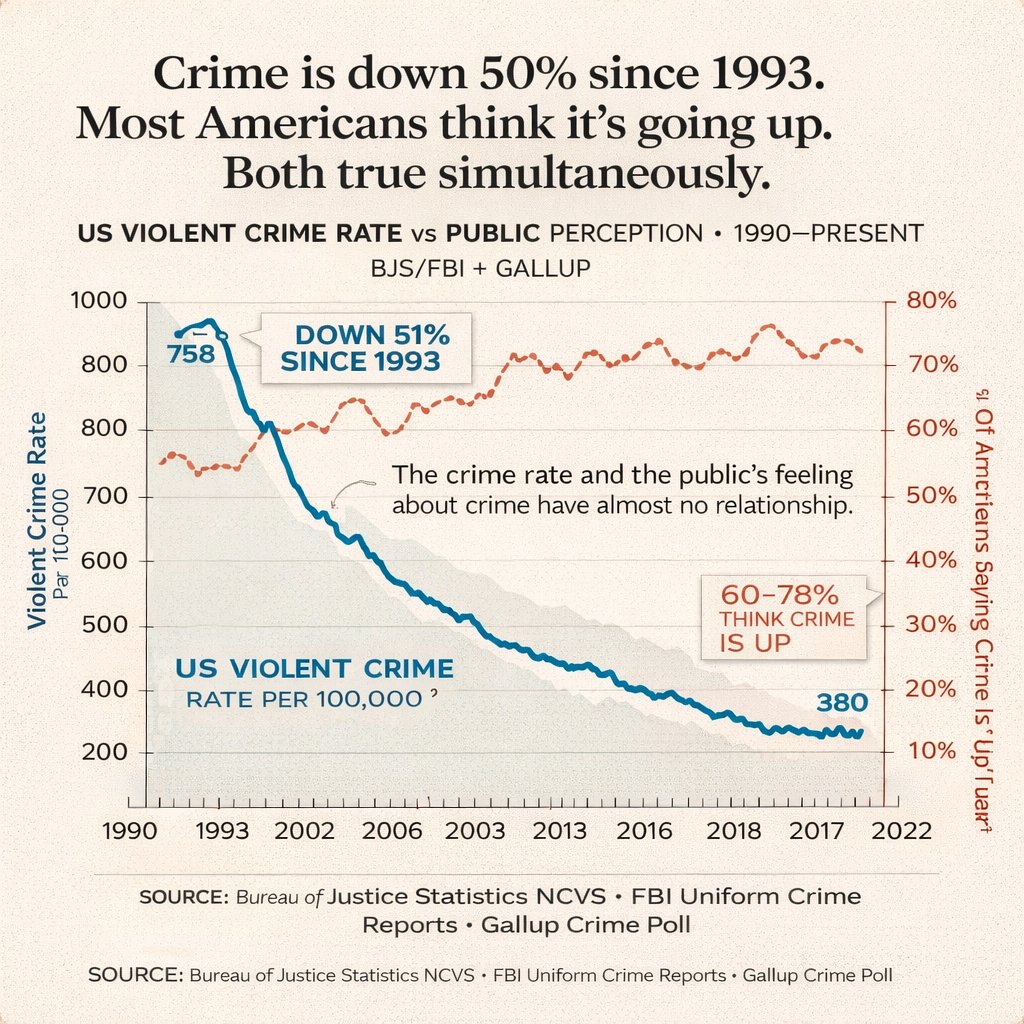
Dual-Axis Crime Data Chart — Editorial Infographic Prompt
プロンプト · EN
type
dual-axis line chart infographic
style
editorial data visualization, matte paper texture background, clean journalistic design
typography
headline
serif font, bold, centered
labels
sans-serif, clean, uppercase and sentence case mix
layout
header
main_title
{argument name="main headline" default="Crime is down 50% since 1993. Most Americans think it's going up. Both true simultaneously."}
subtitle
US VIOLENT CRIME RATE vs PUBLIC PERCEPTION • 1990–PRESENT BJS/FBI + GALLUP
chart_area
background
light beige with faint horizontal grid lines
axes
x_axis
label
Years
ticks
item 1
1990
item 2
1993
item 3
2002
item 4
2006
item 5
2003
item 6
2013
item 7
2016
item 8
2018
item 9
2017
item 10
2022
y_axis_left
label
{argument name="left axis label" default="Violent Crime Rate Par 100-000"}
scale
item 1
200
item 2
400
item 3
500
item 4
600
item 5
700
item 6
800
item 7
800
item 8
1000
color
black
y_axis_right
label
{argument name="right axis label" default="% Of Americans Saying Crime Is 'Up'"}
scale
item 1
10%
item 2
20%
item 3
30%
item 4
40%
item 5
50%
item 6
60%
item 7
70%
item 8
80%
color
dark red
data_series
item 1
name
Violent Crime Rate
style
thick solid blue line with light grey shading underneath
trend
starts high, drops sharply, then steadily declines
data_labels
item 1
758
item 2
380
item 2
name
Public Perception
style
dashed dark red/orange line with small circle markers
trend
fluctuates but generally trends upwards, staying high
annotations
item 1
text
{argument name="blue line annotation" default="DOWN 51% SINCE 1993"}
style
callout box with pointer, blue text
position
top left, pointing to the blue line drop
item 2
text
60-78% THINK CRIME IS UP
style
callout box with pointer, red text
position
mid right, pointing to the dashed red line
item 3
text
{argument name="center insight text" default="The crime rate and the public's feeling about crime have almost no relationship."}
style
floating text with a small squiggly arrow
position
center, between the two lines
footer
source_text
SOURCE: Bureau of Justice Statistics NCVS • FBI Uniform Crime Reports • Gallup Crime Poll
repetition
text is repeated twice at the bottom

このプロンプトについて

Creates a journalistic line chart comparing actual US crime rates with public perception, complete with headlines and data callouts. Use it as a コンセプトアート starting point for GPT Image 2: keep the visual structure and style constraints intact, then swap in your own subject, brand, or scene.

This prompt is organized as structured JSON with fields such as type, style, typography, and layout. Keeping that hierarchy helps the model separate the subject, layout, interface elements, and detail constraints.

Start with small changes to subject, scene, camera, and color, then generate a few variations to compare composition and detail without turning the page copy into keyword stuffing.

このプロンプトの使い方

  1. Copy the full prompt from the page.
  2. Paste it into an AI model that supports JSON/structured prompts (like Sora 2).
  3. Customize the headline, axis labels, or data arguments to fit your dataset.
  4. Generate the image and refine if needed by adjusting style keywords.

FAQ

Aditya Panchal

@prompts→

公開日
2026年4月30日
元の言語
EN
モデル
GPT Image 2
カテゴリ
コンセプトアート
GPT Image 2コンセプトアートgpt-image-2gptimage2api promptsgptimage2apien
閲覧
2.0K
コピー
176
いいね
146

共有

GPT Image 2 のその他

すべて見る
Minimalist Mother's Day Wallpaper — Sora 2 Prompt with Calligraphy & Carnations

Minimalist Mother's Day Wallpaper — Sora 2 Prompt with Calligraphy & Carnations

@EdimakorJP
Sacred Dragon Dome Ceiling Mural — Sora 2 Prompt

Sacred Dragon Dome Ceiling Mural — Sora 2 Prompt

@KanaWorks_AI
Cubist Minimalist Fashion Portrait — Sora 2 Prompt

Cubist Minimalist Fashion Portrait — Sora 2 Prompt

@ChillaiKalan__

Sora2Hubプロンプトで制作を速く。

検索できるプロンプトページから始め、適切なモデル文脈のまま生成へ進めます。

プロンプトを探す

