
エレガント学園アニメキャラクターシート — Sora 2プロンプト
高級学園生キャラクターの、洗練されたマガジンスタイルのキャラクターデザインリファレンスシートを生成します。クリーンなレイアウト、多言語ラベル、衣装の詳細な分解図が特徴です。
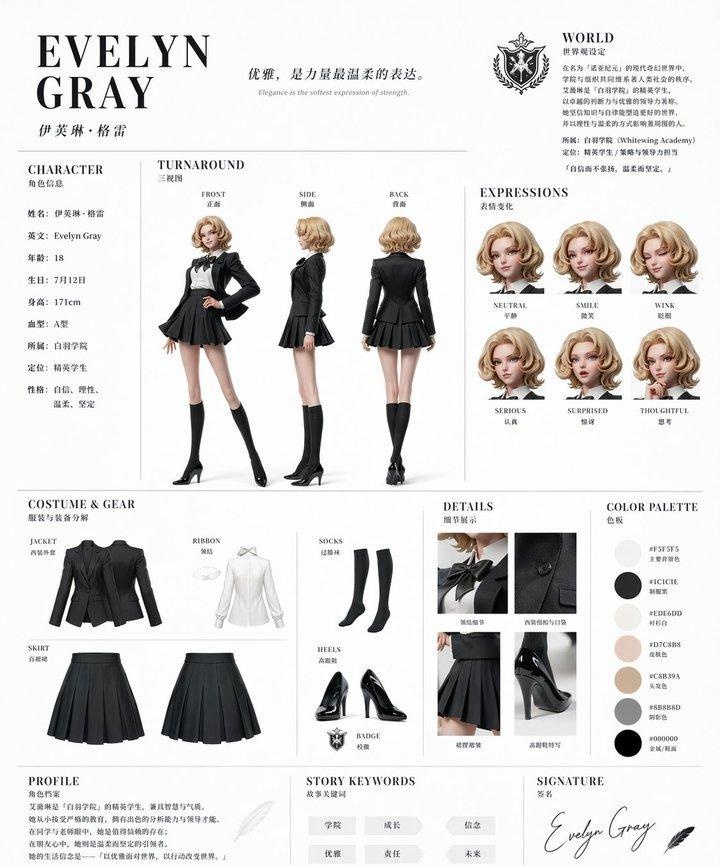
このプロンプトについて
高級学園生キャラクターの、洗練されたマガジンスタイルのキャラクターデザインリファレンスシートを生成します。クリーンなレイアウト、多言語ラベル、衣装の詳細な分解図が特徴です。 Use it as a コンセプトアート starting point for GPT Image 2: keep the visual structure and style constraints intact, then swap in your own subject, brand, or scene.
This prompt is organized as structured JSON with fields such as type, style, character, outfit, layout, branding, and rendering. Keeping that hierarchy helps the model separate the subject, layout, interface elements, and detail constraints.
Start with small changes to subject, scene, camera, and color, then generate a few variations to compare composition and detail without turning the page copy into keyword stuffing.
このプロンプトの使い方
- プロンプト全体をコピーし、Sora 2(または互換性のあるAI画像生成インターフェース)に貼り付けます。
{character name}、{hair color}、{outfit color}などのカスタマイズ可能な引数を編集して、独自のキャラクターを作成します。- アニメやイラストの出力に対応した、適切なモデルやスタイル設定を選択すると、最良の結果が得られます。
- 画像を生成し、三面図、表情シート、衣装クローズアップなどの複数セクションからなるリファレンスシートを確認します。
- 変数を調整したり、シーンの文脈を追加したりして、キャラクターデザインを理想に近づけます。


