
Sora2 Hub
Sora2 Hub
  • プロンプトライブラリ
  • 料金
  • ショーケース
Sora2 Hub
Sora2 Hub
Sora2 Hub

Sora2 Hub

Sora 2、Veo 3.1、Nano Banana Proを搭載したプロフェッショナルAI制作プラットフォーム。高度な制御、HD画質、透かしなしで、魅力的な動画とスタジオ品質の画像を作成できます。

Email:support@sora2hub.org

AI動画生成

  • テキストから動画
  • 画像から動画
  • Veo 3.1
  • Sora 2
  • Kling 3.0
  • Kling 2.6
  • Kling 2.5
  • Runway
  • Wan 2.6
  • Seedance 2.0
  • Hailuo 2.3
  • Grok Imagine
  • HappyHorse-1.0

AI画像生成

  • テキストから画像
  • 画像から画像
  • Nano Banana Pro
  • Nano Banana
  • 4o Image
  • Flux Kontext
  • Z Image
  • Seedream 4.5
  • Seedream 5.0 Lite
  • Nano Banana 2
  • GPT Image 2
  • AI画像アップスケーラー

AIエフェクト

  • AI年齢フィルター
  • AI性別変換
  • AIキス
  • AIハグ
  • ジブリ画像
  • AI人魚フィルター
  • AIボディシェイク
  • スマイルフィルター
  • AI太る
  • アクションフィギュア

製品

  • 機能
  • ショーケース
  • 価格

会社情報

  • 会社概要
  • お問い合わせ

© 2025 • Sora2 Hub ORG All rights reserved.

  • プライバシーポリシー
  • 利用規約
  • 返金ポリシー
  1. ホーム
  2. /
  3. プロンプト
  4. /
  5. GPT Image 2
  6. /
  7. Iridescent Butterfly UI Design System — Sora 2 Prompt
GPT Image 2AIプロンプト

Iridescent Butterfly UI Design System — Sora 2 Prompt

Create a stunning dark-mode UI/UX design system with luminous butterfly-inspired aesthetics, perfect for portfolio showcases and case studies.
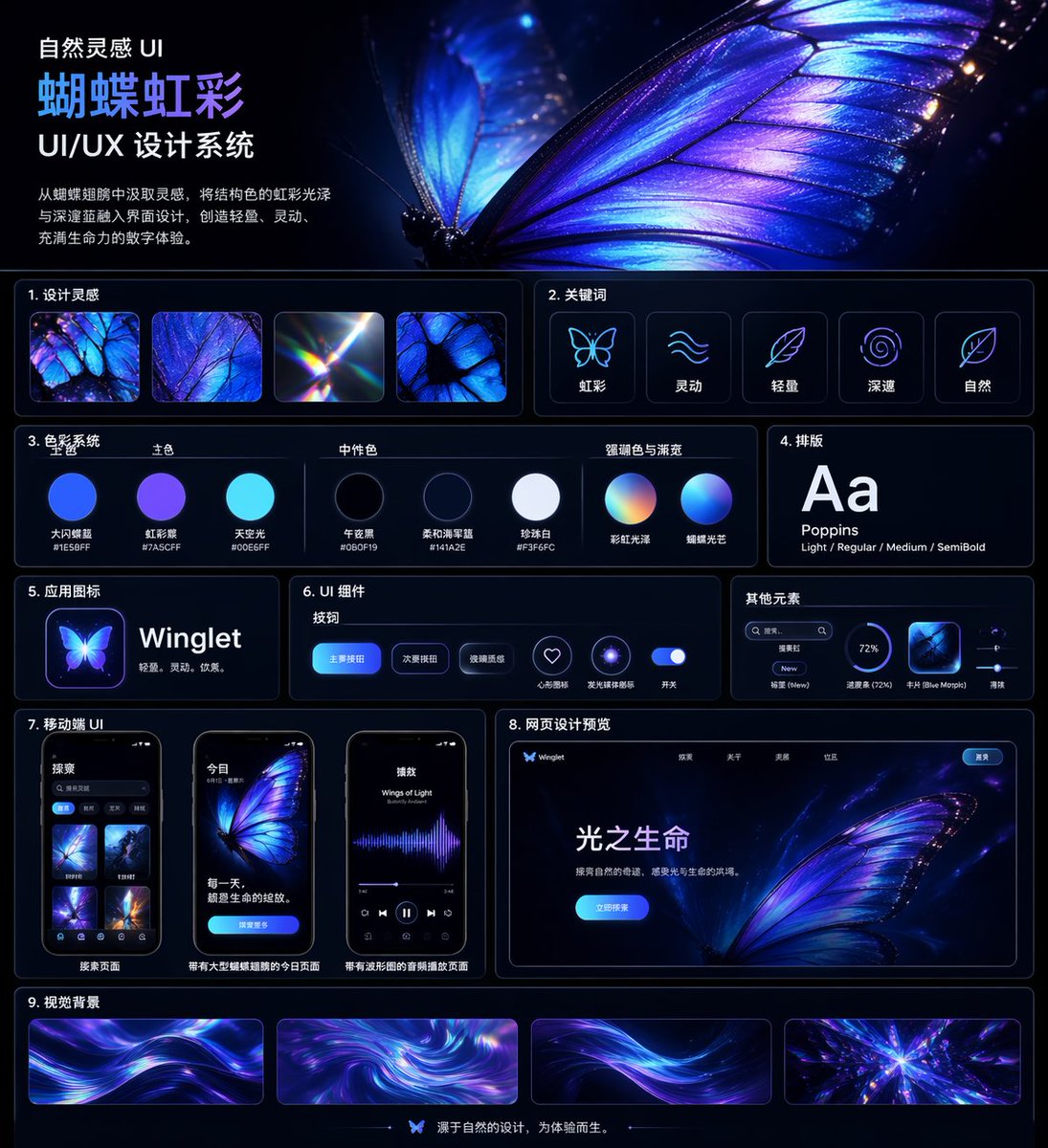
Iridescent Butterfly UI Design System — Sora 2 Prompt
プロンプト · EN
type
UI/UX 设计系统展示项目
theme
深色模式,自然灵感,发光虹彩美学
language
中文
canvas
aspect_ratio
方形海报
background
深午夜蓝至黑色,带有微妙光晕
style
高级未来感展示项目,配有纤细的霓虹蓝面板轮廓、光泽高光、柔和光晕及高对比度
header
title
自然灵感 UI {argument name="system title" default="蝴蝶虹彩"} UI/UX 设计系统
description
{argument name="chinese description" default="从蝴蝶翅膀中汲取灵感,将结构色的虹彩光泽与深邃蓝融入界面设计,创造轻盈、灵动、充满生命力的数字体验。"}
hero_image
一个超细节的发光蝴蝶翅膀,呈现电光蓝、紫罗兰色和虹彩青色,占据右上角一半区域,可见脉络结构、半透明边缘、火花状粒子,后方有第二个模糊的翅膀
layout
sections
item 1
title
1. 设计灵感
position
左上角,标题下方
count
4
labels
item 1
虹彩蝴蝶翅膀微距
item 2
蓝紫色翅膀纹理特写
item 3
光折射棱镜光晕
item 4
蝴蝶翅膀细胞图案
item 2
title
2. 关键词
position
右上角,主图下方
count
5
labels
item 1
虹彩
item 2
灵动
item 3
轻盈
item 4
深邃
item 5
自然
icon_style
圆角深色卡片内的简约发光线条图标
item 3
title
3. 色彩系统
position
中左
subsections
item 1
title
主色
count
3
labels
item 1
大闪蝶蓝 #1E5BFF
item 2
虹彩紫 #7A5CFF
item 3
天空光 #00E6FF
item 2
title
中性色
count
3
labels
item 1
午夜黑 #060F19
item 2
柔和海军蓝 #141A2E
item 3
珍珠白 #F3F6FC
item 3
title
强调色与渐变
count
2
labels
item 1
彩虹光泽
item 2
蝴蝶光芒
visual
圆形色板和渐变球体,下方附有中文标签
item 4
title
4. 排版
position
中右
count
1
labels
item 1
Aa Poppins Light / Regular / Medium / SemiBold
visual
深色卡片上的大号白色 Aa
item 5
title
5. 应用图标
position
左中
count
1
text
{argument name="app name" default="Winglet"} 轻盈。灵动。优雅。
visual
应用名称旁的发光蝴蝶应用图标
item 6
title
6. UI 组件
position
中心
subsections
item 1
title
按钮
count
3
labels
item 1
主要按钮
item 2
次要按钮
item 3
玻璃质感
item 2
title
图标
count
2
labels
item 1
心形收藏
item 2
发光圆环
item 3
title
开关
count
1
labels
item 1
开关
visual
深色面板上的圆角蓝色按钮、霓虹图标按钮及发光开关
item 7
title
其他元素
position
右中
count
4
labels
item 1
搜索框
item 2
标签 New
item 3
进度条 (72%)
item 4
卡片 Blue Morpho
visual
紧凑水平卡片中的小型实用 UI 组件
item 8
title
7. 移动端 UI
position
左下
count
3
labels
item 1
搜索页面
item 2
带有大型蝴蝶插图的今日页面
item 3
带有波形图的音频播放页面
visual
三款圆角智能手机样机,深色界面,蓝紫色蝴蝶视觉效果
item 9
title
8. 网页设计预览
position
右下
count
1
labels
item 1
光之生命
visual
桌面端落地页样机,包含蝴蝶主图、顶部导航、亮蓝色行动号召按钮及中文正文
item 10
title
9. 视觉背景
position
底部全宽
count
4
labels
item 1
流光丝带背景 1
item 2
漩涡虹彩
item 3
流光丝带背景 2
item 4
光芒晶体爆发
visual
四个紫色、蓝色和青色的长方形背景样本
footer
count
1
text
源于自然的设计,为体验而生。
center_icon
小型蝴蝶图标
art_direction
materials
玻璃拟态、霓虹边缘光、平滑渐变、微妙反射
colors
电光蓝、靛蓝、紫罗兰、青色、白色
composition
整洁的网格布局,包含 9 个带编号的内容板块,充足的留白,纤细的圆角边框,以及占据主导地位的蝴蝶主图
render_quality
高度精致,排版清晰,高级 Behance 风格设计系统项目

このプロンプトについて

Create a stunning dark-mode UI/UX design system with luminous butterfly-inspired aesthetics, perfect for portfolio showcases and case studies. Use it as a コンセプトアート starting point for GPT Image 2: keep the visual structure and style constraints intact, then swap in your own subject, brand, or scene.

This prompt is organized as structured JSON with fields such as type, theme, language, canvas, header, layout, and art direction. Keeping that hierarchy helps the model separate the subject, layout, interface elements, and detail constraints.

Start with small changes to subject, scene, camera, and color, then generate a few variations to compare composition and detail without turning the page copy into keyword stuffing.

このプロンプトの使い方

  1. Copy the provided prompt block from this page.
  2. Paste it into your preferred AI model that supports structured design generation (e.g., Sora 2, Midjourney, or Stable Diffusion with appropriate extensions).
  3. Customize the variables: change system title (default: "蝴蝶虹彩"), chinese description, and app name (default: "Winglet") to fit your project.
  4. Generate the output. The AI will produce a detailed dark-mode UI/UX design system layout with iridescent butterfly elements.
  5. Use the generated design for case studies, portfolio covers, or as a style guide.

FAQ

兔妹_兔子

@tuzi_ai→

公開日
2026年4月25日
元の言語
EN
モデル
GPT Image 2
カテゴリ
コンセプトアート
GPT Image 2コンセプトアートgpt-image-2twitter
閲覧
973
コピー
145
いいね
43

共有

GPT Image 2 のその他

すべて見る
Ultra-Realistic 3D Exploded View Prompt: Sony BRAVIA 8K TV

Ultra-Realistic 3D Exploded View Prompt: Sony BRAVIA 8K TV

@Ankit_patel211
Luxury Tennis Fashion Poster — Bold Studio Shoot Sora Prompt

Luxury Tennis Fashion Poster — Bold Studio Shoot Sora Prompt

@blueski68251660
Photorealistic Fashion Magazine Cover — Sora 2 Prompt

Photorealistic Fashion Magazine Cover — Sora 2 Prompt

@aichof21

Sora2Hubプロンプトで制作を速く。

検索できるプロンプトページから始め、適切なモデル文脈のまま生成へ進めます。

プロンプトを探す

