
Anthropomorphic Neuron on SF Cable Car — Whimsical Sora 2 Prompt
Generate a surreal, cinematic portrait of a Victorian-style neuron commuting on a San Francisco cable car at golden hour—perfect for whimsical AI art projects.
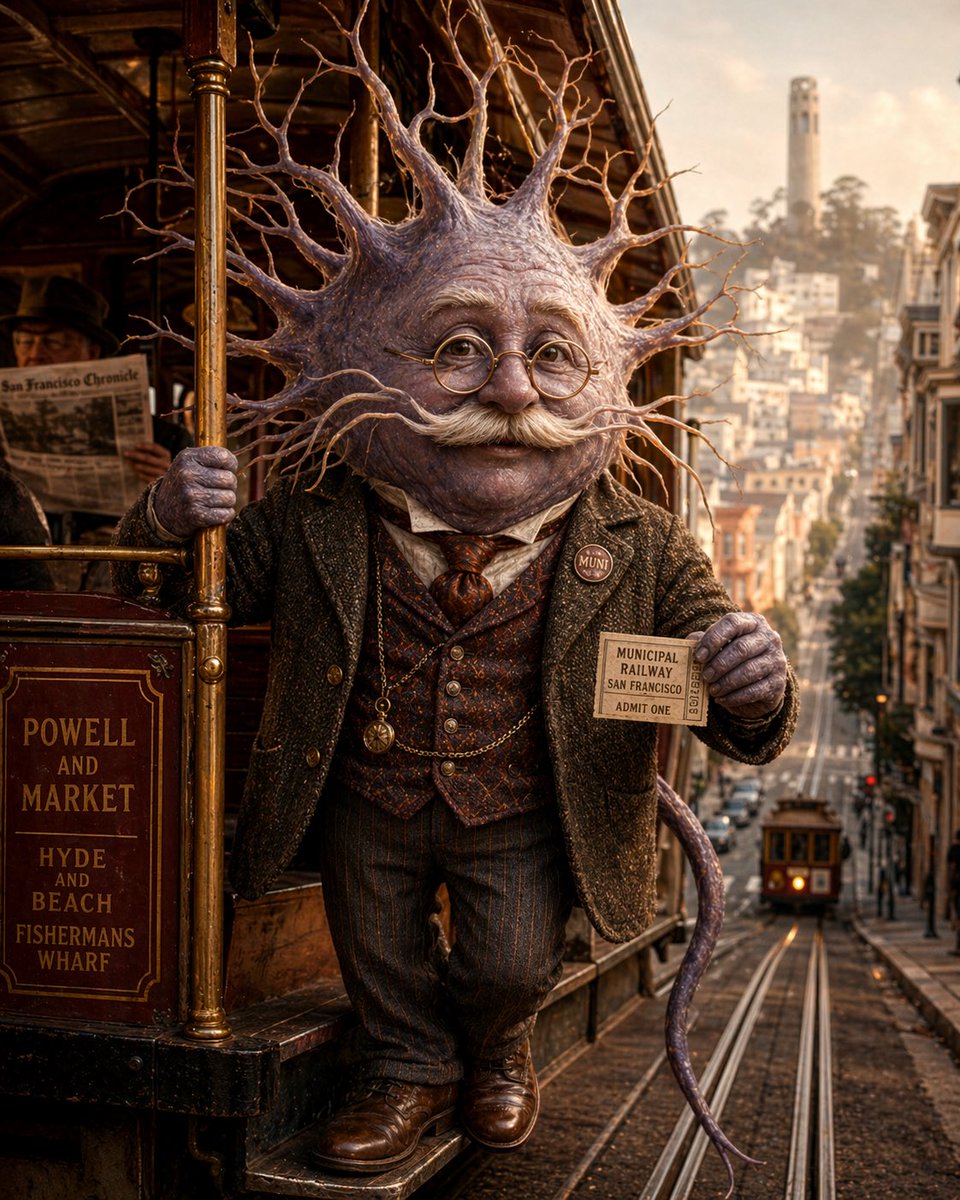
A whimsical cinematic portrait of an anthropomorphic neuron riding on the outside step of a classic San Francisco cable car at golden hour. The character has a large neuron head with a rounded central body and dozens of long branching dendrites radiating outward like a crown, textured in pale lavender, mauve, and fleshy gray with subtle organic sheen. Its face area is obscured and featureless. The figure is dressed like a Victorian or Edwardian gentleman commuter: dark tweed jacket, patterned waistcoat, collared shirt, necktie, pinstriped trousers, polished brown leather shoes, and a pocket watch chain. One hand grips a brass pole on the cable car, and the other hand holds up a vintage transit ticket reading "MUNICIPAL RAILWAY SAN FRANCISCO ADMIT ONE." Add a small round lapel pin that says "MUNI." A slender purple tail-like axon curls behind the body. The cable car is richly detailed varnished wood and brass, with a route sign on the side reading "POWELL AND MARKET / HYDE AND BEACH / FISHERMANS WHARF." In the background, show a steep San Francisco street with cable tracks descending into the distance, a second cable car far down the hill, dense urban buildings on both sides, and Coit Tower visible on a hazy hilltop. Warm nostalgic lighting, shallow depth of field, ultra-detailed textures, surreal realism, humorous but elegant mood, centered full-body composition, vertical framing.
このプロンプトについて
Generate a surreal, cinematic portrait of a Victorian-style neuron commuting on a San Francisco cable car at golden hour—perfect for whimsical AI art projects. Use it as a コンセプトアート starting point for GPT Image 2: keep the visual structure and style constraints intact, then swap in your own subject, brand, or scene.
Common directions include gptimage2api prompts, gptimage2api, and ko. Treat these tags as creative cues; the prompt structure and preview image are the more useful guide.
Start with small changes to subject, scene, camera, and color, then generate a few variations to compare composition and detail without turning the page copy into keyword stuffing.
このプロンプトの使い方
- Copy the entire prompt text from the description field above.
- Paste it into your preferred AI image generator (Sora 2, Midjourney, DALL·E, or Stable Diffusion).
- Tweak variables like lighting (golden hour, overcast), mood (humorous, elegant), or background details (add fog, change time of day).
- Adjust the aspect ratio for vertical or square framing based on your project needs.
- Generate multiple variations and upscale the best result for print or digital use.


