
GPT Image 2AIプロンプト
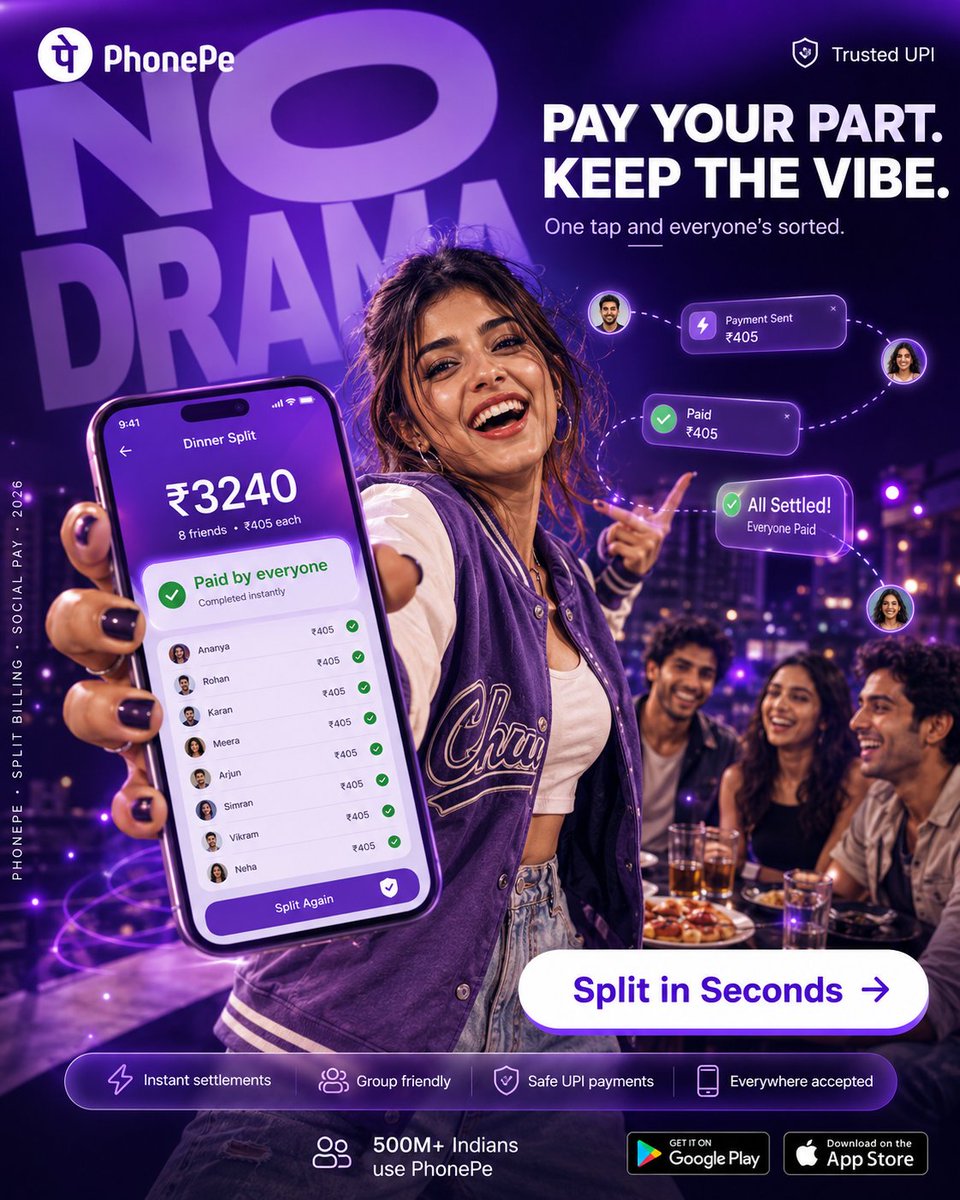
PhonePe UPI Split Bill Party Ad — Neon Purple Style
Generate a high-resolution, cinematic social media ad for PhonePe's instant group bill-splitting feature, featuring a stylish nightlife scene, detailed phone UI, and glowing transaction cards.
プロンプト · EN
目标:为 argbrand name: PhonePe 制作一个精致的竖版社交媒体广告,以大胆的派对/夜生活氛围推广 UPI 支付的即时群组账单分摊功能。 画布:1:1 正方形数字广告,高分辨率,深紫色和霓虹紫配色,光泽感金融科技营销风格,具有戏剧性的景深效果。背景为夜晚的屋顶餐厅或酒廊,带有紫色光斑,以及餐桌旁的一群朋友。 布局:左上角显示白色的 PhonePe 标志和文字标识。右上角显示一个带有“Trusted UPI”文字的小盾牌图标。在主体后方,放置巨大的半透明紫色文字“NO DRAMA”,稍微倾斜并填充左上角背景。在右上角,放置加粗的白色大写主标题:“PAY YOUR PART. KEEP THE VIBE.”,下方为副标题:“One tap and everyone’s sorted.”。在副标题下方添加一条简短的装饰性下划线。 主体:前景中一位年轻女性自信地站在派对桌旁,身穿紫色棒球夹克,内搭白色露脐上衣和浅色牛仔裤,涂着黑色指甲油。她左手将一部大屏智能手机靠近镜头,使其成为前景的主导物体,同时另一只手俏皮地指向前方。她的脸部应被一个自然的肤色棕色矩形遮挡块覆盖,背景中三位坐着的朋友的可见脸部也应被类似的肤色矩形块覆盖。保持姿势、服装和灯光时尚且年轻化。 手机屏幕:展示一个紫色的 PhonePe 风格账单分摊界面,标题为“Dinner Split”。顶部显示时间“9:41”。大额金额:“₹3240”。下方显示:“8 friends • ₹405 each”。一张绿色成功卡片显示“Paid by everyone”和“Completed instantly”。在下方,准确显示 8 行分项好友列表,每行包含一个小圆形头像、姓名、金额“₹405”和一个绿色对勾:1) Ananya, 2) Rohan, 3) Karan, 4) Meera, 5) Arjun, 6) Simran, 7) Vikram, 8) Neha。在屏幕底部,添加一个紫色的圆角按钮,标注为“Split Again”,并带有白色盾牌/对勾图标。 浮动 UI 元素:添加 3 张发光的紫色交易卡片,通过虚线曲线和小圆形头像气泡连接:1) 带有闪电图标的“Payment Sent ₹405”,2) 带有绿色对勾图标的“Paid ₹405”,3) 带有绿色对勾图标的“All Settled! Everyone Paid”。让它们悬浮在右侧主体指向的手部周围。 号召性用语 (CTA):在右下角中心附近,放置一个大的白色药丸状按钮,带有紫色文字“Split in Seconds”和一个向右的箭头图标。 底部信息栏:添加一个半透明的圆角紫色长条,从左到右包含 4 个功能胶囊/图标:1) 带有“Instant settlements”的闪电图标,2) 带有“Group friendly”的群组图标,3) 带有“Safe UPI payments”的盾牌图标,4) 带有“Everywhere accepted”的手机图标。在其下方或旁边显示一个小群组图标,标注“500M+ Indians use PhonePe”。在右下角,包含 2 个应用商店徽章:“GET IT ON Google Play”和“Download on the App Store”。 侧边文字:沿左侧边缘,添加白色小字竖排文字:“PHONEPE • SPLIT BILLING • SOCIAL PAY • 2026”。 视觉风格:高级超写实广告合成,电影级紫色轮廓光,光泽感 UI 叠加,霓虹光效,充满活力的夜生活氛围,清晰的前景手机,模糊的背景朋友和城市灯光,清晰易读的排版。 约束条件:使用精确的可见数量:手机上有 8 行好友列表,3 张浮动支付卡片,4 个底部功能项,2 个商店徽章,总共 4 个遮挡脸部的方块。避免添加额外的标志、额外的支付卡片或额外的功能胶囊。
このプロンプトについて
Generate a high-resolution, cinematic social media ad for PhonePe's instant group bill-splitting feature, featuring a stylish nightlife scene, detailed phone UI, and glowing transaction cards. Use it as a コンセプトアート starting point for GPT Image 2: keep the visual structure and style constraints intact, then swap in your own subject, brand, or scene.
Start by replacing brand name, then keep the camera, composition, and material cues in the same order. This makes the output easier to compare across variations.
このプロンプトの使い方
- Copy this entire prompt and paste it into your AI image generator (like Sora or a compatible model).
- Select a model that excels at photorealistic ad composites and complex UI elements.
- You can tweak the
brand namevariable (e.g., change 'PhonePe' to another UPI app) to customize the branding. - For best results, use a high or max resolution setting to capture the detailed phone screen and floating UI elements.
- Generate the image and review. You can adjust lighting keywords (e.g., 'cinematic purple rim light') for different moods.


