
GPT Image 2AIプロンプト
Travel Fridge Magnet Poster — Sora 2 Prompt
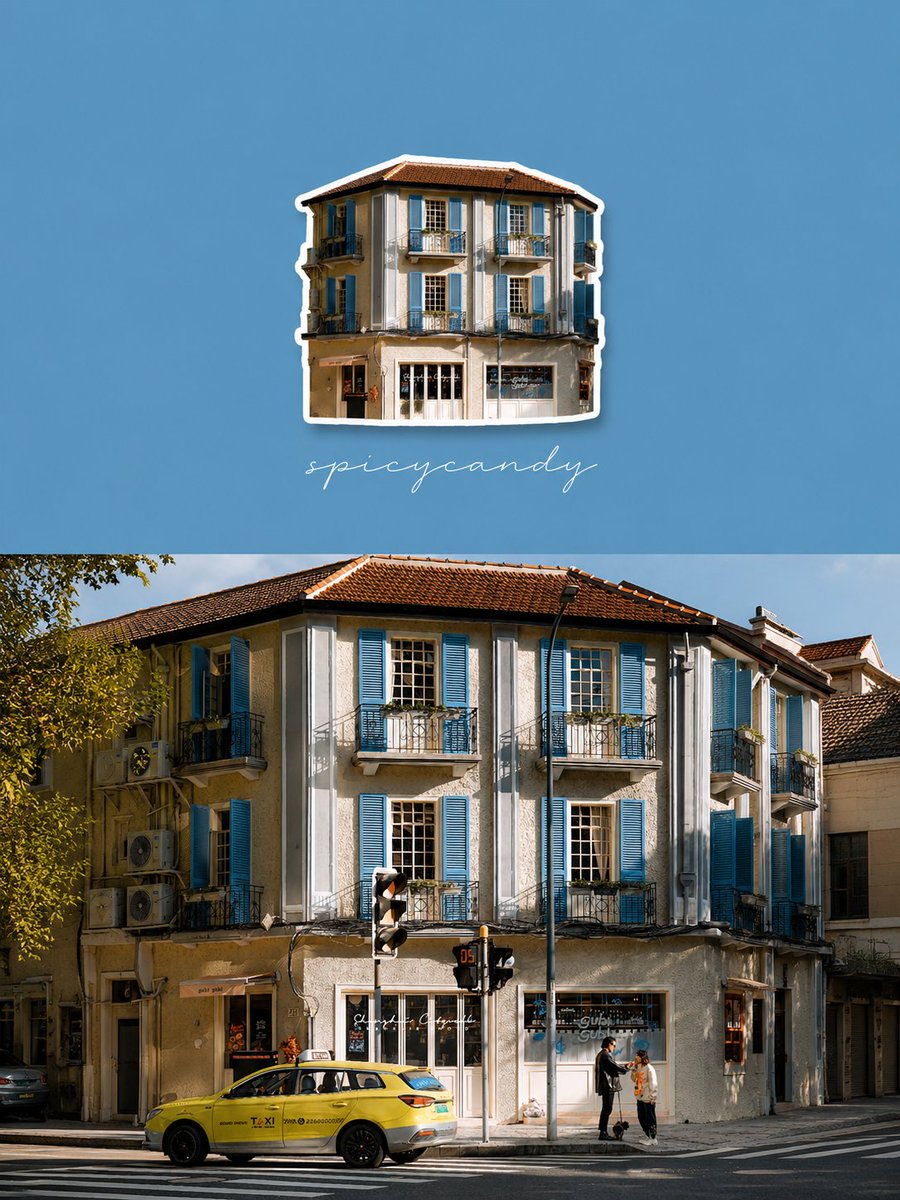
Turn your real travel photo into a stunning split-screen poster with a minimalist fridge-magnet icon, solid color background, and elegant handwritten text.
1 / 2
プロンプト · EN
基于我提供的真实照片,生成一张上下分屏的旅行摄影海报,整体参考 “argstyle: 城市打卡 / 冰箱贴 / 极简拼贴” 风格。
[构图] 图片采用 3:4 比例的竖版布局,分为上、下两部分。
上半部分占据约 50%,采用极简纯色背景;
下半部分占据约 50%,保留原始照片,不做任何修改。
[上半部分:冰箱贴图标] 提取下半部分真实照片中最具辨识度的核心元素。将该建筑或主体元素转化为简单的 “冰箱贴风格角色图标”。
1. 保留核心轮廓和标志性特征;
2. 设计简洁明快,如同旅行纪念品冰箱贴;
3. 带有轻微的 3D 效果和投影;
4. 边缘清晰,带有白色或浅色描边;
5. 对细节进行适度简化;
6. 图标居中放置在上半部分的中心偏上位置;
7. 图标尺寸小巧精致,留白充裕。
[背景颜色] 从照片中提取最主要、最令人印象深刻的颜色作为上半部分的背景(例如服装颜色或强烈的环境色)。颜色应为纯色、饱和且干净,如同明信片一般。不要使用渐变或复杂的图案。
[排版] 在图标下方添加一行优雅的英文手写文字:“arghandwritten text: spicycandy”
[整体美学] 高端旅行摄影卡片:真实照片 + 极简磁贴图标 + 原色背景 + 轻盈排版。清新、整洁、明亮,充满城市漫游氛围。强调辨识度、色彩记忆和旅行氛围。
[避免] 普通的拼贴画、复杂的上半部分、多余的装饰、修改下半部分的照片、乱码文字、过度的卡通化、图标过大或文字遮挡主体。
このプロンプトについて
Turn your real travel photo into a stunning split-screen poster with a minimalist fridge-magnet icon, solid color background, and elegant handwritten text. Use it as a コンセプトアート starting point for GPT Image 2: keep the visual structure and style constraints intact, then swap in your own subject, brand, or scene.
Start by replacing style and handwritten text, then keep the camera, composition, and material cues in the same order. This makes the output easier to compare across variations.
このプロンプトの使い方
- Copy the prompt from the product page into your AI image generator.
- Choose a capable model like Sora 2 or a similar text-to-image model that excels at photo-realistic composition.
- Upload your photo as the required input. The AI will use it for the bottom half and to extract the main icon.
- Customize the variables: Replace
style(e.g., 'minimalist collage') andhandwritten text(e.g., your city name) to personalize your poster. - Generate and refine. If the icon isn't clear or the color isn't right, re-generate or slightly adjust the prompt wording.


